In a service company, the project manager plans his tasks in 4 steps (break down, prioritize, assign, track) to maintain his margin.
Planning project tasks is about breaking down the project into tasks, prioritizing them, assigning them to the right resources, and then tracking their execution. In a service company, each task corresponds to billable time: poorly planned, it eats into the margin of the mission.
Proper planning and task assignment makes the difference in project management.
In general, you should always set yourself profitable and realistic goals. Next, you need to follow 4 specific steps to plan your project tasks efficiently and productively.
Split the project into tasks.
Identify available resources.
Assign tasks based on these resources.
Track and monitor the execution of tasks.
🔎 Key elements to remember
A poorly planned task is paid for in non-billable hours: planning protects the margin as well as the deadlines.
Break down each task finely enough so that it remains estimable and attributable on its own.
Prioritize by billable milestone and critical path before the urgency felt.
Link every task to time entry: without it, real profitability remains invisible until invoicing.
What is task planning in a project?
Task planning takes place within the phases of a project, once the scope has been validated. It then moves down to the execution level: each task is assigned an owner, an estimated duration, and a delivery date. Without this level of detail, a schedule displays milestones without specifying how to achieve them.
The use of a task management and project management tool facilitates and optimizes the scheduling of tasks, but not only. More generally, the management of the project and the management of its resources make it possible to obtain better profitability.
Project tasks planning is therefore a strategic element whose stakes cannot be underestimated!
In a consulting firm or a IT Services, several assignments move forward in parallel and the same consultants move from one to the other: a task that is poorly estimated in the costing or followed up too late quickly turns into non-billable hours. Scheduling tasks then means linking each task to a resource, a duration and a cost.
What is a project task?
A project task is an elementary, estimable action entrusted to a person, which contributes to a deliverable. On the development of an application, mocking a screen or integrating a feature are tasks. A good task remains fine enough to be quantified and followed on its own, without hiding several days of uncertain work.
In a service company, a task consumes billable time. The same task assigned to a junior consultant or a partner does not have the same cost, since the daily rate differs. A project task in a consulting firm carries three pieces of information: the work to be done, the person doing it, and what their time costs the project.
Why plan the tasks of a project?
Planning tasks protects the delivery date and the project's profit margin. A task discovered along the way is rushed and consumes hours not included in the initial estimate. In a service company, these hours fall outside the profit margin, since the time spent was sold at a price fixed in the quote.
Task scheduling is where the gap between billed time and actual time becomes visible before invoicing. Without it, a project manager only discovers the overrun when preparing the invoice, after the margin has already been used up.
This interpretation also applies at the firm level. A consultant who spends three days more than planned on a project does not spend them on another: the delay of one task shifts the workload across the entire portfolio.
How do you define the milestones of a project?
A task is a job to be done, with a duration and a person responsible. A milestone is a timeless checkpoint: it marks the end of a set of tasks, such as a billable delivery or milestone. Tracking milestones tells if the project is meeting its deadlines; Track tasks, how to get there.
To establish the milestones of a project, start with what triggers a contractual event. A signed client acceptance, an accepted deliverable, a validated phase: these events are milestones. A weekly progress meeting is not one, as it doesn't mark the end of a set of tasks.
In a fixed-price project, each milestone warrants an additional question: does it trigger a billable invoice? A billable milestone commits the firm's cash flow in addition to the schedule. Delaying it postpones payment.
Include billable milestones on the mission schedule, just as they are in the contract. A mission manager who sees them on their schedule can then prioritize accordingly.
What is the critical path of a project?
The critical path is the longest chain of dependent tasks in a project, the one that determines the completion date. Each task on the critical path has no slack: delaying it by one day delays the delivery by one day. Tasks outside the critical path have some leeway and can slip without affecting the deadline.
The calculation becomes mechanical once the dependencies between tasks are established: add up the durations of each chain of linked tasks; the longest chain is the critical path. The PERT chart and the Gantt chart display these dependencies.
In a service society, the critical path is primarily used for arbitration of resource planning When a consultant falls ill, knowing whether their current task is affected determines whether they need to be replaced that same day or if the project can absorb the absence. Without this information, every absence is treated as an emergency, and the replacement is tied up with someone who would have been more productive on another project.
Goals are fundamental because they determine tasks, resources, and people in charge of the project.
Let's say a development company plans to deliver an application for which it has estimated 950 hours of programming.
Three programmers will develop the code for five hours a day, dedicating 100% of that time to this project:
950 hours / 3 programmers = 316.6 hours, which each of them will have to complete.
Taking into account that they will be working five hours per day, they will need 63 working days to complete the project (316.6 hours to be completed by each programmer / 5 hours per day that they can devote = 63.3 working days).
Setting goals is key, because if we want to deliver the app in less than two months, we'll have no choice but to bring in more staff.
These are issues that touch on the subsequent management and distribution of work tasks, so this is the first thing to clarify.
After defining the goals, you are ready to follow the four key steps to properly manage and assign tasks.
Step 1: Split the Project into Tasks and Prioritize Them
With your goals in mind, divide the project into tasks and subtasks so that you can prioritize them.
There are various task scheduling tools to help you out.
Cutting with the right granularity: the WBS structure
Before prioritizing, break down the project down to estimable, assignable tasks one by one: this is the Project Breakdown Structure (WBS). A practical rule sets the limit at five man-days per task. Beyond that, the task hides too much uncertainty and risks being underestimated; Too thin, it multiplies the monitoring work without gaining precision.
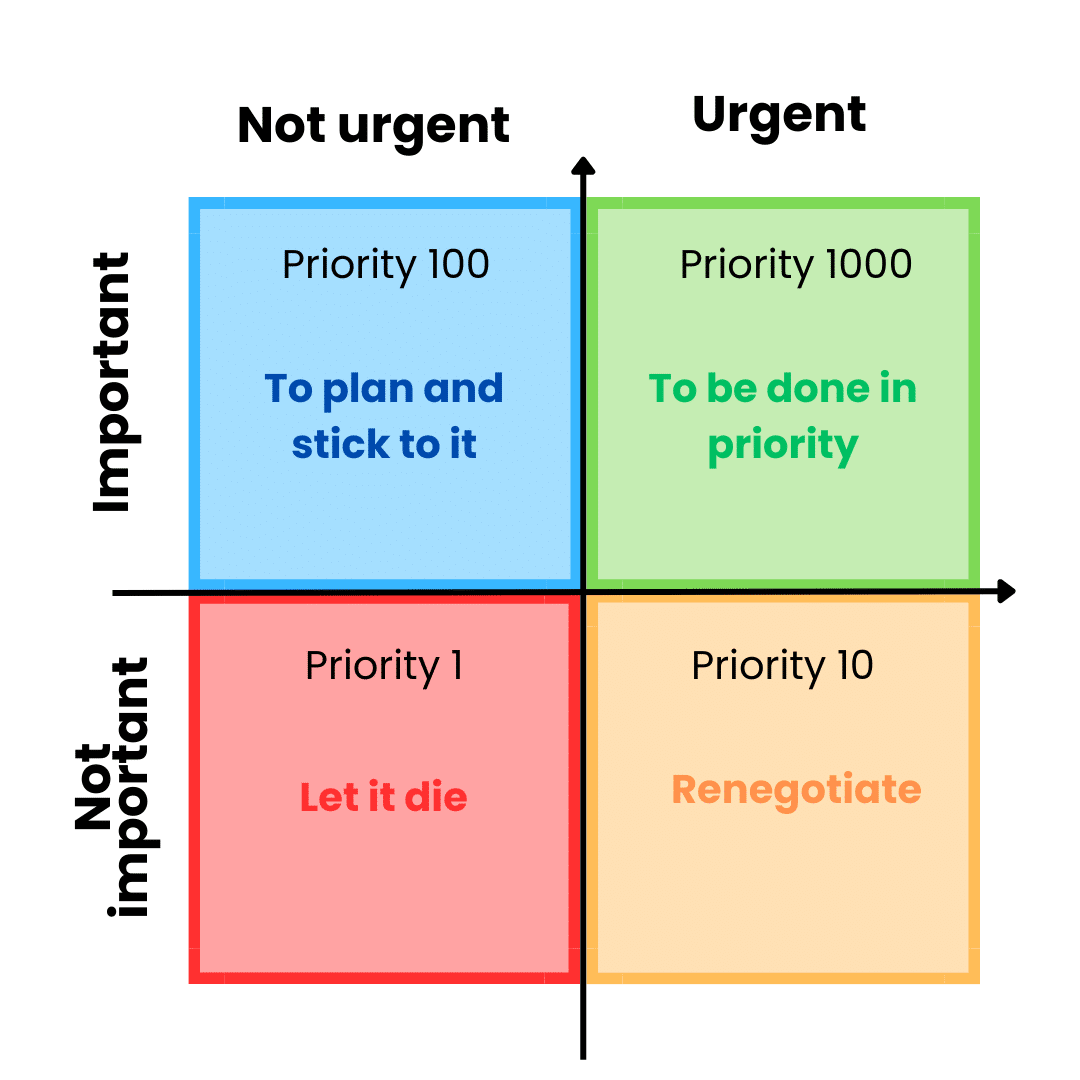
Eisenhower's Matrix
This system help you categorize urgent and important tasks, distinguishing quality and time constraints.
The Eisenhower Matrix
The Eisenhower matrix has four spaces to order your project tasks.
Important and urgent tasks : In this box are tasks that need to be completed immediately and that usually arise from unforeseen events in daily life. To go back to the previous example, the absence of one of the programmers and the need to do the work assigned to him before this eventuality.
Important but non-urgent tasks: These are long-term tasks that can be postponed.
Unimportant but urgent tasks : These are matters that can be delegated to other team members or that need to be automated.
Tasks that are neither important nor urgent : therefore, they could be eliminated, because they waste our time.
The PERT method
The PERT chart is another tool for effectively dividing a project into tasks.
The PERT chart
It consists of sets of actions that are related to each other. It is especially useful in projects where tasks depend on different departments or large teams.
It unifies criteria and tightens relationships to ensure that tasks are executed correctly and smoothly, in the planned order and with priority given to delivery dates.
Its representation is reminiscent of a relay race, where worker "B" cannot start running until worker "A" has completed the task assigned to him.
The ICE rating
The ICE (Impact, Confidence, Easy) scoring model is another methodology that evaluates tasks based on three parameters, which helps prioritize the most important tasks.
The following aspects are scored from 1 to 10:
Impact: chat is the objective of the task, with 1 being a low impact and 10 being a high impact (crucial task).
Trust: the certainty that the expected impact of the task will be achieved. A value of 1 is a task that we don't trust a lot of, and a value of 10 is a value of proven tasks that we know will have the desired impact.
Ease : The degree of ease of the task, taking into account the constraints of time, resources, costs, etc. The easier the task, the higher the score.
The ICE score for each task will be the result of multiplying the values given for impact, confidence, and ease. The highest output will designate the priority order of tasks.
The MosCow Method
The MoSCoW method is a task prioritization technique used in agile management.
It classifies the requirements of a task into four categories.
Must haves ,
Should have (important but not critical),
Could have (optional) and
Won't have (not a priority for now).
With a more concrete example, in an application development project, user authentication could be a Must have, while a dark mode would be a Should have and compatibility with a connected watch a Won't have.
Prioritize by Billable Milestone and Critical Path
These methods order the tasks, but in a fixed-price mission one criterion is the most important criterion: the billable milestone. A task that unlocks an invoice or is on the critical path (the longest chain of dependent tasks, the one that sets the end date) takes precedence over a task that is useful but has no effect on delivery. Deferring a task from the critical path shifts the delivery, and the billing milestone with it.
At this stage, make sure that the staff has the necessary skills to execute a given project.
It's important to keep in mind that these aren't just technical issues. Depending on the project, soft skills can be just as relevant.
For example, in projects involving multiple departments, it will be necessary to verify that participants have negotiation, empathy, or communication skills. These skills will be necessary to carry out the project.
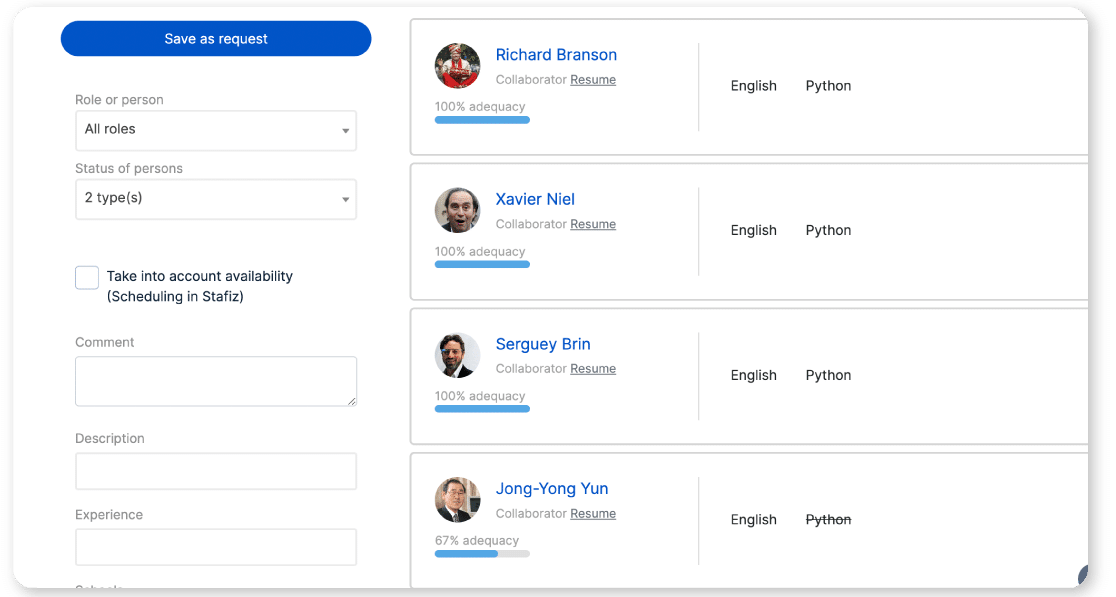
Identify the right profiles with Stafiz
Check Availability and Monitor Workload
An often neglected point is the verification of the availability of resources, especially in companies that have several projects in progress and profiles involved in several of them.
It is essential to ensure that we have the right developer to execute a given development, and that he will actually be available when we need him.
This involves checking any paternity or maternity leave, holidays, scheduled absences, etc. This will include reorganizing tasks or finding a replacement when the person initially assigned is not available.
In a practice or IT Services, the availability displayed is not the actual availability: the same consultant often works on several assignments. Before assigning a task, also look at the inter-contract for competent profiles that are still available.
When an employee feels confident, his or her involvement in the projects is greater. If they doesn't have the right qualification level, it is worthwhile to train them within the company.
In this way, they will perceive that the organization cares about them and provides them with the necessary resources to do their jobs, which enriches them professionally.
You can then make it a point of honor to consider the preferences of professionals in the distribution of tasks.
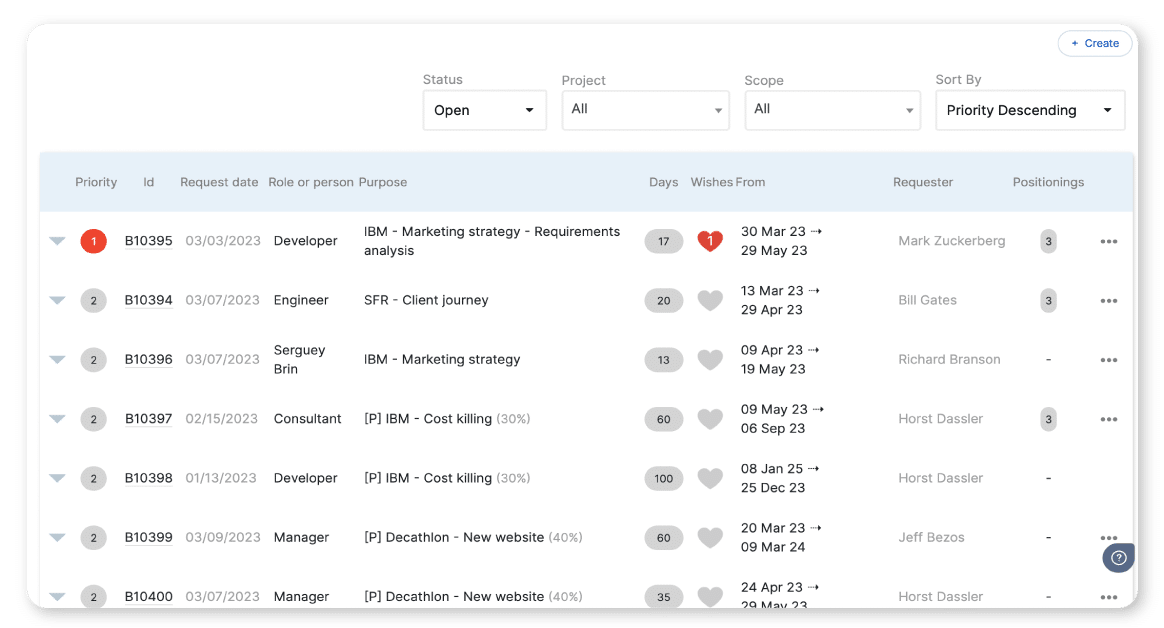
Express interest in a mission in Stafiz
To maintain high levels of drive and involvement, there's no secret: you need to share workloads fairly.
In this respect, it's essential to anticipate future needs by using analyses to predict which teams will be busier or less busy, redistributing tasks to other employees if necessary.
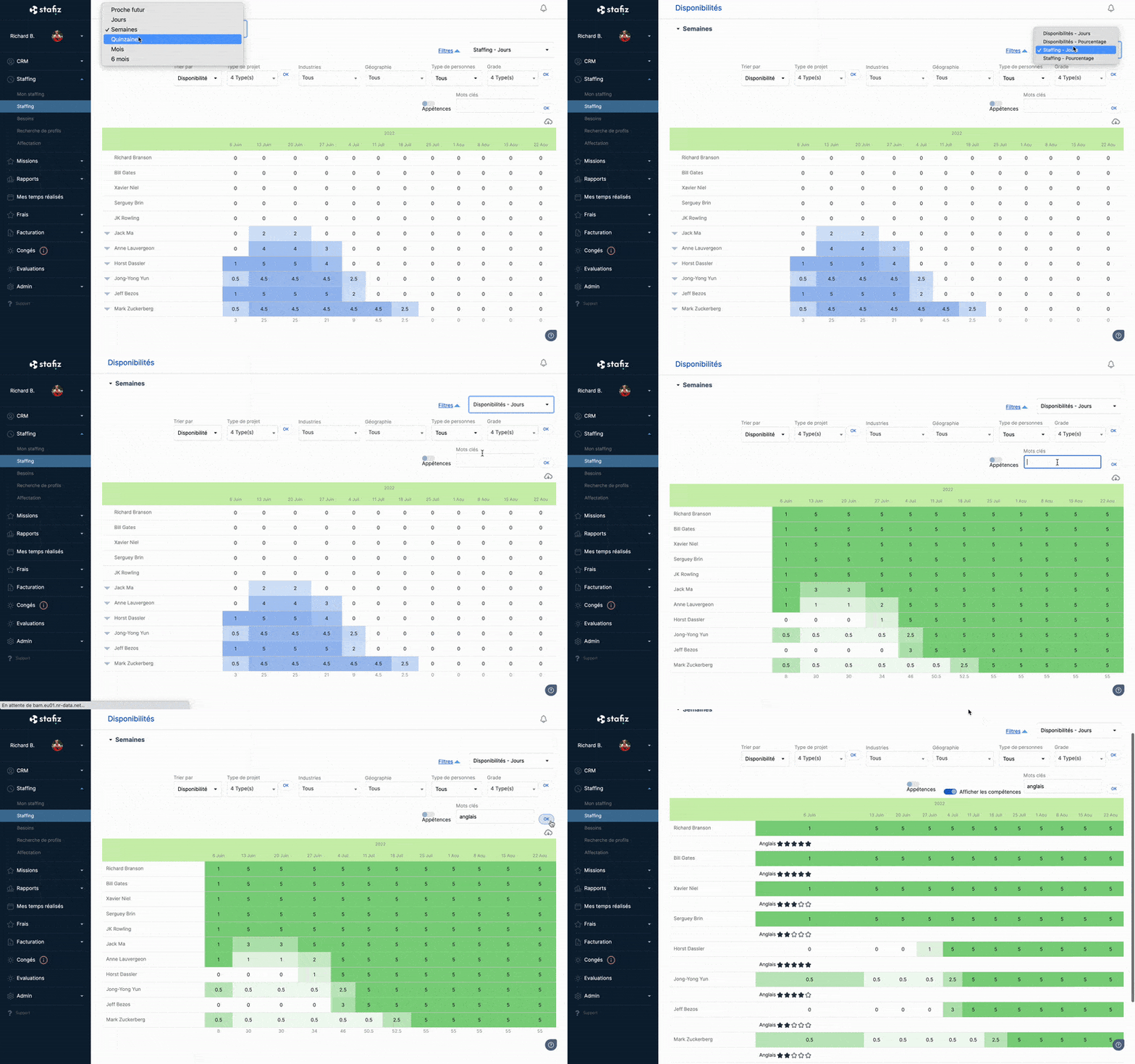
Check employee availability in Stafiz
Digitalize and simplify employee scheduling & workload management
Once your project has been broken down into tasks and your human and technical resources have been identified, you can move on to the third step: task assignment.
To do this, assign the following information to each of the tasks that make up the project.
Who will be responsible?
How long will it take and when will the task for which he is responsible have to be ready?
What tools will it be used to carry out?
Task assignment can be performed and represented in different ways.
GANTT: a Well Known Breakdown Chart
This task scheduler is a system of bars occupying a certain time space.
In a GANTT chart, you'll see at a glance:
the name of the task,
the estimated time for its execution,
the person responsible for the task,
interdependence with other tasks.
Use a Staff Table
The staff table also allows you to quickly visualize the professionals involved in a project, the tasks assigned to them, and the estimated time to complete them.
Both in the GANTT chart and in the staff tables, workloads of the available profiles are displayed.
Sometimes, depending on how the project evolves, it may be necessary to balance these workloads for proper project development.
Balancing Workloads
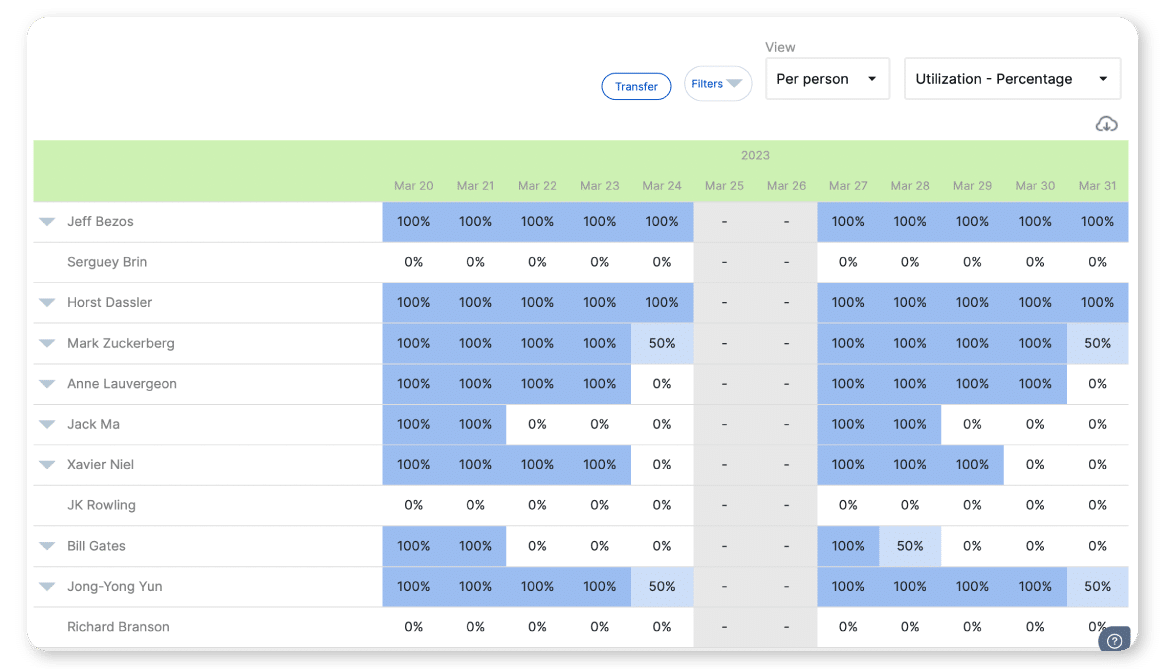
The utilization rate is the indicator that allows workloads to be measured and balanced in a fair way, without jeopardizing the objectives and deadlines set for the execution of a project.
The utilization rate is equal to the time spent on billable projects divided by the available time. If an employee works 5 hours a day on billable projects out of a total of 7 hours in their workday, their utilization rate for this day will be: 5 / 7 * 100 = 71.42%.
By knowing the utilization rate of all project members, you can make better decisions about task organization, scheduling, etc.
The billable utilization rate also allows you to organize costs according to the actual time spent by each person and optimize the time planned for each task, thus ensuring the continuity of the project.
Read at the task level, this rate indicates whether the assignment remains profitable: a task entrusted to an already saturated profile slips, a task entrusted to an under-occupied profile costs more than it brings in.
With a resource planning, you have up-to-date data on the entire team, taking into account staff leave, days of absence or illness, whether they work full-time or part-time, etc.
Thanks to all this, resources will be better distributed, enabling overloads to be avoided or potential mismatches to be detected before they even occur. This will have a positive effect on the overall development of a project.
Step 4: Tasks Execution Monitoring
Once all the resources have been allocated according to the objectives, it's time to track the tasks themselves.
As we have seen, planning is key. But sometimes unforeseen events occur that require changes or modifications to the initial planning.
Detecting unforeseen events in time, or even anticipating them, is the main purpose of this phase. The use of a project monitoring tool is very useful because it allows:
automatic alerts when certain tasks are not completed on time and in the right way,
act quickly if changes need to be implemented in the event of unforeseen events,
the proper coordination of resources to achieve objectives,
detect bottlenecks in certain tasks that delay the development of other necessary actions,
readjust workloads in real time, promoting worker motivation, productivity and ensuring that the project is executed according to the planned parameters,
detect deviations in the budget, control subcontracting costs or non-billable costs,
Streamline communication between all team members.
What tools are used to plan project tasks?
For a small team, a to-do tool like Trello or Asana is enough to list and track tasks. In addition to several dozen employees and simultaneous assignments, a project management and management software resource planning like Stafiz connects each task to time spent, resources, and margin, which a spreadsheet doesn't show.
The choice is less about the advertised functions than about what the tool leaves in its blind spot.
One mission at a time, one dedicated team
Shared spreadsheet
The actual time spent on each task
Two or more assignments, consultants shared between them
To-do tool (Trello, Asana)
The consolidated cost of a consultant, across all assignments
Fixed-price assignments, margin tracked per task
Operational piloting system (Stafiz)
The task, the time seized, and the margin all live in the same place.
The spreadsheet works as long as only one person updates it and only one project is running. It breaks down the moment the same consultant appears on three different schedules: nothing consolidates his workload, and the conflict comes to light the day two project managers are counting on him for the same week.
Pitfalls to avoid in task planning
Four common mistakes can derail a task plan: breaking things down too broadly, prioritizing based on perceived urgency, planning based on theoretical availability, and never comparing planned tasks with actual workload. The first three can be corrected when creating the plan. The fourth must be corrected every day of the project.
Breaking down tasks too large. A task that's too big hides too much uncertainty to be reliably estimated. No one can say where it stands, and it remains marked as in progress until the day it's behind schedule. The right scale is one that still allows the task to be estimated independently. Beyond that, the uncertainty ceases to be visible.
Prioritize the perceived urgency. The client who follows up most often doesn't always have the most critical task. A high-profile task located outside the critical path can wait. A low-profile task that blocks a billable milestone commits the project's cash flow. Defining the critical path before starting avoids this last-minute trade-off.
Planning based on theoretical availability. A consultant listed as 100% committed to a project rarely actually finishes it: they might be completing the previous pre-sales work, training a junior consultant, or taking vacation time. A schedule built on the contract figure, rather than the actual workload, creates delays from the moment it's signed.
Never compare what's planned with what's actually done. A schedule that no one updates remains accurate until the first unforeseen event. Without time tracking for each task, the discrepancy between billed time and actual time spent will only become apparent at the billing stage, after the profit margin has already been used up.
From task to margin: time entry closes the loop
A planned task only becomes a management tool if the time actually spent is entered in front of it. The chain then closes: provisional planning, tasks, time entry, profitability. Without time entry, a service company compares the cost of a task with what it has invoiced only at the time of invoicing, too late to react.
This closing mechanism also applies at the portfolio level: the 9-step project plan provides the time frame within which tasks are placed, and the project schedule sets the dates that billable milestones must meet.
Case study
Altai Consulting is a consulting firm with 105 employees in France.
Before Stafiz, time tracking and project indicators lived in two separate systems, reconsolidated by hand in Excel. The team wasted time consolidating and management decisions were slowed down due to a lack of up-to-date project data.
❝
Stafiz is very project-oriented and particularly suitable for consulting firms, as it breaks down information by task and man-days.
Giang Huong Huynh
Operations & Financial Manager
Since the deployment of Stafiz, Altai's project managers have been reading the margin and burn rate in real time, without going back to Excel: time tracking and project indicators live in a single platform.
Discover the full Stafiz x Altai Consulting success story
How task planning changes the margin of your missions
The four steps of task planning can be summed up in one sentence: break down the project into quantifiable tasks, see who is actually available, assign them, and then track their progress. The difficulty lies elsewhere. In a service company, each task represents billable time, and a schedule that ignores this dimension says nothing about the profitability of the project.
A firm that plans its tasks without linking them to recorded time only discovers its margin when it comes time to invoice. Linked to the same schedule, it allows for adjustments while the project is underway: postponing a task located outside the critical path, replacing a consultant working on a billable milestone, adjusting the resource planning before the overtaking.
The phases structure the project life cycle: scoping, planning, execution, closing. Task planning takes place within these phases: it breaks down work into concrete tasks, assigns them, and tracks them. Confusing the two makes you lose the level of execution, where deadlines and real load are at stake.
Task organization structures the work: who does what, in what order, and with which tools. Planning adds time and commitment: a start date, a duration, and a deadline met by a client. A team can organize its tasks without planning them. In a service company, planning impacts profit margins, as it compares the planned work with the billable hours.
A task breakdown sheet links each task to a manager, a start and end date, and their dependencies. It makes visible who does what and when. Its real interest: to identify tasks whose delay blocks the next ones, before they postpone the entire delivery.
The project manager manages the planning of tasks: he breaks down the work, sets the priorities and assigns the tasks. In a service company, he does not do it alone: the manager arbitrates the resource planning between assignments, and each consultant estimates and then updates the progress of his or her own tasks.
With multiple projects, the challenge is the big picture: the same people move from one assignment to another. A consolidated view of the load per person, all projects combined, becomes essential. A management tool like Stafiz centralizes it and avoids staffing a task on someone who is already saturated, or seeing the conflict too late.
A spreadsheet is fine as long as tasks, resources, and tracking fit on a shared sheet. As soon as several assignments accumulate, the same people move from one to the other and the margin depends on the time actually spent, it reaches its limits: data is quickly obsolete, re-entered, margin is known too late.