We're not telling you anything: the success of a project is based on different criteria.
A balance between time, budget and production quality management must be maintained to carry out your mission and meet customer expectations.
To put all the chances on your side, consider integrating the budget landing into your project financial monitoring !
🔎 What to remember about the budget landing
- The budget landing is the updated projection of the expected margin at the end of a project, calculated from the time consumed and the rest to be done — where the budget remains fixed over the year and the reforecast is triggered in the event of a significant deviation. Upstream, timeboxing limits these discrepancies by setting a non-negotiable duration per task.
- Four tools, four distinct questions : provisional budget ("what target are we aiming for?"), forecast ("where are we probably going to land?"), reforecast ("is the budget still holding?"), landing ("what margin at the end of the project?"). Confusing the four blurs the financial trade-offs.
- The method consists of 6 steps : collect data, analyze progress (Budget or resource planning), identify discrepancies, update forecasts using quantified scenarios, check margins and costs, and then formalize a shareable report.
- Communicating a margin of uncertainty protects the projection : ±10-15% at the beginning of the project, ±5-7% at the halfway point, ±2-3% at 80% progress. This aligns the management with the actual horizon of predictability and avoids false certainties during the mission.
What is Budget Forecasting?
budget forecasting: definition
✏️ Synonyms: financial landing, reforecast, landing projection, accounting landing, project management control
The budget landing is the calculation that adjusts the budget forecasts by taking into account the tasks or times completed.
It is a formula that highlights the real progress of a project and identifies the gaps between planned and completed.
What are the Objectives of Budget Forecasting?
The main objective of the reforecast is to control costs in relation to the budget initially planned for the project.
Calculated and automatically updated via a tool, the landing projection makes it possible to review profitability estimates by comparing the schedule and the use of resources with the objectives of the project.
This means you can stay in proactive control of spending by anticipating deviations that could be caused by current planning.
The advantage? You have all the keys in hand to rectify the trajectory of the project and achieve your objectives by making several adjustments:
- optimization of the resources allocated to tasks,
- objective decision-making in the face of the reality on the ground,
- Revision of the budget with a view to increasing margins.
The Role of Budget Forecasting in Project Management
When it comes to project tracking, the KPIs to track are plentiful.
It can then be tempting to doubt the value of monitoring margins on landing and to fear a counterproductive effect of over-analysis...
But we are here to assure you otherwise.
Benefit from Increased Project Profitability Monitoring
As seen above, the budget forecasting is a tool for optimizing resource planning.
By being alerted to upcoming deviations, you pay better attention to the project schedule.
Properly configured, the landing acts as a predictive budget/margin alert system: as soon as a cumulative deviation exceeds your tolerance threshold, you are notified before the end of the month; not three months later, when the drift is consolidated.
Make Revenue Forecasts More Reliable
By tracking the rate of completion, the revenue projection is more reliable.
You then benefit from reliable financial reports that improve your forecast visibility on the company's overall situation and facilitate your accounting.
Stafiz's reporting tool to the rescue!
This allows you to provide a safe margin for unforeseen events and prove to your customers and partners that you are a trusted player!
Manage resource allocation optimally
Reforecasting does not stop at the prevention of financial risks: temporal risks are also ruled out.
The questions answered by the reforecast:
- Who is positioned on which task?
- Is an essential employee planned elsewhere?
- What about roles: can a junior free up a manager's time?
These are all questions that will allow you to adjust the workload, and the costs related to the salaries and daily rates of your project teams.
This makes it easier for you to spot over-consumption or initial underestimates of resources.
All you have to do is adjust the distribution of tasks of the resource planning depending on the actual progress of the project.
Once capacity occupancy is optimized, you can ensure that resources will be able to meet delivery deadlines.
Budget, forecast, reforecast, project landing: what's the difference?
These four related terms have four distinct uses in project management. Here's how to distinguish them so you don't get the wrong tool when managing your projects or your practice.
Provisional budget: the annual target set before the launch
The provisional budget is the financial projection established upstream of a period (often the fiscal year or the mission). It sets a target for revenues, costs and margins to be achieved. Once validated, it serves as a reference for the entire duration of the financial year and remains fixed. It is the one that feeds into the commitments made to shareholders, the management committee or the client.
When and how to make a provisional budget ? We advise you to draw it up before the start of a project to determine if it is financially viable, and if you have opportunities for budget optimization.
Forecast: the forecast to be revised regularly
The forecast is an updated projection of future results, built at regular intervals (monthly, quarterly) from the latest available data. Unlike the budget, it evolves over time: its role is to give management an up-to-date view of the likely landing, without affecting the initial budget target. It is also referred to as a rolling forecast when the projection slides continuously over 12 months.
Reforecast: the new forecast triggered by a project variance
Reforecasting consists of reconstructing forecasts during the year when a significant discrepancy appears between the initial budget and the observed reality. A crisis, an unforeseen market event, a cost overrun or a commercial acceleration: these are all reasons to trigger a reforecast to realign the figures on the ground.
When to make a reforecast? In general, after the first months of the financial year, when the cumulative budget vs. actual difference becomes significant. Finance departments use it over three horizons:
- Short-term (week, month): cash adjustment,
- Medium-term (quarter): revision of operating income,
- Long-term (annual closing): projection of the landing of the financial year.
The reforecast is based on actual sales figures, incurred expenses and trends observed in the market. It does not replace the budget: it complements it.
Rolling forecast
The rolling forecast is a variant of the forecast: instead of covering the frozen fiscal year (Jan → Dec), it slides continuously over 12 rolling months. At the end of each month, the past month is removed and an additional month is added at the end of the period. As a result, management always maintains 12-month visibility, even at the beginning of the fiscal year. Particularly suitable for fast-growing companies or volatile markets. Not to be confused with the reforecast, which is punctual and reactive (triggered by a deviation) while the rolling forecast is systematic and planned.
Landing: the final projection from the realized
The landing is the projection of the final result from the data already produced and the remaining forecasts. On a project, it calculates the expected margin at the end by comparing the days consumed with the production plan.
Over the course of an annual financial year, we are talking more about an accounting landing : the projection of the tax result at the end of the year, used by CFOs to prepare for the end of the year.
The difference with the reforecast is the scope:
- The landing is a projection at the level of the project or the accounting closing: we calculate where we will end up,
- The reforecast is a projection at the level of the financial year or the overall finances of the company: alerted by the discrepancies, the forecasts are reconstructed over the remaining months.
When to use each tool?
| Provisional budget | Annual / Mission | 1 time upstream | What target are we aiming for? |
| Forecast | Monthly/Quarterly | Regular, Scheduled | Where are we likely to land? |
| Reforecast | Triggered by a Gap | One-off | Is the budget still holding? |
| Budget landing | Project | Continuous, as soon as you enter | What margin at the end of the project? |
| Accounting landing | Annual exercise | Quarterly / Year-End | What is the closing tax result? |
On a project, it is the budget landing that drives the day-to-day process: it updates the margin with each time entry, without waiting for a quarterly review.
How to Calculate the Financial Forecast of a Project?
Reforecasting is powerful. But its ability to ensure your profitability is matched only by the complexity of its calculation, in the end.
Discover in the following steps how Stafiz makes it easier to manoeuvre, for accurate and secure estimates thanks to data.
Step 1: Collect Financial Data
To collect all the data related to cost fluctuations, a project management ERP is essential.
If you're looking for a tool — or want to evaluate the suitability of yours — make sure it has the following features.
- Time management: time entry, real-time tracking, desired granularity (minute, hour, day, week, etc.), input reminders, synchronization with calendars. Bonus: validation process.
- Accounting management: entry of costs, categorization of costs, allocation to different resources.
- Budgeting: provisional and on-date budget, synchronization with costs, taking into account salaries.
Step 2: Analyze Progress
Once the data has been consolidated, how should progress be interpreted ?
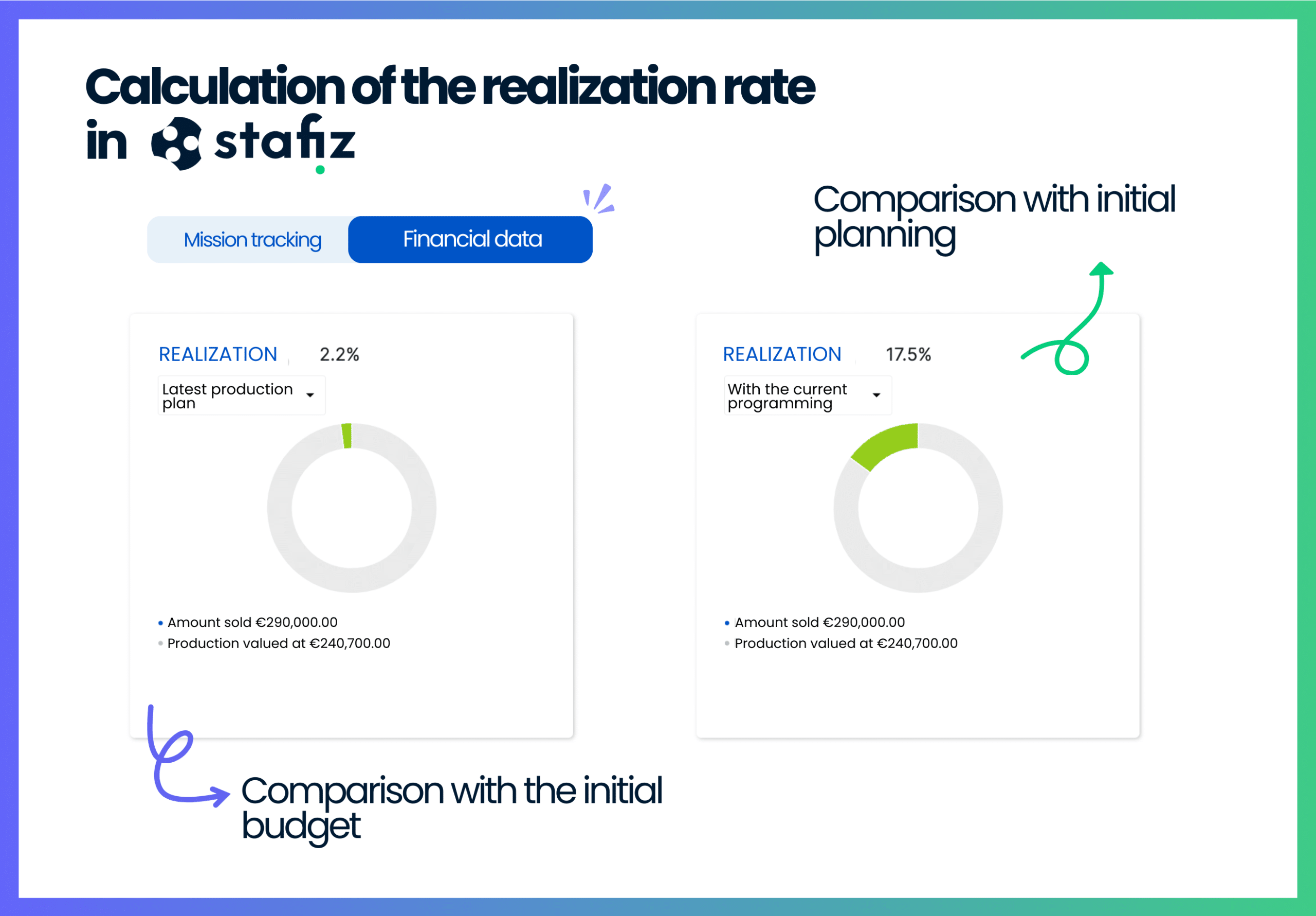
Start by calculating the completion rate. To do so, go to the Stafiz mission tracking page, KPI tab. Two methods are then possible.
The Resource Planning Method
This method is used to compare the days already completed with the forecasts of remaining days.
📌 Formula:
Completed days / (completed days + planned days)
This method is preferred when:
- you monitor performancein relation to a commercial commitment,
- you do budget forecasting reviews or end-of-project reviews,
- You want to identify budget overruns.
💬 Example "We had planned 100 days on the project, we consumed 90 → 90% progress"
Choose this approach for your operational management.
The Budget Method
This time, the days worked are related to the days budgeted on the production plan.
📌 Formula:
Days Completed / Days Budgeted
Instead, use this method if:
- you need dynamic and continuous monitoring,
- You want to adjust the resource planning during the mission,
- You have frequent changes in workload.
It is the best option for strategic and financial monitoring.
💬 Example:
"We have completed 60 days, there are 20 days to go → 75% progress"
We can only recommend that you use Stafiz to track the landing of your projects.
You get these results in a few clicks, without having to set up complex and unbelievable functions depending on the data source.
Comparison Table
| Formula | Days Completed / Days Budgeted | Completed days / (completed days + planned days) |
| Vision | Fixed goal to be achieved | Dynamic and up-to-date vision |
| Usage | Follow-up on the initial commitment | Real-time operational management |
| Overshoot indicator | Easy to read | Less readable |
| Responsiveness to change | Not very responsive | Highly responsive |
| Management of very long projects | Less suitable (fixed reference) | Adapted (continuous reassessment) |
| Customer relevance | Very clear for customer reporting | Less relevant without explanations |
Step 3: Identify and Analyze Gaps
The comparison between the completion rate and the initial objectives makes it possible to identify the differences in profitability.
💡 A 0% completion rate therefore indicates that the profitability objective provided for in the budget is therefore respected.
A slight variation around 0 is therefore not alarming, whether negative or positive.
How to Analyze a Negative Completion Rate
If your current rate is -10%, you are 10% less profitable on this mission than you expected.
However, a rate equal to or less than -20% implies that the mission costs more than expected. It must therefore be completed quickly, or an adjustment of the budget or deadlines must be demanded.
How to Analyze a Positive Completion Rate
If your current rate is 20%, you are 20% more profitable on this mission than expected, well done!
On the other hand, a rate above 30% is surely too good to be true.
It is common for resource planning so the system thinks that there is no more work planned, and artificially overestimates the performance.
Check if the resource planning is up to date.
Step 4: Update the Forecast
Now that the discrepancies have been identified, it's time to move on to corrective actions.
For example, you can change the Assignments of resource planning in case of over- and under-load.
⚠️ It is imperative to measure the impact of these changes on your margins and costs before validating your decision.
To do this, you can use Stafiz's Scenario Builder.
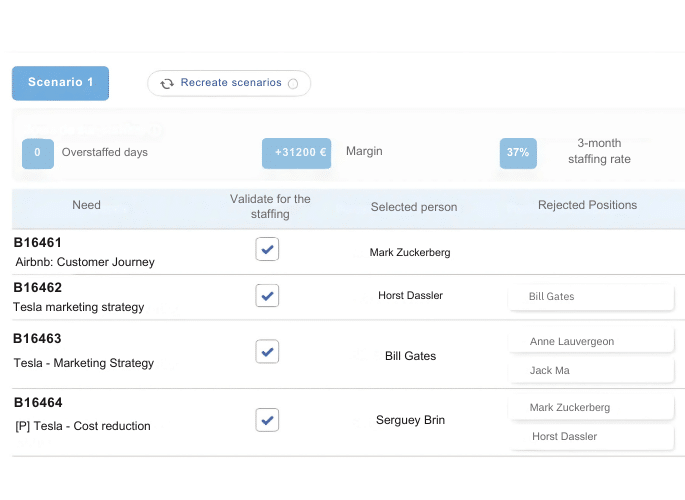
- The scenario tool offers a selection of relevant profiles. You can select several to explore all the possible options.
- The calculator displays the best-case scenario results based on time and margin targets.
- Turn this scenario into an actual schedule! With one click, schedule the suggested resource assignments. You can edit certain properties, excluding certain resources from the final schedule if you wish.
Step 5: Final Checks
Just like the human mind, technology can have its own limitations.
Only the elements made available to it will be processed by the software. So remember to check if certain events or information have been taken into account.
Margins and Costs Check
Before drawing up your financial report, pay attention to the proper consideration of costs by your tool.
If the data from resource planning are not linked to your financial data, the margin may not take into account the reality of profit.
Without synchronization between your different tools, you will need to think about adding all the adjustments related to the project costs.
In the event of absence or adjustment of schedules, the salary costs must therefore be informed.
The Customer Discounts Case
In the event of negotiations or a commercial gesture, you could offer a reduction in the original sale price of the project.
Remember to indicate this in your system to update the budget landing. In this way, the projected turnover will be reduced accordingly.
Stafiz allows you to record these discounts directly in the invoices tab: the calculation is automatic!
Define a margin of uncertainty
A landing is not an exact number but a probable projection. Experienced management controllers always associate it with a margin of uncertainty : a high/low interval (e.g. ±5%) that reflects the degree of confidence in the assumptions. The more the project progresses, the narrower the margin becomes. Communicating a landing with its margin of uncertainty aligns management with the actual horizon of predictability — and avoiding false certainties in the middle of the project.
Step 6: Make a Final Report
The financial landing is an indicator rich in perspectives, and which will be of interest to various actors in the project.
As a result, it is interesting to make a summary report of the costs and revenues actually generated on an assignment.
You can repeat this action as many times as you need, depending on the pace of your follow-up meetings : weekly, monthly, project-stage, or even daily if necessary.
Conclusion: why make a budget landing in project management?
The budget landing avoids unpleasant surprises, improves profitability and facilitates the proactive management of projects. It is an essential lever to ensure the financial and operational success of your missions.
To implement it effectively, remember the six structuring steps: collect reliable data, analyse progress with the appropriate method (resource planning or Budget), identify profitability discrepancies, update forecasts via quantified scenarios, check consistency before communicating, and then formalize a shareable report.
And don't forget to distinguish between landing, reforecasting, forecasting and budget: each answers a different question, at a different time in the cycle. On a project, it is the budget landing that drives the day-to-day operation — provided that it is automated.
However, its formulas are complex and depend on an ever-increasing amount of data. It is therefore essential to equip yourself accordingly, for example by opting for a tool like Stafiz to link your financial management to your project planning.
Frequently asked questions about budget landing in project management:
On a long project, we recommend a monthly landing at a minimum, or even weekly on critical phases. For an accounting year, the rhythm is rather quarterly, with a close landing at the end of the year. The rule: as soon as a triggering event appears (overrun, delay, change of scope, commercial reframing), a landing must be recalculated without waiting for the next planned review.
On a project, it is the project manager or the mission director who produces the landing, sometimes in tandem with a management controller. Over the course of an annual financial year, it is the CFO or the management controller who steers the accounting landing, consolidating the data from operations, sales and accounting. In both cases, the landing is then shared with the general management and, depending on the size of the company, with the management committee.
Several indicators are used depending on your maturity:
- Completion rate (Budget or resource planning — see Step 2),
- Landing margin (expected revenue – projected costs at closing),
- CPI (Cost Performance Index = budgeted cost / actual cost) from Earned Value Management,
- VAC (Variance At Completion = budget – landing),
- All that remains is to be done (RAF) in man-days.
These indicators intersect: a positive realization rate with a plummeting margin signals a hidden cost drift — typically a sub-resource planning compensated by juniors.
The budget landing relates to a project or an operational budget: it calculates the expected margin at the end of the project from the completed one. The accounting landing covers the entire fiscal year: it projects the accounting result at the end of the year (turnover, expenses, EBITDA, net income) to prepare for the closing. The first is a project manager's tool; the second is a CFO tool. They feed into each other: the accounting landing consolidates all the landings of projects in progress.
The simplest method combines two pieces of data: the actual to date (days consumed × rate × costs incurred) and the remaining to be done (planned days remaining × rate). Landing = completed + remains to be done. This total is then compared to the initial budget to measure the variance. On Stafiz, this calculation is automated: the projection is updated with each time entry, without Excel manipulation.
No, but they are linked. The landing is the result of the calculation (the final projection). The reforecast is the act of reconstructing the forecasts during the year when a significant deviation appears. In other words: a reforecast is made to produce a new landing. On a project managed in an ERP like Stafiz, the landing is continuously updated — the reforecast then becomes implicit with each entry.
The forecast is an updated projection of future results, built at regular and planned intervals (monthly, quarterly); the landing is the projection of the final result at the end, calculated from the actual and the remaining to be done. Basically, they answer the same question — where will we land? — but the forecast follows a fixed schedule while the landing is updated as soon as new data arrives. On Stafiz, the landing is recalculated automatically with each time entry: it becomes the continuous forecast of the project.
The rolling forecast is a rolling forecast over 12 rolling months: each passing month is replaced by a new month on the projection horizon. Unlike the annual budget, which expires over the quarters, the rolling forecast always keeps a 12-month visibility. It is particularly suitable for fast-growing companies, volatile markets and multi-entity groups. Not to be confused with the reforecast (one-off, triggered by a deviation): the rolling forecast is systematic and planned. Most modern finance departments combine the two: annual budget + quarterly rolling forecast + emergency reforecast if there is a major deviation.
The business plan is a creation or development document (3 to 5 years), produced upstream of a project to convince funders or structure a strategy. The landing is a management tool during the financial year (month or quarter) that projects the final result from the achieved. The business plan defines the long-term target; the landing verifies that we are getting closer, year after year. On a project, the landing is the operational equivalent: it projects the margin at the end of the project, not at 5 years.
A multi-currency landing adds two complexities: conversion (exchange rate) and hedging. The rule: consolidate everything in the reporting currency (often the euro for French groups), with an exchange rate to be defined (average monthly rate, closing rate, historical rate). Stafiz and most project management ERPs automatically manage the conversion by synchronizing local time entries with a centralized rate. To be monitored: the exchange rate effect can mask a real operational drift; always isolate the spread "at constant rates" to manage the actual performance.
The landing is not an exact number but a confidence interval. At the beginning of the year or at the beginning of the project, count on a margin of uncertainty of ±10 to ±15%. At the halfway point, it reduces to ±5-7%. At 80% progress, it is around ±2-3%. Setting it explicitly protects the landing from reproach in the event of a final deviation: the management knows from the outset that the estimate evolves with the level of information available. On Stafiz, the degree of progress is displayed in parallel with the margin projection — you instantly know how much you can trust the figure.