In short: centralized PSA software resource planning, time and invoicing in a single environment and replaces the fragmented tools (Excel + CRM + accounting) of service companies.
>In consulting firms and IT Services, the profitability of each assignment depends on the project margin and the utilization rate of consultants. However, most structures manage these indicators with four or five tools that do not talk to each other: a CRM, a spreadsheet resource planning, invoicing software, and reporting that is recompiled every week.
As a result, the real margin of the missions remains unclear until the end of the project, when it is too late to adjust the budget. Consultants find themselves on an inter-contract without the manager having had the visibility to reposition them in time. And the projected turnover is based on data that is already obsolete.
Professional Services Automation (PSA) software brings together the entire cycle in a single interface, from business opportunity to cash out. The project margin becomes legible during the mission, the resource planning can be scheduled for 90 days and each hour entered by the consultants feeds directly into the invoicing.
This article details the five building blocks of PSA software, the measurable results after adoption, the criteria for evaluating a solution and the pitfalls to avoid during deployment.
🔎 What you need to know about PSA software
- PSA software covers the entire cycle of the customer project, from the assignment of consultants to margin management, whereas generalist ERPs, project management tools and CRMs cover only one brick.
- Practices with a PSA have a 25-point higher utilization rate than those without a tool (source: Consultancy BenchPress 2023).
- The deployment lasts 4 to 12 weeks for an SME and can go up to several months for a large group. The ROI is measured between 3 and 6 months after production.
- The decisive criteria for choosing a PSA are real-time financial management, native capacity planning, multi-contract invoicing (management, package, milestones) and integrations with French accounting (Sage, Cegid).
What is a PSA software?
PSA stands for Professional Services Automation. In the international literature, this category of tools is also referred to as Professional Services Automation software.
PSA software supports each stage of the life cycle of a customer project:
- business opportunities,
- assignment of consultants,
- execution of the mission,
- time tracking,
- invoicing,
- margin management,
- pre-accounting.
Where an ERP for service companies covers accounting, purchasing and HR in a cross-functional way, PSA software adds profitability monitoring: the resource planning by skills, time monitoring by consultant, multi-contract invoicing and management of the margin on a mission-by-mission basis.
These functions rarely exist in a traditional ERP, and when they do, they require months of configuration. In a PSA, they are native and linked to each other: one hour entered by a consultant updates the project margin and the rest to be invoiced without re-entry.
From quotation to cash: what a PSA software covers
The PSA software covers five bricks, from the business opportunity to the margin forecast. Its particularity: these bricks are intertwined and communicate natively. Assigning a consultant to a project automatically updates the financial forecast because the system already knows its ADR and the duration of the mission. With separate tools (Asana + Excel + Sage), this connection does not exist.
Resource planning and capacity planning
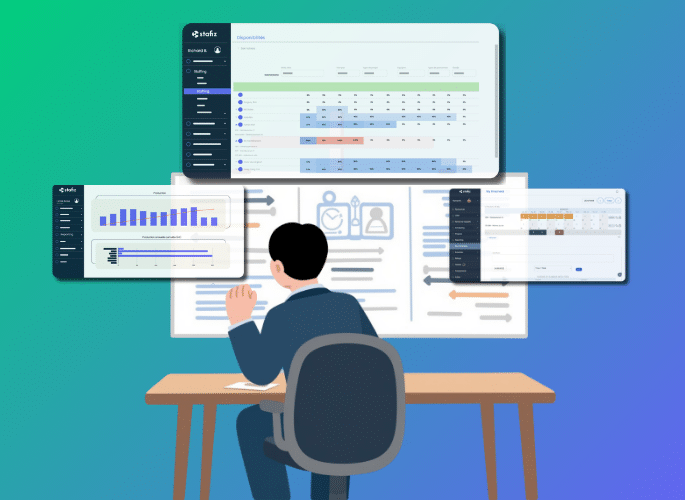
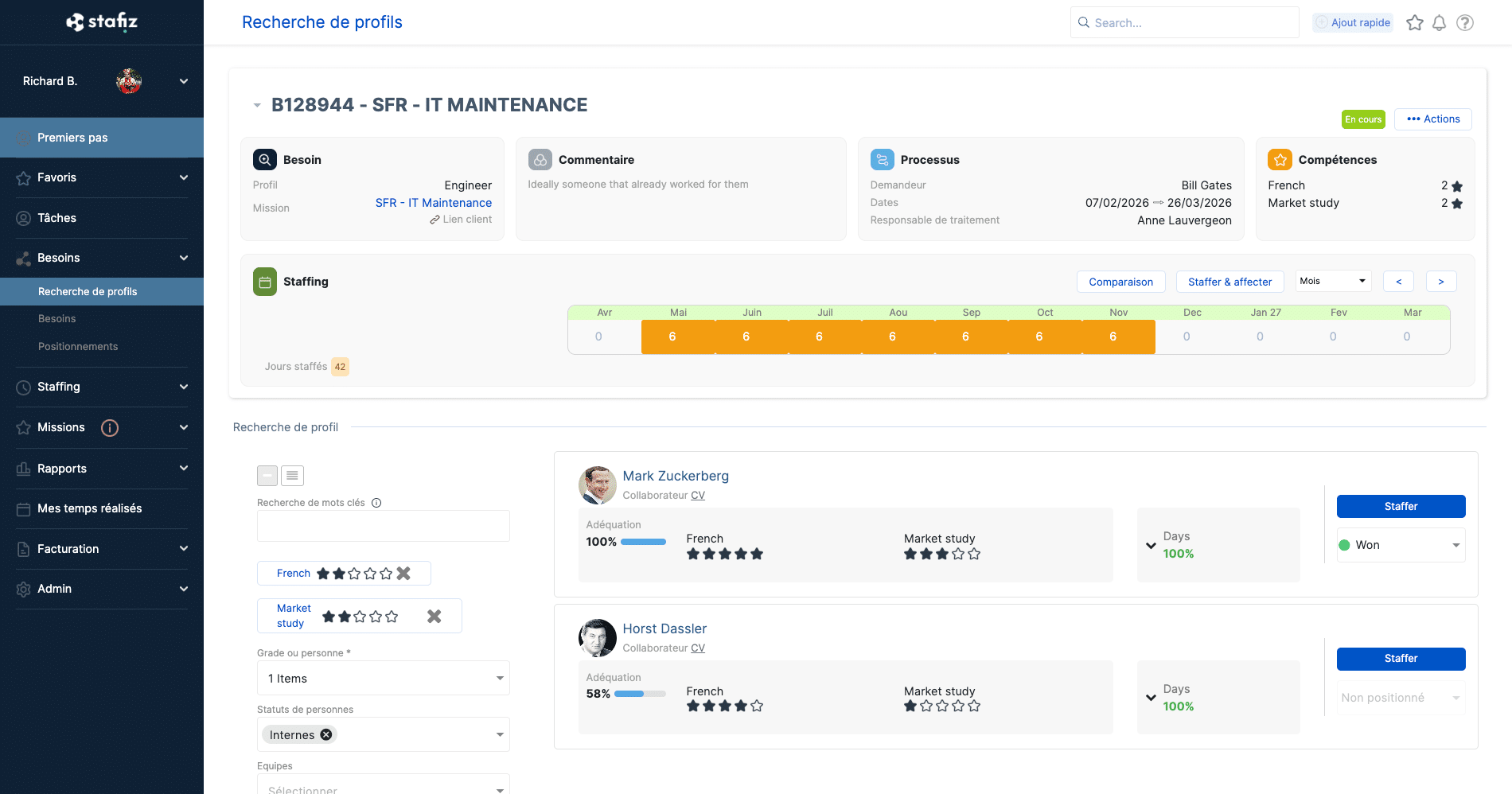
The resource planning and capacity planning cover the management of project resources: finding the right profiles, anticipating the load and managing over-allocation or under-load. A Software resource planning integrated into the PSA allows you to:
- pre-staff consultants as soon as the commercial opportunity arises, before the contract is signed, in order to organize employees more efficiently;
- Visualize the upcoming load and identify cases of overgrowthresource planning or sub-resource planning (intercontract);
- Manage outsourcing and freelancers in the same workflow as in-house employees.
- Anticipate resources to ensure you have the right profiles for future projects.
The most advanced PSA solutions also offer:
- automatic suggestions of profiles according to skills, availability and appetites;
- Detecting risks of under- or over-loading consultants before they materialize.
Be careful, this layer of intelligence does not replace the manager's decision: it presents him with the most relevant options so that he can arbitrate more quickly and with a complete vision of the project (or portfolio).
The native integration of capacity planning distinguishes PSA software from capacity planning software or a simple project management tool: in a PSA, the workload per consultant is directly related to the project margin and invoicing. Without this brick, the resource planning remains approximate, based on the memory of managers and .xls shared files.
Time monitoring and time report
Each hour entered into a PSA software automatically feeds into the calculation of the margin and the rest to be invoiced. Time monitoring is the daily point of contact between the consultants and the system: flexible entry (per day, per half-day, per hour), validation workflow by the manager and direct link to invoicing.
With no direct link between time tracking and invoicing, hours worked are never invoiced, due to forgetfulness or a discrepancy between the two systems. This lost turnover is impossible to replenish after the fact, hence the need to have time tracking integrated into invoicing.
Multi-contract invoicing
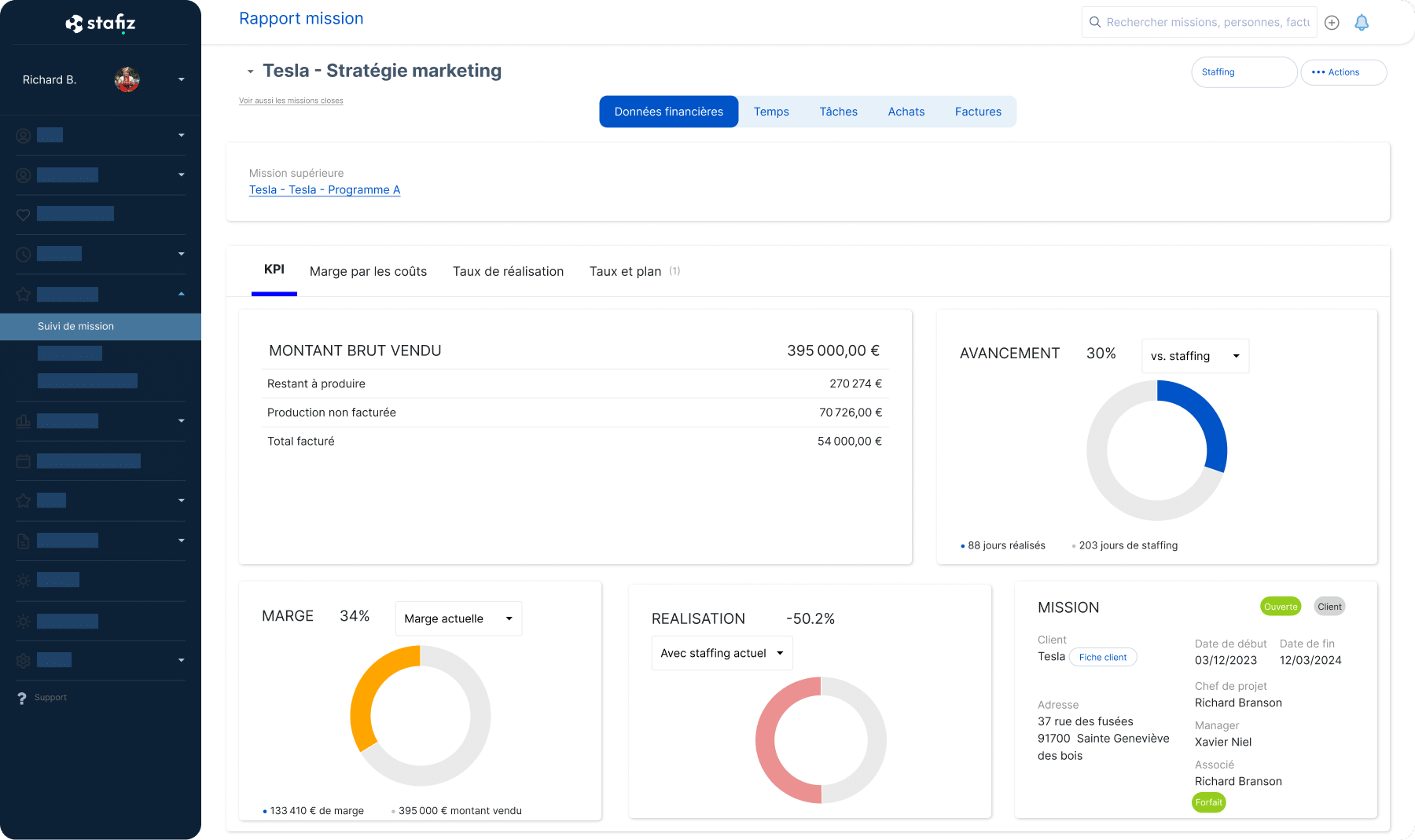
On-call services, packages, on-call services, managed services and subscriptions, licenses: a PSA tool manages these different project billing models from the same interface. Project management tools or traditional ERPs, on the other hand, require a separate invoicing tool.
The advanced features of a PSA like Stafiz include:
- intercompany re-invoicing between legal entities;
- e-invoicing compliance (Factur-X, Peppol);
- monthly mass invoicing for time-based assignments;
- the follow-up of unpaid invoices and the rest to be invoiced.
Project financial management
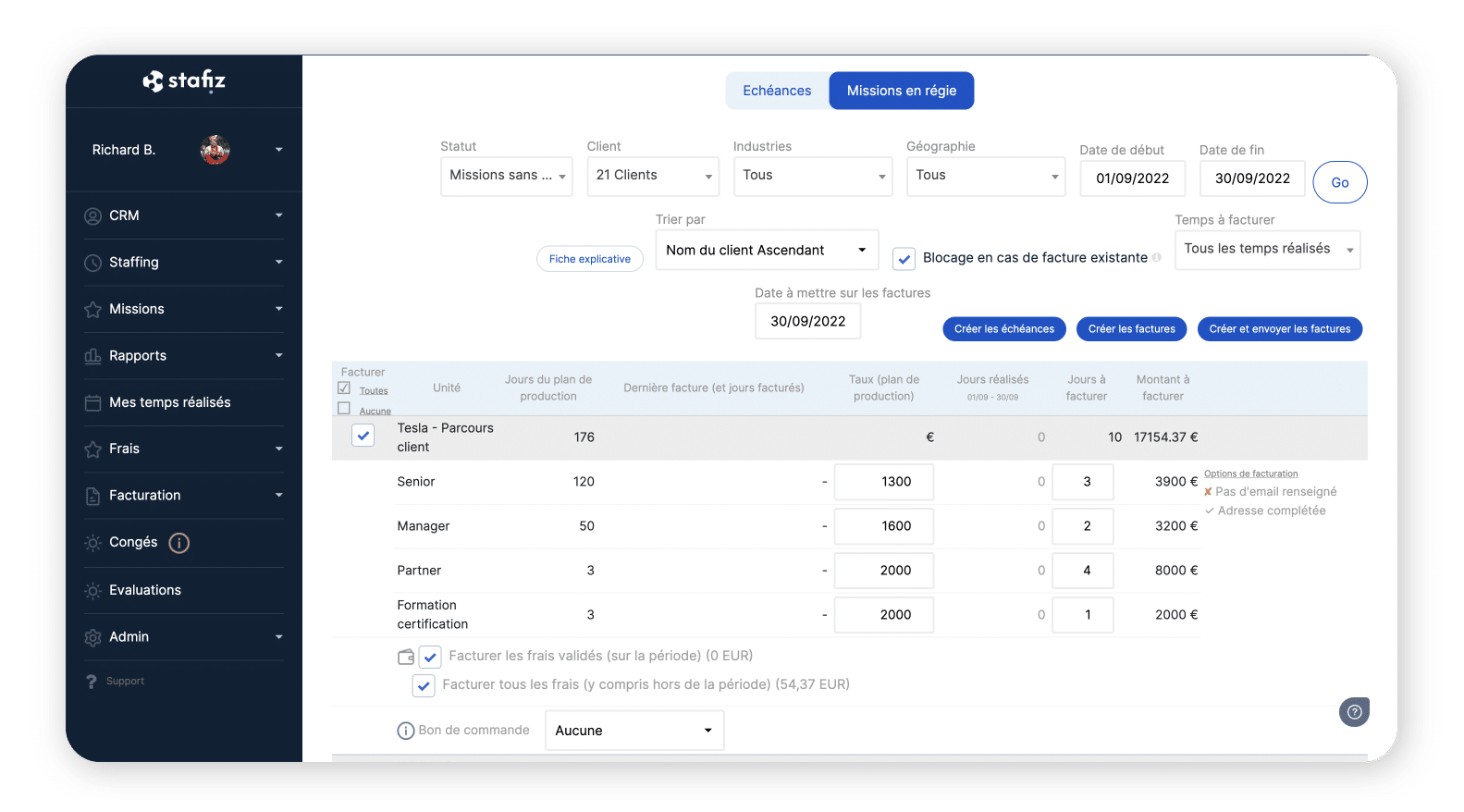
Project financial management covers the monitoring of the margin by mission and the consolidated vision of the activity at the company level. Two levels for which finance teams — especially the CFO — and project teams — such as the director of operations — appreciate using PSA software on a daily basis:
- profitability of projects: provisional vs. actual budget, landing margin, automatic calculation of FAE/PCA (invoices to be drawn up and deferred revenues), forecast by BU;
- strategic planning activity: consolidated vision of the project portfolio and financial management of activity at the company level. The PSA also feeds the pre-accounting and anticipates the accounting close thanks to the API synchronization with the accounting software.
The PSA consolidates all project costs and revenues into a single view: ADR and CJM of assigned employees, subcontracting, expense reports and purchasing. Without PSA, this data lives in the HRIS, a subcontracting spreadsheet and an unrelated expense management tool.
As a result, the margin of an assignment becomes legible during its execution, not at the accounting closing. The most advanced PSA tools go further: they detect when a project is consuming its budget faster than expected and alert the head of mission before the margin is depleted.
Automated collaboration and workflows between teams
In a consulting and IT services company that operates in silos, the coordination between pre-sales, production and invoicing is based on emails and calls. At each stage, someone may fall behind, or forget to convey important information. PSA software replaces these manual transitions with automatic workflows.
| 1. Signing of the mission | The sales representative sends an email to resource planning manager to report the new assignment. | Pre-sales creates a file with the qualified opportunity; The project team receives it automatically. |
| 2. Assignment of consultants | The resource planning Manager follows up with the team leader and the consultants by phone. | The resource planning is triggered from the folder, with the suggested profiles by skill and availability. |
| 3. Milestone billing | The project manager notifies the invoicing by another email when the milestone is reached. | As soon as a milestone is validated, the invoicing team is automatically alerted to issue the invoice. |
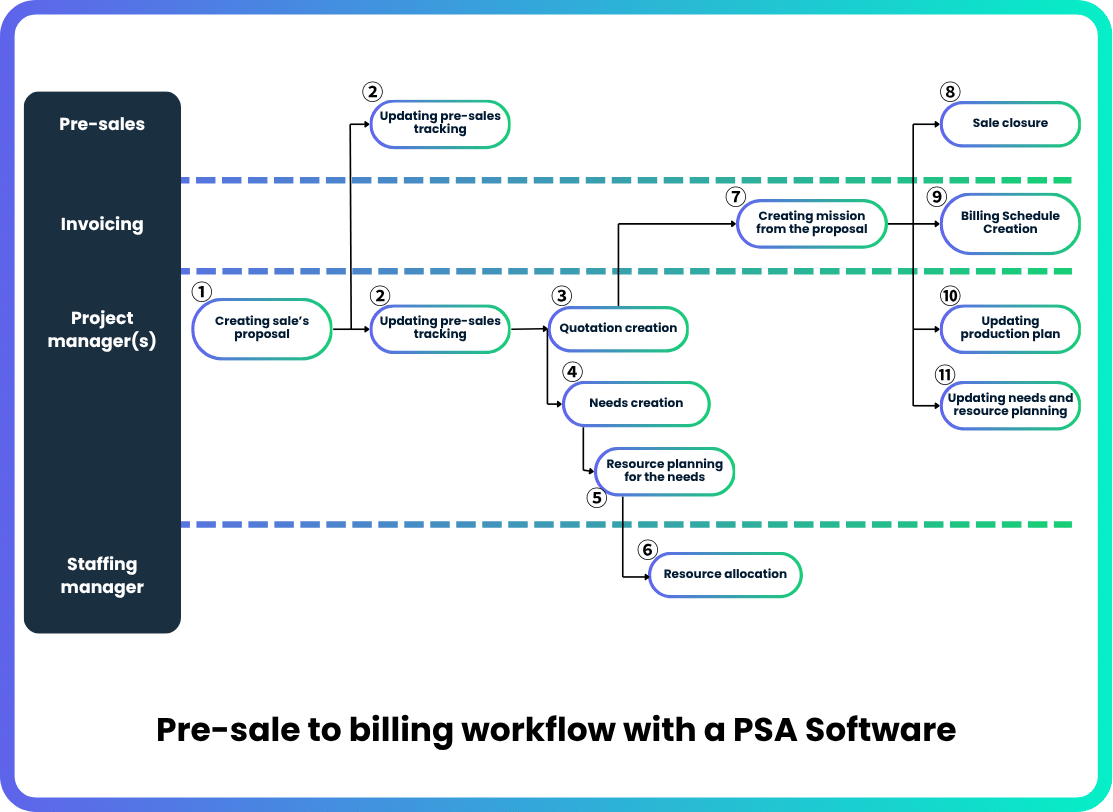
This feature becomes especially critical in multi-team or multi-site assignments, where a consultant can work on 2-3 simultaneous projects with different interlocutors.
PSA Software vs. Generalist ERP vs. Project Management vs. CRM
This table shows the difference between the four categories of tools that service companies use the most.
| Main perimeter | Complete professional services business cycle, from quotation to invoicing | Cross-functional management (accounting, purchasing, HR, production) | Scheduling and tracking tasks | Customer relationship management and sales pipeline |
| Native project invoicing | Yes (management, fixed price, milestones, on-call duty) | Partial (no native management of professional services sales models) | No | No |
| Resource planning by skills | Yes (capacity planning, matching, pre-resource planning) | Rarely native | No | No |
| Real-time project margin | Yes | Partial (often staggered) | No | No |
| Time reports and time tracking | Yes (internal module or API connection) | Variable | Limited (not billing-related) | No |
| Native accounting integration | Yes (internal module or API connection) | Integrated | No | No |
| Typical target | Consulting firms, IT Services, agencies, integrators | All companies | All project teams | Sales teams |
| Example tools | Stafiz, Kantata, Certinia, Maconomy | SAP, Oracle, Sage X3 | Monday, Asana, Jira | Salesforce, HubSpot, Pipedrive |
What is the difference between a PSA software and a project management tool? Billing.
A tool like Monday or Asana handles tasks, not margins. He does not know that a consultant charges 800 euros per day on a contract basis and that his three-month mission must generate 48,000 euros in turnover. In the PSA, each day staffed has a price, and each hour entered has an impact on the margin.
Which industries use PSA softwares?
PSA software is aimed at professional services companies whose business model is based on the sale of human time, skills or deliverables. Whether it's a PSA consulting firm, a PSA software for IT Services or PSA software for service companies, the functional base remains the same. Four sectors stand out for their specific challenges.
Consulting firms (management, strategy, project management)
This is the historical target of the PSA. The firm manages fixed-price and time-based assignments, often simultaneously. The priority issues: monitoring the margin on a mission-by-mission basis, maximising the utilization rate of consultants and making the turnover forecast more reliable for the partners. The resource planning by skills and project financial management are the most critical building blocks.
IT Services and digital services companies
In IT Services, the dominant model is the management model: consultants placed with clients for assignments of 3 to 18 months. The specific challenges: rapid matching between a customer need and an available profile, management of CRAs (activity reports), monthly mass invoicing and monitoring of the intercontract. The PSA system must also manage the positioning of profiles in pre-sales and the monitoring of on-call duties.
Software integrators and publishers
These structures combine fixed-price projects, time management, subscriptions or managed services and sometimes the purchase/resale of licenses. Invoicing is the most complex brick: schedules, milestones, units of work. The PSA solution must support this diversity of models without multiplying the tools.
Marketing and communication agencies
The agencies manage short client projects (2 to 6 weeks) with teams recomposed for each mission. The main challenge: visibility on the workload of the teams and the margin per customer project, as well as flexibility and granularity in planning (sometimes short working period on projects). The vocabulary differs (agencies use "team planning" and "client projects" rather than " resource planning and "missions"), but the operational need remains the same.
PSA vs PPM: two logics, two usecases
There is a strong overlap between PPM ( Project Portfolio Management) software and PSA software for consulting firms: both manage a portfolio of assignments, projects, clients and resources. It is for this reason that the two categories are often confused, and why some firms discover Stafiz by searching for "PPM software". But their central logic is not the same.
- PPM thinks first and foremost in terms of a portfolio of initiatives: choosing, prioritizing and arbitrating projects. The central question: "Are we doing the right projects?"
- PSA thinks first and foremost in terms of economic and operational activity: managing a service company from start to finish, from pre-sales to production, then to invoicing and margin.
| Central question | "Are we doing the right projects?" | "Is the activity really profitable?" |
| Managed Objects | Initiatives, programs, investments | Multi-model assignments/projects (time management, fixed price, milestones, on-call duty), consultants, invoices, time entered |
| Life cycle | Demand, Selection, Prioritization, Governance | Opportunity, resource planning, fulfillment, invoicing, margin |
| Granularity | Macro view, portfolio arbitrage, scenarios | Consultant by consultant, week by week |
| Users | CEO, PMO, CIO, sponsors | Operations Directorate, resource planning and talent management, finance department, heads of mission |
| Billing | Absent or peripheral | Key module of the system |
On a daily basis, an IT consulting and services company asks itself four questions.
- Who should be staffed on the new project? Who is available and when?
- What is the current projected margin?
- What to charge this month?
- How many days of intercontract next month?
The PSA answers these four questions. The PPM, no.
When to choose a PPM or PSA?
You need a PPM if:
- you manage a portfolio of internal initiatives (R&D, transformation, internal IT);
- your main issue is budgetary arbitration between competing projects;
- Your projects do not generate direct customer billing.
You need a PSA if:
- Your business is based on selling time and skills.
- you invoice customers on a time-and-cost basis, a fixed price or a mixed model;
- Your main challenge is the margin per mission and the utilization rate.
You may need both if you're a large integrator or software company with a significant services branch. In this case, the PSA manages the execution and invoicing, the PPM manages the governance of the portfolio.
Why adopt a PSA software when you are a service company?
Because the fragmentation of tools is more expensive than the PSA itself. In addition, there is an opportunity cost of not adopting a PSA: the extra performance you don't get by not using it. All the consulting and IT services companies that have adopted Stafiz mention the same tipping point: the moment when Excel became unmanageable.
Their main problem: the fragmentation of information between different software such as Excel for the resource planning, a CRM, a classic project management tool, accounting software, and Power BI for reporting.
Use case: when spreadsheets no longer keep up with the growth of a consulting firm
Greenworking is a consulting firm and training organization specializing in business transformations, with 40 employees in France.
The resource planning and invoicing were managed on Excel files, handled manually by the COO. With growth, the utilization rate remained unclear, the follow-up of purchase orders was delayed, and the firm's remaining capacity was unidentifiable.

❝
Stafiz provides a quick and accurate view of several key indicators of the management of a consulting firm: the availability of employees, the availability of employees, the availability of employees, the availability of the utilization rate, invoicing of missions and follow-up of purchase orders. This is a real difference compared to Excel files that have to be manipulated in all directions, and the data can be consulted in real time and instantly on the tool.
Florentin Seux
COO
After deploying Stafiz, Greenworking has an instant view of the availability of consultants, the utilization rate, invoicing of missions and follow-up of purchase orders. Billing monitoring is simplified and the firm knows in real time if its capacity has been reached.
The absence management software has been removed.
Use case: how to manage 250 employees in 5 countries using a PSA solution
PMP is an international consulting firm, present in France, Spain, Canada, the United Kingdom and the Benelux region.
Before Stafiz, project load and margin data lived in spreadsheets shared between offices. Files were never up-to-date, collaboration between countries was limited, and project managers only detected budget risks after the fact.

❝
Stafiz has allowed us to grow our teams more efficiently. The structure that Stafiz provides us with allows us to manage more and more projects while maintaining the expected level of reliability.
Frédéric Jover
Co-founding Partner
After deploying Stafiz, PMP measured +25% margin and +30% off utilization rate. Project managers are notified of budget risks in real time, and resource planning are based on a consolidated multi-country view.
What your practice loses without PSA software
The finance department does not know how much a project brings in until it closes. It does not have a granular vision (phases, tasks) and a consolidated and forecasted vision of the performance of projects, entities and customers at the same time. Traditional management is done on different tools — project management, time tracking, accounting — that don't talk to each other. Accounting tools are not integrated into projects: data must therefore be manually reconciled and consolidated to have up-to-date reporting. When time tracking and invoicing live in two separate tools, some hours worked may never be billed. This lost turnover is impossible to reconstitute after the fact.
The director of operations does not have an up-to-date and forward-looking vision of the workload of the teams, availability and skills. It can therefore not optimize or anticipate capacity planning. Once again, classic tools do not talk to each other:
- the CRM/pre-sales is not connected to the project management tool, which makes it difficult to anticipate upcoming projects;
- the project management tool and the HRIS do not make it possible to make a direct link between project needs and the talent base for availability, skills, and appetites;
- all project revenues and costs are not automatically centralized or forecasted, which does not allow project finances to be monitored with foresight and proactivity (purchases, expenses, external talents, etc.);
- The invoicing tool is not connected to projects. Invoices and purchase orders are not anticipated and triggered at the right time to reduce average payment times.
The manager resource planning detects the intercontract after the fact. Fifteen working days of under-charge for a senior consultant at 700 euros/day of salary cost charged, this represents 10,500 euros absorbed without compensation.
The general management presents a turnover forecast to the board based on manually compiled data, which has already been delayed by two weeks and is above all not forecast. Recruitment and investment decisions are based on a blurred picture.
What results can be expected from a PSA software?
An increase in the utilization rate of consultants
The Consultancy BenchPress 2023 study (The Wow Company, 233 independent consulting firms in the UK) indicates that adopting a PSA results in an average increase of 48% to 73% in consultant utilization rate and a margin visible in real-time.
| No tools | 48 % | 106 days billed |
| Excel | 66 % | 145 days billed |
| Isolated solutions | 71 % | 156 days billed |
| PSA Software | 73 % | 161 days billed |
In concrete terms, adopting a PSA tool means that a consultant will spend an average of 55 days more on billable assignments (vs. non-productive time: intercontract, training, internal admin). For a firm of 50 consultants, with a ADR 800 euros, this represents a potential of 2.2 million euros in turnover that was dormant in the inter-contract and poorly calibrated assignments.
Better control over margin
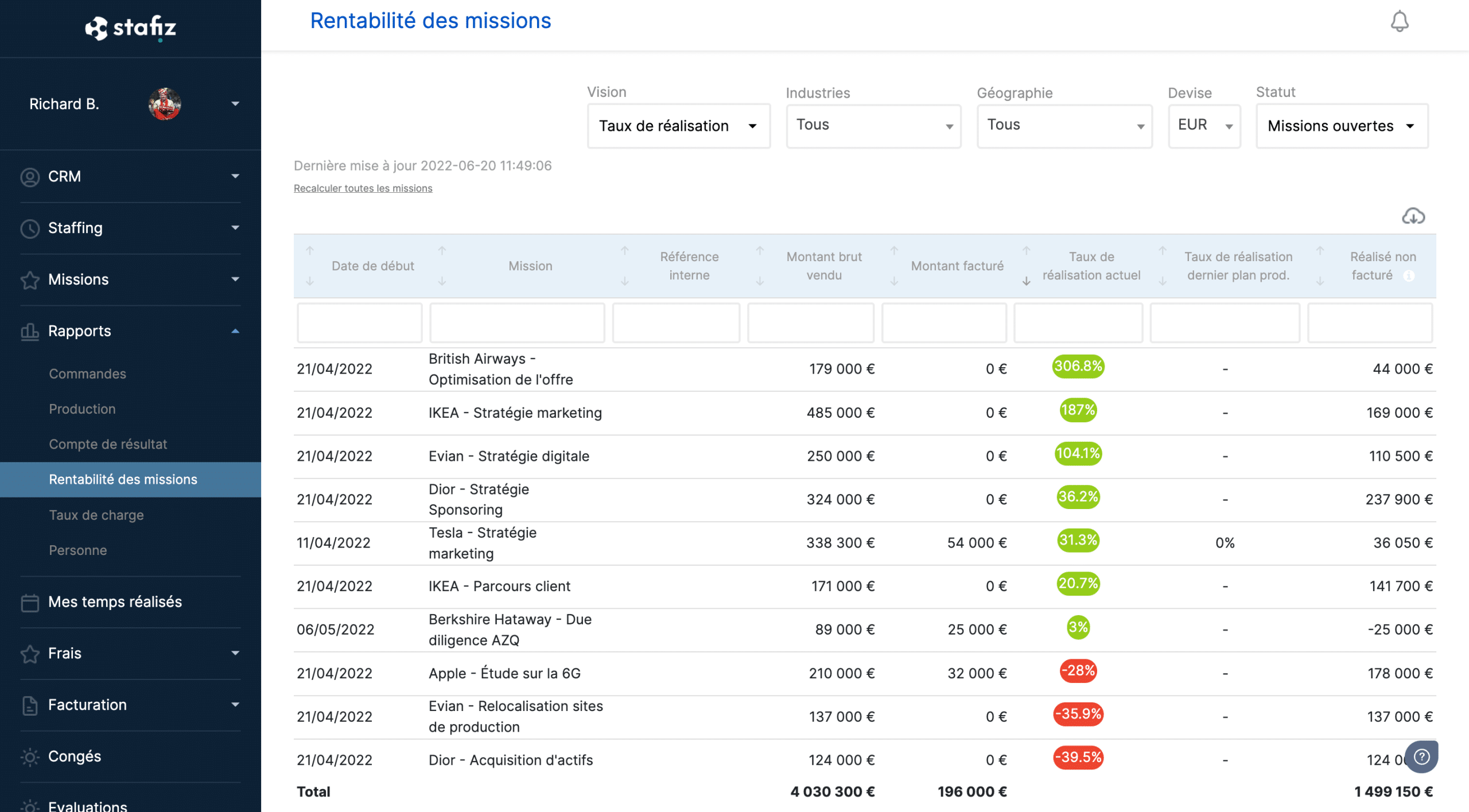
According to the same study, consulting firms equipped with PSA software measure their gross margin at least once a quarter. By comparison, a third of consulting and services companies that rely on several decentralized tools have to wait until the accounting close to know if their activity is profitable or not.
PSA software makes the margin visible early enough to act: detect a mid-mission budget overrun, identify the reasons for these deviations, renegotiate an amendment or reassign a consultant before the project's profitability changes.
What Consulting Firms Measure After Adopting Stafiz
The trends in the study are confirmed by the figures put forward by the companies that have adopted Stafiz:
| Colorado Consulting | +35% utilization rate, +15% project margins, 5 hours/week saved on the resource planning |
| PMP | +25% margin, +30% utilization rate |
| JICAP | -25% software costs, 5h/week saved |
| YouMeO by BearingPoint | Automation of project management and invoicing |
| Greenworking | Real-time visibility on availability, billing rates, project monitoring |
When to switch to a PSA software?
Beyond 20 employees, manual coordination between separate tools costs more than the PSA platform, not to mention the additional performance that you can't unlock without the PSA platform. Here are six red flags to look out for:
- your practice has more than 20 employees and the resource planning by Excel reaches its limits (you make corrections by email or phone);
- You manage more than 15 active assignments simultaneously with different billing models.
- your teams are over- or understaffed and you are unable to anticipate and allocate your talents to maximize production;
- The finance department spends more time consolidating data than analyzing performance;
- You discover budget overruns after the end of the missions.
- Recruitment is accelerating and you don't have reliable visibility on the 90-day load.
Point of vigilance: below 15 to 20 employees, the ROI of a PSA tool materializes more slowly. If the complexity of resource planning and invoicing remains low, lighter tools may be sufficient temporarily. The risk is to oversize the tool in relation to the real need.
What tools does PSA software replace and what should it integrate with?
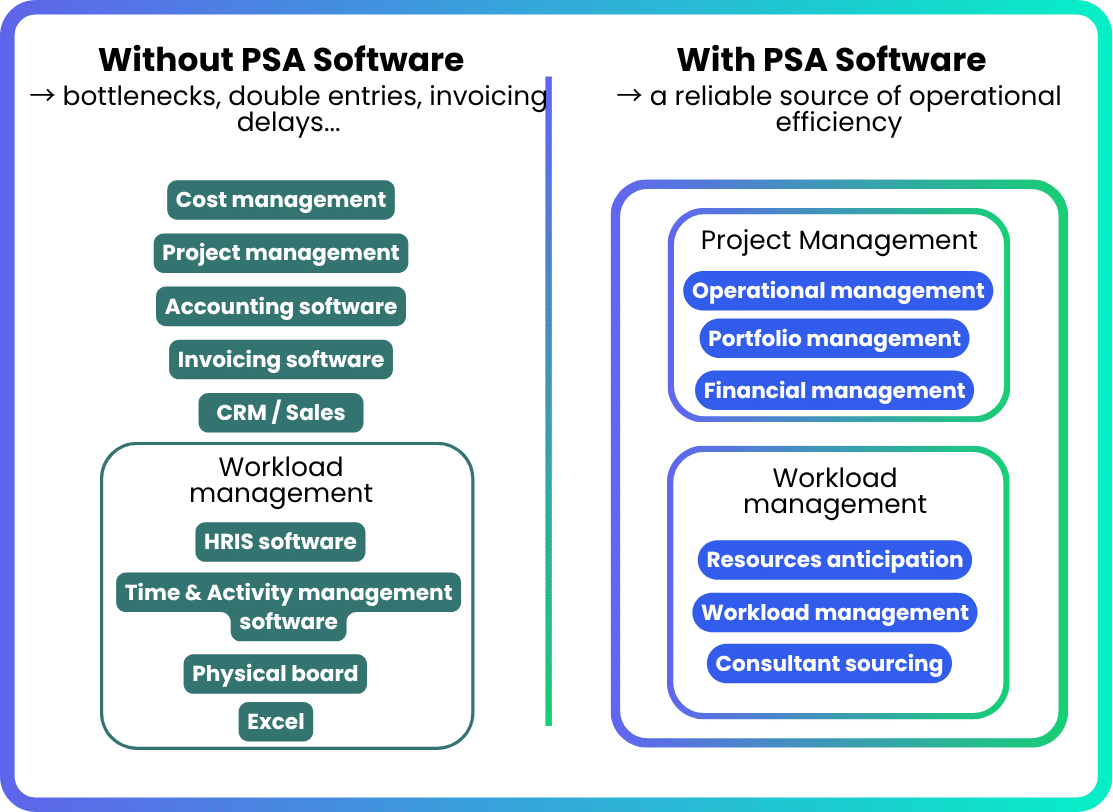
PSA software doesn't replace everything: it centralizes the operational core and connects to the rest of your ecosystem. The table below shows what disappears, what is absorbed by the PSA, and what remains in place with an API synchronization.
Before and After Adopting PSA Software: What's Changing in Your Stack
| Pre-sales / CRM | CRM Sales (Salesforce, HubSpot) | Pre-sales module integrated with PSA, or API synchronization with existing CRM |
| resource planning / workload plan | Excel, physical boards, software Time and Activity management grafted onto the HRIS | Native workload management: resource anticipation, selection, load management |
| Time tracking | Software Time and Activity management or Excel, time tracking software such as Toggl Track | Integrated time tracking, linked directly to invoicing |
| Project management and operational performance | Classic GANTT management tool such as Asana, Monday | Operational management (phases, tasks, deadlines) and financial management (costs, margin per phase) in the same screen with alerts |
| Expense Management | Separate tool such as Spendesk | Integrated module: expense reports, purchasing, subcontracting consolidated in the project cost |
| Billing | Separate invoicing software | Integrated invoicing module (invoice triggers and workflow), or API synchronization with the existing tool |
| Financial performance and accounting | Sage, Cegid. Tools not fully adapted to performance management: no complete analysis of the business performance of projects and clients | Monitoring and anticipation of performance adapted to consulting and service companies thanks to data consolidation. Granular vision by phase, teams, BUs, customers, associated operational and financial monitoring. Pre-accounting (automatic cut-offs) and financial anticipation, API synchronization with the accounting software. |
| PPM | Separate PPM software | The PSA covers project portfolio management. A PPM remains useful for the arbitration of internal initiatives. |
| Proactive Reporting | Power BI manually recompiled | Native dashboards by role (CFO, DirOps, DG) |
What tools should the PSA software connect with?
| Accounting tool | Sage, Cegid | Native integration or API |
| ERP | SAP, Oracle | Native integration or API |
| CRM | Salesforce, HubSpot, Pipedrive | Bi-directional API |
| Payroll and HRIS | PayFit, Lucca, SAP HR | API or export |
| BI | Power BI, Looker | Native Connector or API |
| Calendars | Outlook, Google Calendar | Native synchronization |
| Electronic invoicing | Factur-X, Peppol | Built-in compliance |
The key questions to ask yourself when comparing two PSA software: does the tool offer an open API, or only native connectors?
Native connectors make deployment easy, but an open API preserves scalability as your IS becomes more complex. Stafiz offers native connectors and an open API to Sage, Cegid, Salesforce, Power BI and more than 30 tools.
How to evaluate a PSA software: features, KPIs, and pitfalls to avoid
The 14 criteria to evaluate a PSA software
This list of questions allows you to assess the ability of PSA software to cover the real needs of your service company.
- Does workforce management include what I need? Capacity planning with skills management, flexible allocation.
- Are my current and future sales models supported (fixed price, sales and sales services, managed services, etc.)?
- Is the margin visible during the mission or only on the balance sheet?
- Are FAE/BCP calculated automatically?
- Is the integration with your accounting tool (Sage, Cegid) or your ERP (SAP) native or does it require a tailor-made development?
- Does the tool manage subcontracting and freelancers in the same workflow as interns?
- Does PSA scale from 20 to 500 employees without changing tools?
- Is the support French-speaking with dedicated support?
- Is the data hosting European and GDPR compliant?
- Does the tool offer a mobile application for field entry?
- Does the PSA natively manage multi-currency and multi-entity?
- Is the publisher specialized in your sector (consulting firm, IT Services, integrator) or generalist?
- Does the vendor publish its product roadmap and how often does it deliver updates?
- Does the tool manage e-invoicing compliance (Factur-X, Peppol)?
What KPIs should I track in a PSA software?
A PSA system must natively produce the following indicators, without manual export or recompilation:
- billable utilization rate (activity rate excluding leave): proportion of productive time, i.e. invoiced, in relation to available time;
- Utilization rate: measures the time spent on internal or external projects;
- gross margin and net margin by mission: during the mission, not at the accounting closing;
- Projected vs. actual turnover: 3, 6 and 12-month rolling vision;
- Remaining to be invoiced: amount of services delivered but not yet invoiced;
- ADR Real vs ADR sold: difference between the negotiated daily rate and the rate actually applied;
- average duration of inter-contract: average number of days between two assignments per consultant;
- Billing Delay: The time elapsed between the service and the issuance of the invoice.
These 8 indicators constitute the minimum scorecard for a service company that wants to effectively manage its profitability. To go further, we detail the 12 financial indicators to follow to manage your projects in this article.
Does a PSA software handle outsourcing and freelancers?
Yes, provided you choose a PSA designed for the French market.
In France, IT Services and consulting firms rely heavily on subcontractors and freelancers to absorb peak workloads or access advanced skills. However, most traditional tools (cross-functional ERPs, spreadsheets, project management tools) only manage internal employees. The result: two parallel workflows, margins distorted by the absence of the real cost of outsourcing and an incomplete view of the available load.

A PSA tool adapted to the French market such as Stafiz integrates external employees into the same flow as internal ones.
- resource planning Unified: the matching engine searches for profiles by skills and availability, whether it is a salaried consultant or a freelancer. The manager resource planning Sees all available capacity in a single view.
- Actual Scope of Assignment: The cost of the subcontractor (ADR is integrated into the calculation of the margin on a rolling basis, alongside the salary cost of interns. Without this consolidation, the margin posted is misleading.
- Invoicing and reconciliation: management of supplier purchase orders, reconciliation between the subcontractor's CRA and its invoice, inter-company re-invoicing between entities. This circuit avoids overcharging invoicing and margin discrepancies discovered too late.
- Contractual compliance: monitoring of framework contracts, subcontracting ceilings per client or per mission, umbrella conditions. In a context where principals are demanding more and more transparency on the subcontracting chain, this traceability is becoming a prerequisite.
If your PSA solution doesn't handle externals, you'll need to keep Excel or a separate tool next to it. And you lose the visibility that the PSA was supposed to give you.
6 pitfalls to avoid when adopting a PSA software
- Choose Monday or Asana because they are known. These project management tools handle tasks, not invoicing or margin. A consulting firm needs a tool that connects the resource planning to turnover.
- Over-customize the tool from the start. Start with the standard setup and iterate next. Creating 15 custom fields on job cards and reconfiguring approval workflows will waste a lot of time. Instead, adjust after 3 months of actual use: changes will be all the more relevant if they are based on field data.
- Deploy the tool without onboarding consultants. If your consultants continue to enter their time in Excel out of habit, the PSA runs on empty: no time data, no calculable margin, no reliable invoicing. Train your consultants in data entry from the first week and appoint one referent per team.
- Migrate data without cleaning it. The Excel files of resource planning often contain projects that have been closed for two years, consultants who have left the firm, and consultants who have ADR obsolete. Allow a week of cleanup before migration.
- Choose a PSA that is disconnected from accounting. If the integration with your accounting software (Sage, Cegid) is not native, you create a double entry instead of deleting one.
- Thinking that deploying the PSA will mobilize the teams for months. A SaaS PSA can be deployed in 4 to 12 weeks for an SME. Even for large companies, the project remains lighter than a traditional ERP because the business processes (resource planning, time-based invoicing, time tracking) are already preconfigured.
How to choose the right PSA software for your consulting firm?
If your firm is still managing the resource planning In a spreadsheet, invoicing in separate software, and reporting in Power BI, the cost of this fragmentation is lost consolidation hours, undetected margins, and forgotten invoices each month.
The PSA software exists to bring these bricks together. The question is no longer "do you need a PSA?" but "which PSA fits your structure, size and billing models?".
Stafiz pre-sales links, resource planning, project management and finance in a single environment designed for consulting firms and IT Services. For the first time, you see your business as it really is.
Frequently asked questions:
A PSA system works as a continuous flow from pre-sales to cash. The business opportunity triggers the pre-resource planning, which triggers the assignment, then the time tracking feeds into the automated invoicing, which feeds the margin management. Each step feeds the next without re-recording.
In a consulting firm, an ERP covers accounting, procurement, and HR in a generalist way. There are several types of ERP, and those designed for IT activity management can be cumbersome to configure. PSA software targets the complete project cycle of service companies: resource planning, time tracking, project invoicing and margin per mission. For the operational management objectives of a consulting firm or a IT Services, the PSA is the most suitable tool.
Yes, provided that the complexity of the activity justifies it. A firm of 30 consultants that manages on-time and fixed-price assignments, with subcontracting and simultaneous clients, takes full advantage of a PSA. Below 15 people with a simple model, the ROI can be slower.
From 15 to 80 euros per user per month for SaaS solutions. The actual cost includes initial setup, data migration, and training. The relevant calculation: total cost in relation to gains (hours of consolidation eliminated, invoices issued faster, margins controlled).
This criterion weighs heavily on French companies. PSA software designed for the European market offers native connectors with Sage and Cegid. The challenge: to avoid re-entering the operational tool and the accounting.
It plugs into it. The PSA manages the operational aspects (time, missions, project invoicing) and exports the entries to the accounting software. The two tools are complementary: the PSA does not do general accounting, and the accounting software does not do resource planning.
A project management tool manages tasks, deadlines, and dependencies. It does not manage invoicing or resource planning by skills, nor the project margin in real time. PSA software covers these functions natively. Choosing Monday or Asana to manage a service company is like using a planning tool where a financial management tool is needed.
For an SME with 50 to 200 employees, the deployment of a SaaS PSA takes between 4 and 12 weeks. For large companies (more than 500 employees, multi-entity, multi-country), the project lasts 3 to 6 months. The deployment remains less complex than that of a generalist ERP, which requires a more cumbersome configuration.
The ROI is measured on three axes: (1) the turnover recovered thanks to better invoicing, (2) the costs avoided (tools replaced, consolidation removed), (3) the margin preserved (early detection of overruns). Estimate the percentage of time not billed, multiply by the ADR and the number of consultants, then compare to the annual cost of the PSA.