At a glance: This guide gives you a decision grid based on 9 categories of criteria and 5IT Services, to choose an ERP adapted to your model (direct management, fixed price, multi-entity).
In a Digital Services Company (IT Services), your margin depends on two things:
- The utilization rate of your consultants (the share of days actually sold to a client).
- and the quality of the resource planning (the right profile on the right mission).
When this data lives in Excel or a generalist ERP that is not adapted to your needs, your CFO closes the month 30 to 60 days after the end of the assignment, your sales director promises a client a consultant who is already placed elsewhere, and your CEO arbitrates renewals without knowing the real margin.
Beyond 20 or 30 consultants, these tools require you to re-enter the Activity Reports (CRA), to reconstruct the margin by hand, and to pay for specific developments. Not to mention that a pure management consulting firm does not have the same priorities as a group of 500 employees in several countries.
Choosing the right ERP for IT Services, it means arbitrating on what distinguishes your service model: the mix of time and conditions, size, management maturity. This is what this guide makes visible, beyond feature comparisons.
What is an ERP for IT Services ?
An ERP (Enterprise Resources Planning) centralizes a company's processes in a single system. He makes the business modules communicate with each other to give each department the same up-to-date data.
A generic ERP consists of several modules:
- business management and CRM.
- accounting and financial management.
- human resources management.
- production or operations management.
- inventory management.
- project management.
An ERP for Digital Service Company (sometimes called business ERP or verticalized ERP) replaces or adapts these bricks to follow the specificities of a digital service company for management by business: management, package, managed services, validated customer CRA and invoicing, monitoring of the intercontract, utilization rate, recruitment and selection of profiles with skills files . Unlike a generalist ERP (Sage, Cegid, SAP, Odoo) designed for stock flows and industrial production, it does not require your IT department to pile up specific developments to manage the daily life of a service activity.
Why your IT Services needs a dedicated ERP (and not a generalist ERP)
The economic model of a IT Services is based on the sale of man-time, with a long operational chain (opportunity→ resource planning → CRA → invoicing → margin) where each break costs you profitability.
A generalist ERP is designed to manage stock flows, accounting entries and production: it does not know the difference between a day of management, a fixed rate of 30% progress and an on-call invoice. It potentially does not handle differences ADR and CJM by role (and their customization on a case-by-case basis for example), inter-contract (when your consultant is not on assignment and costs without bringing in.): in short, the operating modes of a IT Services. .,
Choosing an ERP for IT Services, it means taking a tool that knows, without additional development, how to manage these elements.
TheIT Services
A IT Services is paid in three ways:
- Advertising management: you invoice the time actually spent by the consultant at the client's site (for example a Java developer placed with a bank for 6 months). This is the most common method of sale.
- The package: you sell a project at a fixed price with a binding deliverable (for example an application redesign at €250k). You recognise the turnover as you progress, which is what the IFRS 15 accounting standard requires.
- Managed services: you take charge of a recurring scope (for example, the TMA of an application park) with a monthly service commitment.
A business opportunity turns into resource planning, resource planning via time monitoring feeds the CRAs (activity reports, the consultant's clocking in validated by the client), the CRAs trigger invoicing, invoicing feeds the project margin. A recapture in the middle breaks the accounts.
Here, the reference metric is not productivity, but the billable utilization rate (Activity rate, excluding holidays). A generalist ERP will give you an overall productivity figure, but won't be able to tell how many billable hours are attributable to each consultant. Conversely, the rate of resource planning offers a more reliable view of the company's real activity and allows it to be a better indicator to compare results.
Use case: the gains measured after adopting an ERP for IT Services
Colorado Groupe is a marketing and customer relations consulting firm with around fifty employees. In 2018, the resource planning was based on manual processes and separate absence management software. The management did not have to do the rest per project to calculate the projected margins. Utilization rates stagnated without leverage to improve them.

❝
Before using Stafiz, we were unable to improve our utilization rate. Thanks to Stafiz, we are managing our capacities much better and have improved our margins.
We turned to Stafiz, which not only allowed us to digitize our resource planning, but also to automatically calculate the remaining work to be done on projects.
Isabelle Lalet
Director of Development and Support
After deploying Stafiz, Colorado Groupe measured:
- +35% resource utilization rate,
- +15% project margins
- and 5 hours saved per week on the management of the resource planning.
The absence management software has been removed.
The limitations of generalist ERP and Excel
Generalist ERPs (Cegid, SAP, Oracle NetSuite, Odoo, Microsoft Dynamics) lack the following building blocks:
- Consultant planning: who is available, who enters into an intercontract, who corresponds to the needs of an assignment, with the generation of the skills file for pre-sales.
- Customer validation of CRAs by the customer, with legal value in the event of a dispute over the invoice.
- Recognition of turnover on progress on packages: the share of revenue already earned month after month according to the percentage of progress, as required by IFRS 15.
- Automated FAE and PCA (invoices to be issued and deferred revenues), essential for a fair monthly margin.
- A real-time project profitability dashboard, with drill-down by consultant, client and BU.
Beyond the price of the license, what is the cost of using a generalist ERP instead of an ERP for IT Services ?
The cost of a generalist ERP is not only measured by the price of the license. On paper, a tool with a subscription of around €25 per user per month may seem economical. Conversely, ERPs such as SAP or Oracle NetSuite have higher licensing and deployment costs. But for a IT Services, the real subject lies elsewhere: how much does it cost to adapt a tool that does not know how to natively manage the resource planning, CRAs, intercontract, fixed-price invoicing or project profitability?
The gap can be measured in five areas:
- The utilization rate : for a company of 40 consultants with a ADR of €1,000, each point of the resource planning represents about €88,000 in turnover per year (220 productive days × 1% = 2.2 billable days per consultant, i.e. 88 days for 40 consultants at €1,000 ADR).
- The monthly closing time: on Excel and a generalist ERP, the CFO often has to wait 5 to 10 working days to produce the month's income statement (actual turnover, margin per project, FAE/BCP). An ERP dedicated to IT Services reduces this period to 2 days.
- Late visibility of the project margin: when project profitability is rebuilt after the fact in Excel, it can be known 30 to 60 days after the end of the mission, too late to reallocate a resource, correct a remainder to be done, adjust a drifting package or replace an underperforming consultant.
- The double daily entry between the tools: between the CRA, invoicing, payroll, accounting and reporting, the same consultant data can be re-entered 3 to 10 times. Each re-entry creates administrative time, potential errors, and discrepancies between trade, operations, and finance numbers.
- The Total Cost of Ownership (TCO): a subscription to an ERP at €25/user/month like Odoo remains affordable on the bill, but will not cover the needs of a IT Services without specific developments. At the other extreme, high-end ERPs (such as SAP or Oracle NetSuite) require a more expensive license and a long configuration.
The right question is therefore not: "how much does the license cost?" but rather: "how much does it cost us each month to do not manage the license in real time?" resource planning, CRAs, invoicing and margins?"
The 9 categories of criteria for choosing your management software for IT Services, IT services company or consulting firm
The reading grid combines nine categories that cover the entire chain, from the business opportunity to the accounting close. Each category reveals a maturity level (basic, intermediate, advanced), key integrations, and the tools that stand out in that category.
Sales management and CRM
In the absence of a consolidated pipeline between trade and resource planning, the risk is to engage the same profile on two competing missions. The conflict is then resolved at the last minute, to the detriment of customer relations and turnover.
On this criterion, the ERP must manage:
- opportunity management (probabilization, closing date, negotiated pricing).
- the structured recording of customer needs in pre-sales: profiles sought, expected skills, start dates, ADR target.
- candidate matching in pre-sales (90% of profiles are external at the time of the response).
- calls for tenders.
- the cross-signature of the client contract / consultant contract.
- Portfolio monitoring (renewals, mission extensions, upsell), with conversion rate and average length of the sales cycle by type of deal.
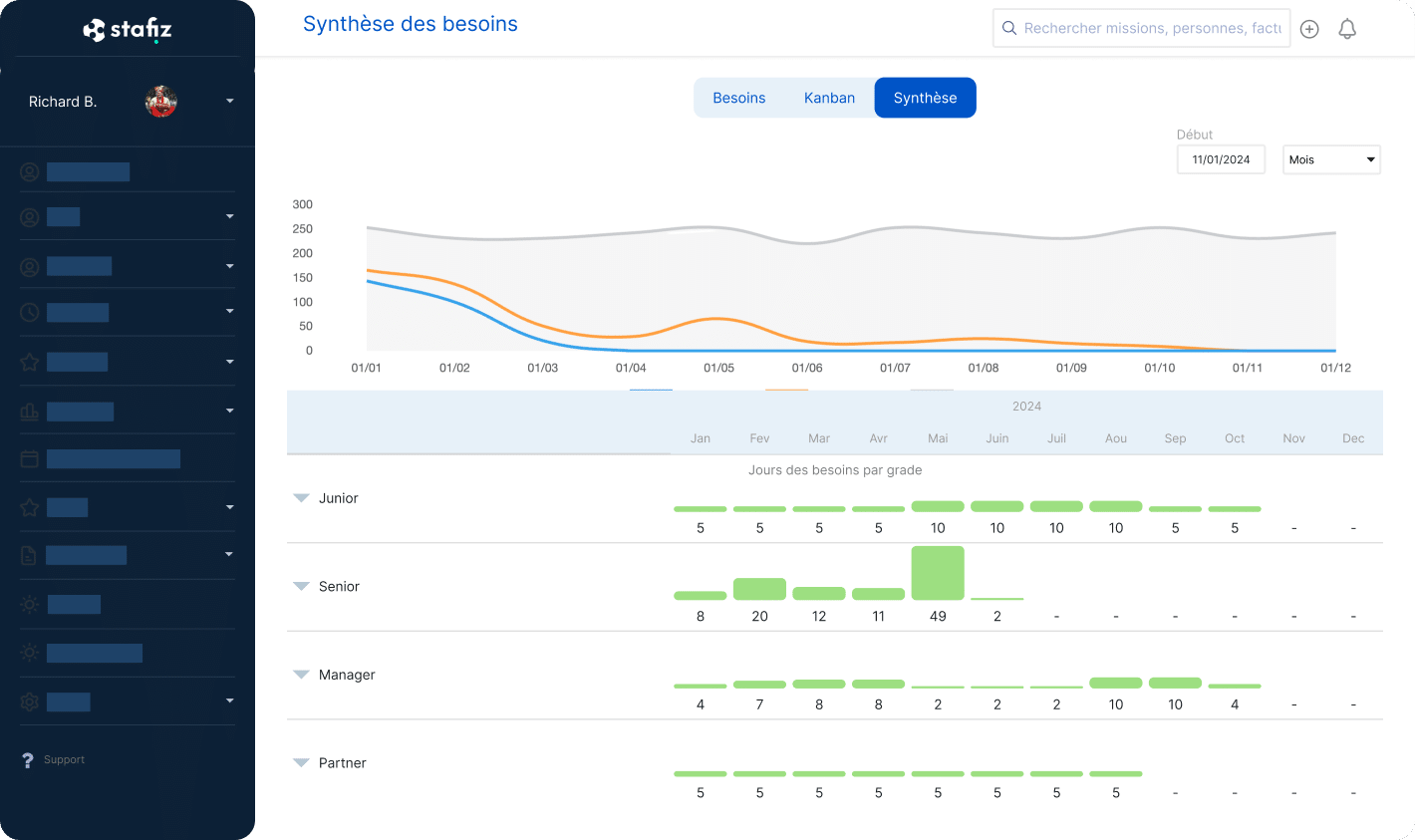
By connecting business opportunities and resource needs, ERP IT Services makes it possible to anticipate the tensions of resource planning and to avoid losing turnover due to a lack of available consultants.
Maturity level:
- Basic: External CRM disconnected, no link with the operational team.
- Intermediate: CRM integrated or connected by gateway.
- Advanced: full chain opportunity → project → resource planning → invoicing in a single system, with business cross-visibility / resource planning in real time.
Key integrations: External CRM (Salesforce, HubSpot), resource planning, TTY.
- External CRM (Salesforce, HubSpot): if the tool IT Services does not cover the commercial dimension, the quality of the integration is decisive to avoid double entry.
- Software resource planning : Late-stage opportunities should be visible in the resource planning to anticipate needs before signing.
- ATS: if a profile does not exist internally, the salesperson must be able to trigger a recruitment directly from the opportunity sheet.
Tools that stand out:
- Karanext: CRM and opportunity management placed at the heart of the tool.
- Stafiz: Native connection between opportunity, pre-sales and resource planning in the same interface.
- BoondManager: CRM integration/resource planning for IT Services in pure management.
Resource planning
Without a shared vision of the resource planning Between the sales department, operations and finance, the risk is to make three contradictory decisions about the same consultant: positioning a profile that is already engaged, underestimating the cost of an intercontract, or missing an early end of the assignment.
On this criterion, the ERP must manage:
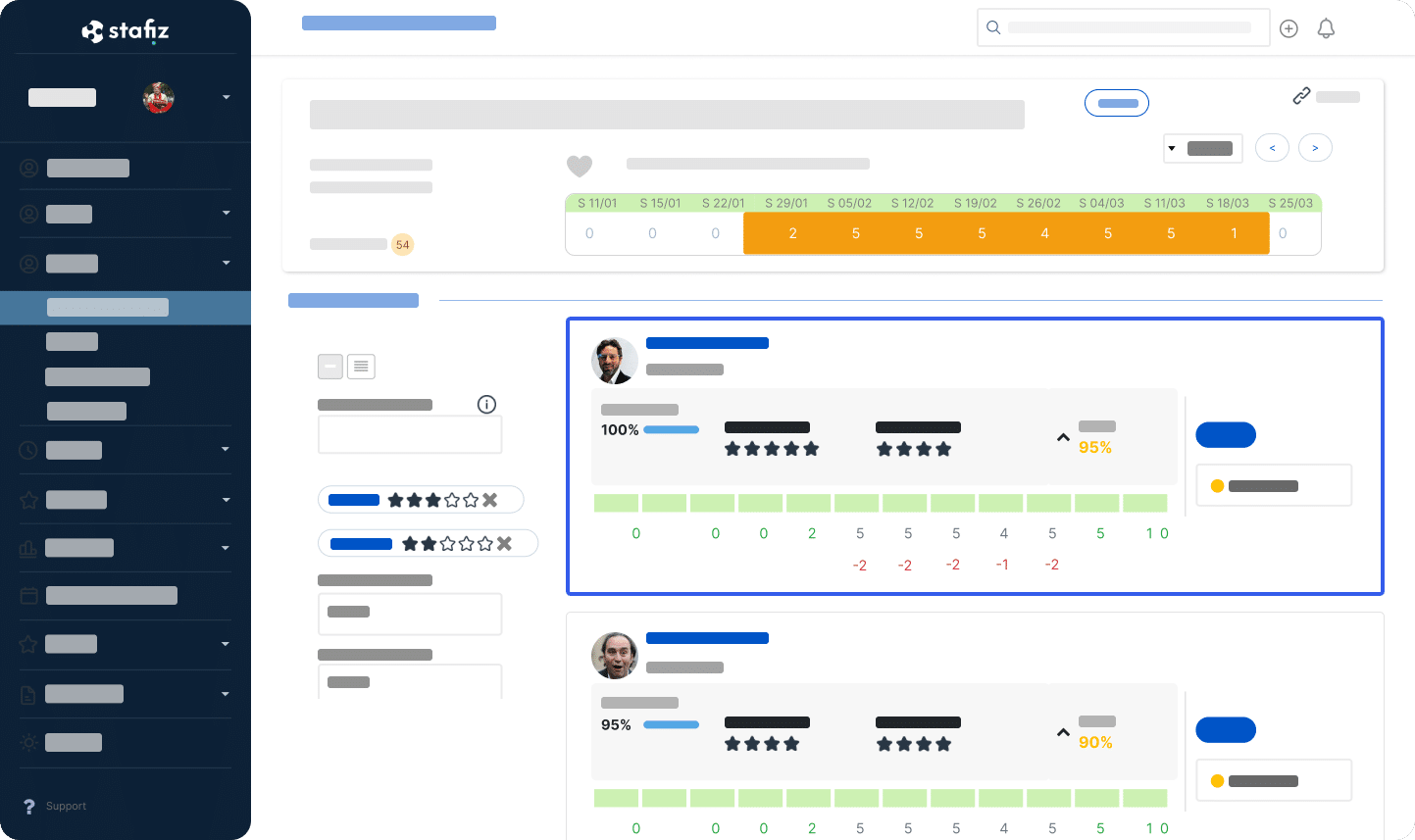
- Real-time visibility on availability and intercontract, with monitoring of the duration of inter-contract by profile, by BU and by skill.
- Alerts on early end of assignment and the upcoming intercontract pipeline, in a 30 / 60 / 90 day rolling view.
- The cost of inactivity calculated continuously and alerts on consultants without imminent assignment, with repositioning proposals.
- The structured competency framework (SFIA, RNCP, or tailor-made taxonomy), kept up to date by the consultants themselves via a validation workflow.
- The generation of competency files for the presentation of profiles to the client.
- The multi-criteria search for profiles (skills, availability, location, ADR, seniority) with automatic or semi-automatic matching and scoring.
- Opening up to external profiles for recruitment (freelancers, third-party pools, candidates in the process of being recruited) with management of consultant preferences (mobility, sector, type of mission).
- The HR → → sales manager validation workflow before a consultant is positioned.
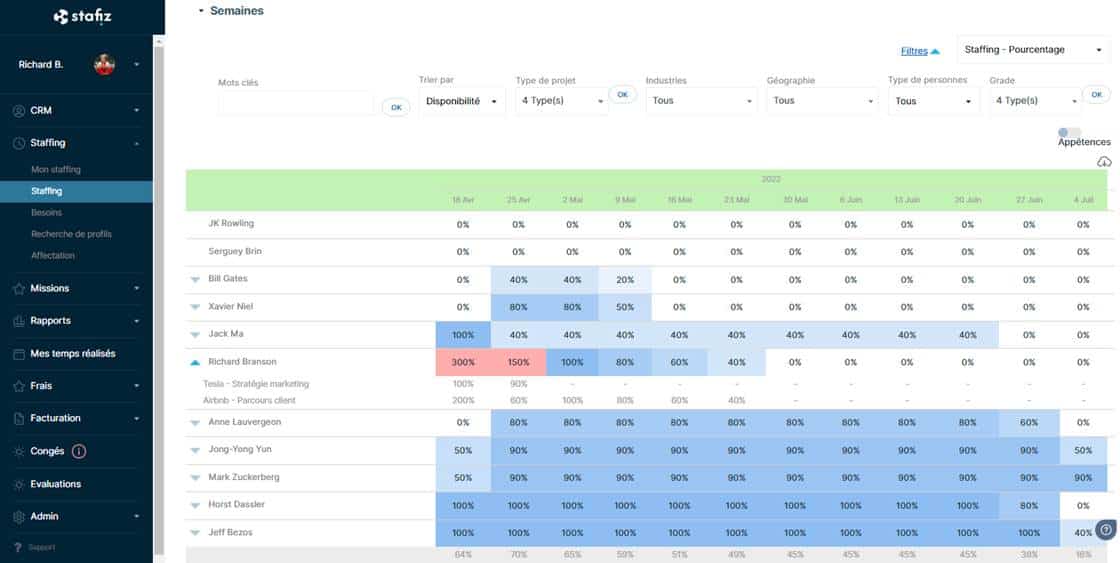
A real-time view of the resource planning makes it possible to anticipate periods of inter-contract or overload, and to avoid losing assignments due to lack of availability.
Maturity level:
- Basic: monitoring on spreadsheets, no consolidated vision.
- Intermediate: Pipelineresource planning In the tool, manual alerts.
- Advanced: automatic matching, real-time inactivity time, rolling anticipation over 30/60/90 days, live link with the CRM and HRIS.
Key integrations:
- HRIS (Lucca, Silae, BambooHR, ADP): synchronization of absences, contracts, entries and exits.
- CRM: visibility on current opportunities to anticipate the needs of resource planning Before signing, a consultant who becomes available in 6 weeks must be compared with a deal in the closing phase.
- ATS: if a profile does not exist internally, a recruitment is triggered from the interface resource planning.
Tools that stand out:
- Boond: pure management and operational management of the intercontract.
- Napta: depth of skills management.
- Stafiz: consolidated vision resource planning + financial.
Human Resources Management and Careers
This category is most often managed in an external HRIS, but the level of integration with the ERP for IT Services is discriminatory. In the absence of synchronization, the risk is that a leave validated in the HRIS will not appear in the schedule resource planning, and that an assignment be entrusted to a consultant who will be absent.
On this criterion, the ERP must manage:
- The administrative side of the consultant: onboarding, offboarding, contracts and amendments, with a workflow specific to the frequent in/out of the IT Services.
- The management of leave, RTT, training and exceptional absences, with calculation of acquired rights and balances in real time, and automatic impact on the planning of the resource planning.
- Follow-up of annual and mid-year reviews, with individual development plan and objectives related to mission skills.
- The training plan and the follow-up of regulatory authorisations, with automatic reminders on expirations.
- The complete recruitment pipeline (sourcing → interview → offers → integration), with a direct link between a need identified in resource planning and the opening of the corresponding position.
- Managing interviews and introducing multiple candidates to the customer in pre-sales, a key step in the sales chain of a IT Services.
Without HR data connected to the resource planning, a IT Services risk of affecting an unavailable or unsuitable consultant, with a direct impact on the performance of the assignments.
Maturity level:
- Basic: double entry in HRIS ↔ ERP, offline recruitment.
- Intermediate: HRIS connector, linkless third-party ATS resource planning.
- Advanced: two-way HRIS synchronization, open position visible in the schedule as a future resource with estimated arrival date, individual development plan related to mission skills.
Key integrations:
- HRIS (Lucca, BambooHR, Cegid),.
- ATS (Lever, Greenhouse, Teamtailor).
- Automation Tool resource planning (Stafiz).
Tools that stand out: Napta: fine management of skills and career paths.
Note that most of the tools for IT Services cover the HR database and delegate recruitment and careers to specialists.
Sales Models and Project Management
When the flat rate goes up in the mix, your CFO no longer thinks in terms of days invoiced but in progress and remains to be done. In the absence of native multi-model management, the risk is to enter the same data twice between the time-based and fixed-price tool, and to produce a late and questionable consolidated income statement.
See also our file on project management in service companies.
On this criterion, the ERP must manage:
- The board (ADR by consultant, by client and by contract, management of amendments and tariff revisions, CRA link → invoicing without re-entry).
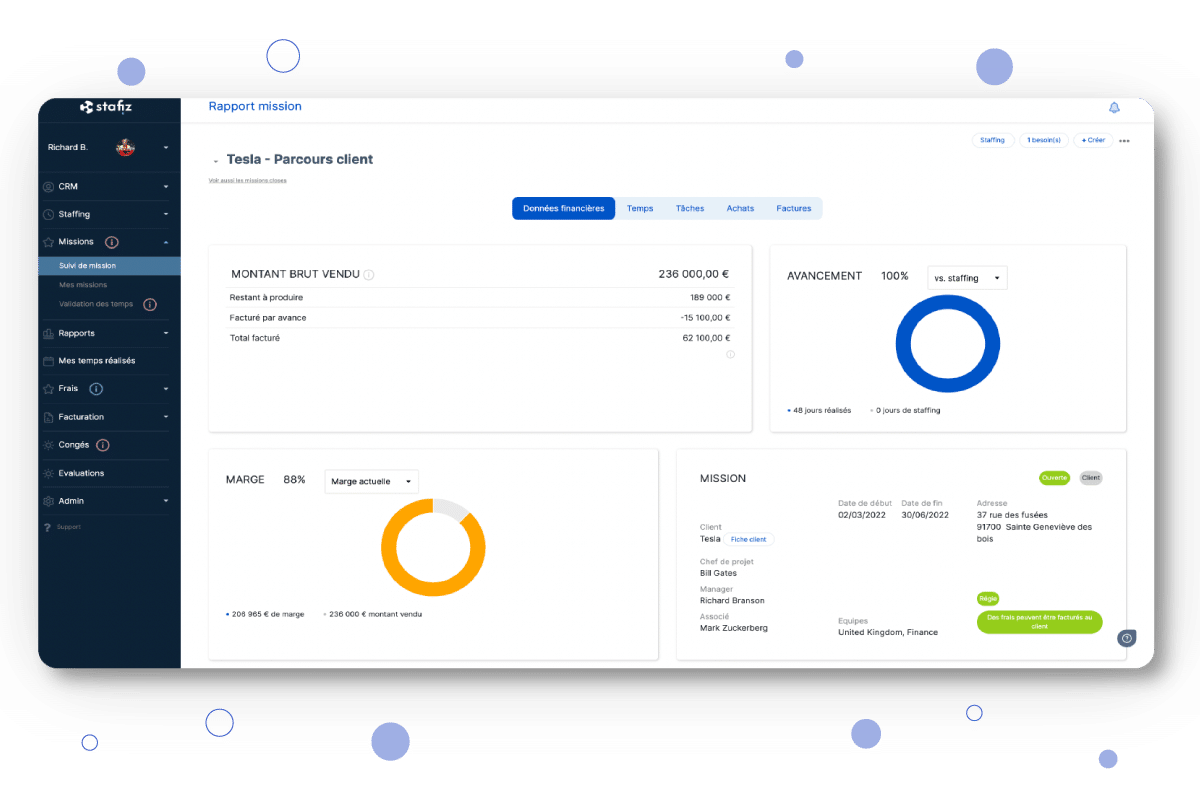
- The lump sum (progress by milestone or percentage, remaining to be done with overrun alerts, recognition of the turnover according to the method chosen (completion or progress), penalties and retention of guarantees).
- Managed services (units of work, service catalog with OU pricing, built-in SLA reporting).
- Mixed projects (combination of several models on the same customer scope or the same BU, with analytical separation for a readable income statement).
Maturity level:
- Basic: a single managed model (often governed).
- Intermediate: management and fixed price coexist in silos.
- Advanced: integrated multi-model management, consolidated view by customer, BU and revenue type.
Key integrations:
- Project management tools (Jira, Asana, Monday): synchronization of tasks and progress for package projects, without double entry.
- CRM: transition from opportunity to project with automatic resumption of negotiated pricing conditions.
Tools that stand out:
- Everwin and Fitnet Manager: complex package (milestones, remaining to-do, penalties), Fitnet more particularly in the consulting firm segment.
- Furious: agency structures with short projects.
- Stafiz: control room and fixed price in the same flow, with a margin per project calculated on the same data.
When the management and the fixed fee coexist in the same income statement, the tool is not enough: project management in service companies also requires structuring the management by phase, by model and by responsibility. Stafiz manages both billing models natively with a consolidated multi-model financial vision.

❝
We realized that we sometimes didn't charge part of the work or fees because of a lack of visibility. We finally have an accurate system, which avoids errors and provides all the visibility to direct our business.
Raphael Beziz
Co-founder, YouMeo
Time reports and time tracking
The Activity Report (CRA) is the only document that proves that a day is billable. In the absence of a CRA chain → validation → invoicing without interruption, the risk is to invoice late, discuss each line with the customer, and lose billable days due to unsigned clocking in.
On this criterion, the ERP must manage:
- Web and mobile time recording (ideally offline).
- The distinction between billable and non-billable time.
- Multiple types of time (on-call, overtime, interventions with negotiated pricing) and their granular entry.
- A validation workflow consulting → → client manager to ensure consistency between the days charged vs. the days worked on the mission.
- Customer validation by electronic signature or dedicated portal, kept as legal proof in the event of a dispute over the invoice.
- Legal archiving of signed CRAs and non-seized CRAs (and alerts) for subsequent checks.
- Automatic export to payroll (variables, on-call duty, overtime), generation of the invoice as soon as the CRA has been validated.
Maturity level:
- Basic: Paper or Excel CRA, re-entry for invoicing.
- Intermediate: online entry, validation manager, semi-automatic export.
- Advanced: integrated customer validation, automatic payroll and invoicing link, legal archiving, zero re-entry.
Key integrations:
- Payroll (Silae, ADP, Payfit): automatic transmission of variables from the time entered.
- Accounting: link between the approved CRA and the posting of turnover to be recognized, automatic FAE/BCP at closing.
- Automated invoicing: generation of the invoice as soon as the CRA is validated, without re-entry.
Tools that stand out:
- BoondManager: CRA with customer validation in the control room.
- Fitnet Manager: expertise on multi-type ARC.
- Stafiz: Multi-type CRA, validation with probative value and native payroll/invoicing/accounting link.
Financial management and analytical management
Category where your CFO wins or loses the battle of the month. In the absence of an integrated financial chain, the risk is to produce a reconstructed income statement in Excel, FAE/BCP passed by hand, and a project margin known too late to adjust the course.
On this criterion, the ERP must manage:
- Automated invoicing, generated from the CRA validated for the advertising agency and from the milestones for the package, with customization of templates per customer, recurring invoices for managed services, and native support for electronic invoicing.
- The dashboard of customer collections and reminders, with average payment time per customer and per BU.
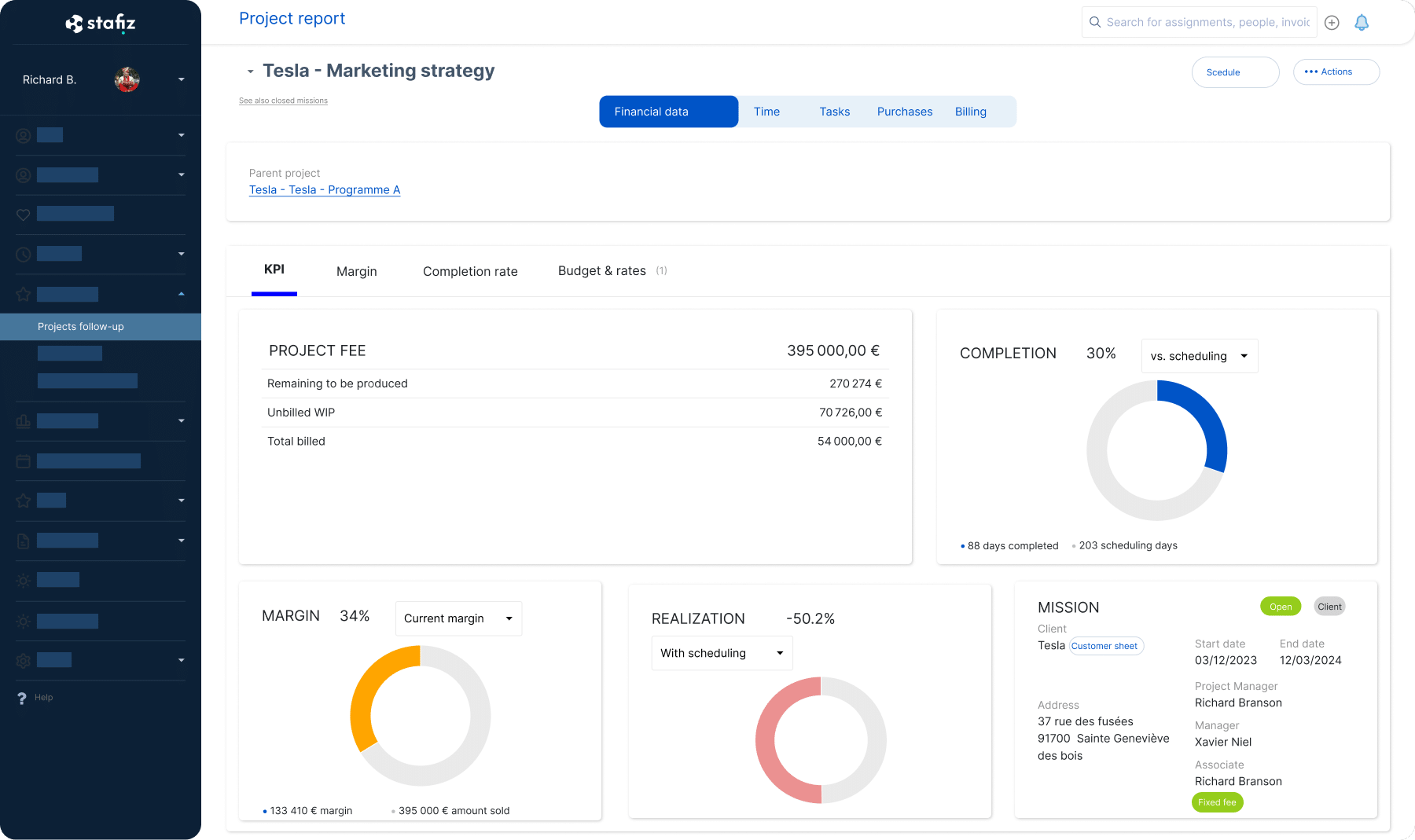
- Profitability monitoring by deal, project, consultant, client and BU, with gross margin, net margin and landing margin per deal, and billable vs. non-billable occupancy rate.
- The calculation of the full cost of the consultant (salary + charges + intercontract + overhead).
- FAE (invoices to be issued) and PCA (deferred revenue).
- The distinction between invoiced / recognized / to be recognized for a rigorous IFRS 15 follow-up.
- The neutralization of intercompany companies in consolidation (invoicing between subsidiaries of the same group).
- FP&A (Financial Planning & Analysis): a tool for strategic planning for the budget and the forecast month by month) with budget by BU, client and type of project, rolling forecast, simulation of scenarios (hiring, loss of a major client, ramp-up) and monitoring of budget/actual variances.
Maturity level:
- Basic: manual invoicing, income statement rebuilt in Excel, no FAE/PCA.
- Intermediate: automated invoicing, project profitability, manual FAE.
- Advanced: Integrated FP&A, Automatic FAE/PCA at Closing, IFRS 15, Multi-Entity Consolidation.
Key integrations:
- Accounting (Sage, Cegid, EBP, Pennylane): export of entries, generation of FEC, automatic reconciliation.
- Payroll (Silae, ADP, Payfit): import of actual wage costs for exact margin calculation.
- External BI (Power BI, Tableau): For groups that already have a consolidated reporting tool.
Tools that stand out:
- Stafiz: forecasting, FAE/BCP and multi-entity vision.
- Everwin: Accounting coverage for IT Services who want a single tool for the trade and accounting.
Integrations and technical ecosystem
A IT Services average connects its ERP to 5 to 8 tools: accounting, payroll, HRIS, BI, electronic signature, sometimes ATS. Without robust and documented connectors, the risk is to pay an integrator every year to patch unstable gateways, and to see silent data loss between systems.
On this criterion, the ERP must manage:
- A documented REST API: the standard technical instruction manual that allows your team or an external provider to connect the ERP to another tool, without depending on the vendor.
- An MCP (Model Context Protocol) server: the recent standard that allows AI assistants (Claude, ChatGPT, Copilot) to query the ERP in natural language.
- Webhooks for real-time synchronizations: automatic notifications that the ERP sends to other systems as soon as an event occurs (CRA validated, invoice issued, consultant repositioned), for instant synchronization.
- Native connectors on the tools on the market, rather than systematic custom development for each integration.
- iPaaS compatibility (Zapier, Make, n8n).
- API call logs and flow monitoring: the history of each exchange, essential for auditing a chain of data or diagnosing a drift.
- Error management and synchronization failure alerts to detect a flow break before it skew the numbers downstream.
- Up-to-date developer documentation (tutorials, code samples, test environment), so that an integration does not depend on a direct exchange with the publisher.
Maturity level:
- Basic: manual CSV imports/exports, no APIs.
- Intermediate: native connectors on 2-3 key tools, poorly documented API.
- Advanced: Open and documented API, native connector ecosystem, iPaaS, monitoring.
Tools that stand out:
- Stafiz: We have a documented REST API and have native connectors on the main accounting and payroll tools.
- Open-source ERPs like Odoo have a native flexibility that allows them to connect to many tools.
- Older tools, on the other hand, may have a limited ecosystem.
Note that the quality of integration is verified tool by tool depending on your software stack.
Data Governance & Security
Questions that your CIO asks and that are rarely well covered in comparisons. In the absence of clear contractual guarantees, the risk is to discover at the time of leaving the publisher that your data is not exportable in a reusable format, or that hosting outside the EU exposes your GDPR compliance.
On this criterion, the ERP must manage:
- Data portability: format and completeness of the export in the event of termination, deadline and conditions of return, contractual ownership.
- Hosting and certifications: France / EU / outside the EU for sovereignty, ISO 27001, SOC 2 or HDS if sensitive data.
- Authentication and access management: SSO, MFA, rights per role so that one project manager doesn't see the margins of another BU.
- Access and change logging (audit trail), to track who did what on financial and operational data.
- GDPR compliance: quality of the proposed DPA, configurable retention periods, right to erasure procedure.
Maturity level:
- Basic: no certification, unclear export, unspecified hosting.
- Intermediate: Documented GDPR, EU hosting, MFA available.
- Advanced: ISO 27001, native SSO, full audit trail, explicit contractual portability.
Tools that stand out: you need to assess regulatory compliance on a vendor-by-vendor basis, on published certifications (ISO 27001, SOC 2, HDS), the quality of the proposed DPA, and the portability clauses in the contract.
Publisher Strength
In the absence of a solid and transparent publisher, the risk is to discover 18 months after signing that the roadmap has pivoted, that the support is no longer French-speaking, or that the publisher has been bought and that your version is no longer maintained.
On this criterion, you must check:
- The financial health and sustainability of SaaS (turnover, trajectory, capital structure: bootstrapped, VC, industrial group).
- Product dynamics (frequency of updates, shared roadmap, bug handling).
- Support: responsiveness, dedicated CSM according to the plan, documentation and knowledge base, native French-speaking support (critical so as not to depend on English-speaking support with a shifted time zone).
- The user community: forum, meetups, user groups, public review database (G2, Capterra, Appvizer).
- Implementation support (network of integrator partners, training).
Maturity level:
- Basic: editor not very transparent, non-shared roadmap, generic support.
- Intermediate: public finances, shared roadmap with premium customers, French-speaking support.
- Advanced: annual financial reporting, dedicated CSM, co-constructed roadmap, certified partners.
It is up to you to study each of the shortlisted ERP tools on a case-by-case basis, based on public information (Societe.com, Kbis, press releases, SaaS comparators such as G2, Capterra, Appvizer). A publisher that has been in business for 15 years responds more slowly to a demand for change than a 5-year scale-up that wants to conquer the market.
Insights by type ofIT Services and their priority needs: the 5 typical profiles
Size alone deceives. A IT Services of 50 people in direct management and one IT Services Of 50 people who pilot of the package do not buy the same tool. To choose the right ERP for IT Services, cross-reference three areas: size, dominant sales model, and management maturity level. The five profiles below cover the configurations encountered on the French market. Tick the profile in which your CEO or CFO recognizes himself or herself on a daily basis. You'll probably recognize yourself in one main profile, sometimes in two.
Profile 1: the IT services company/IT Services Pure management, 10 to 80 consultants
Cabinet or IT Services (infra, dev, data, cybersecurity) where 80 to 100% of the turnover is made by the company. The consultants are on long-term assignments with customers, the sales director also does resource planning, the accounting is outsourced or held by a part-time CFO.
Its difficulties are above all operational, and they follow one another. The sales director and the COO ask themselves the same questions every morning: who is on an inter-contract, who will become available soon, and on what skills?
When the CRAs are still running on Excel or by email, the answer remains partial. As long as they are not validated by a manager, they cannot be invoiced, and cash cannot be released. The occupancy rate is only consolidated at the end of the month, too late to adjust positioning or load in real time.
The financial stakes of this profile are twofold:
- On the resource planning : for 40 consultants at €1,000 ADR, each undetected inter-contract point represents approximately €88,000 in missed annual turnover. (40 consultants × 22 days × €1,000 = €880,000 of exposed cash each month).
- On cash flow: each week of delay between the validation of the CRA and the issuance of the invoice postpones the collection by the same amount At this stage, subjects such as complex project management in the fixed sense, recognition of the turnover on promotion or the developed FP&A are not yet part of the priorities of theIT Services.
The essential criteria for choosing your ERP:
- See in real time who is on intercontract, who will become available soon and on which skills.
- Capture, cascade and archive CRAs in a single tool, up to customer validation via electronic signature.
- Trigger the invoice as soon as the CRA is validated, without re-entering or intermediate Excel export.
- Guarantee minimal ergonomics on the field side: consultant input in a few seconds per day, manager validation in 2 clicks.
Tools adapted to this profile: on this profile, the right IT services software consists of three functions: resource planning in real time, cascaded CRAs validated, and invoicing software for IT services companies that triggers the invoice as soon as the CRA is validated. Boond, Stafiz and Fitnet Manager cover this base without oversizing.
Profile 2: TheIT Services Multi-model growing, 50 to 300 consultants
IT Services which started out as a direct agency and is gradually developing a package or managed services activity, sometimes with an offshore or nearshore service centre. The CFO is internal, the management demands a vision of the income statement by BU and by customer.
The day-to-day tensions are those that the CFO and the project management encounter at each closing:
- To make the management and the package coexist in the same tool without losing the readability by BU,.
- Calculate the real margin per deal taking into account the full cost of the consultant (salary, charges, intercontract, overhead).
- Follow the remainder to be done (RAF) on fixed-price projects.
- Detect budget overruns before delivery.
and keep an accounting integration that can be controlled when flows diversify.
At this level of complexity, three needs are often underestimated: a real follow-up of the rest of the work with automatic alerts, the recognition of the turnover with the distinct progress of invoicing, and the implementation of fine access rights so that one project manager does not see the margins of another.
The essential criteria for choosing your ERP:
- Multi-model management (management + package + managed services in the same flow, without tool silos).
- Actual margin per project, client and BU, with full consultant cost (salary, charges, intercontract, overhead).
- Forecast management (budget by BU, rolling forecast, monitoring of budget/actual variances).
- Native accounting, payroll, and HRIS integrations.
- Fine access rights (a project manager does not see the margins of another BU).
The tools adapted to this profile: Stafiz for management + consolidated package, Everwin and Fitnet Manager, provided that you check that the package management is really native and not a degraded module.

❝
Stafiz is very project-oriented and particularly suitable for consulting firms, as it breaks down information by task and man-days.
Giang Huong Huynh
Operations & Financial Manager, Altai Consulting
Profile 3: the group IT Services or the multi-entity mid-cap, 300+ consultants
Structured group with several legally distinct subsidiaries or BUs, sometimes multi-country. The finance department manages intercompany flows (invoicing between subsidiaries of the same group, to be neutralized during consolidation), multi-entity consolidation and group reporting. The CIO has a real IS policy with requirements on APIs, security and data governance.
At the group level, the group CFO and the CIO share the same constraint: to maintain homogeneous processes through legally distinct subsidiaries. At each fence, they experience the same irritants:
- This accounting consolidation takes several days to reprocess the entries of each subsidiary and avoid double counting.
- Intercos neutralized in Excel because their ERP does not know how to do it natively.
- Consultants shared between BUs without common visibility on their real workload.
- Multi-currency managed on a case-by-case basis as soon as a subsidiary invoices abroad.
- IFRS 15 compliance controlled by hand, entity by entity, on audited packages.
- Group reporting rebuilt in Power BI from CSV extracts of each entity.
Four key needs are not covered by the majority of tools for IT Services :
- Have a chart of accounts and entries for each subsidiary a.
- Consolidate accounting at the level to automatically eliminate intercos (invoicing between subsidiaries).
- a robust API to connect a group BI tool (Power BI, SAP Analytics).
- and an availability SLA accompanied by a contractualized backup policy.
The essential criteria for choosing your ERP:
- Know how to manage multi-entity accounting and consolidation at group level.
- Be able to manage intercos with automatic neutralization at consolidation.
- Be accountingly compliant (IFRS 15, PCG).
- Have an open API and BI connectors (Power BI, SAP Analytics, Tableau) to power group reporting.
- Guarantee data governance and security (ISO 27001, availability SLA, contracted backup policy).
Tools adapted to this profile: Stafiz on the multi-model and multi-entity forecast side, Everwin, or adapted generalist ERPs (SAP Business One, Oracle NetSuite) for the heaviest structures, with the cost of configuration that this implies.
Profile 4: TheIT Services with a strong HR and skills dimension (human resources management of consultants), all sizes
IT Services whose value proposition is based on the depth and freshness of the skills framework: specialized firm, niche technologies, headhunting or sourcing. This profile is complementary to profiles 1, 2 and 3: a IT Services of any size can be recognized if the differentiation is based on skills.
For these IT Services, the COO and the HR department experience four frictions on a daily basis:
- The obsolescence of the repository that consultants do not keep up to date.
- The cumbersome generation of skills files when each profile takes up several hours of Word layout before a client meeting.
- The slowness of the skills/opportunity match when the resource planning is still done manually in Excel and makes available profiles miss.
- The blind spot of certifications and authorisations when their expiry is discovered during an assignment, sometimes during a client audit.
Few tools really cover these four needs: a structured repository with business taxonomy (SFIA, RNCP or custom), automatic generation of skills files from the profile, candidate/mission matching with scoring, and automatic reminders on certifications to be renewed.
The essential criteria for choosing your ERP:
- Have a deep and structured competency framework (SFIA, RNCP or tailor-made taxonomy).
- Automatically generate skills files from the consultant profile, without manual Word.
- Matcher candidates and missions on multi-criteria scoring (skills, availability, seniority, ADR).
- Synchronize HR data with the HRIS (entries, exits, leave, training) and trigger automatic reminders before certifications expire.
Tools adapted to this profile: Napta (skills management specialist), Stafiz to link skills, resource planning or a combination of a IT Services and a dedicated skills tool.
Profile 5: the digital agency or the hybrid firm, 10 to 100 people
A structure that combines advice, fixed-price projects and sometimes management. The projects are short (2 weeks to 6 months), the teams remain in-house, and invoicing is done by progress or by milestone. We prefer to know on Friday evening if the week was profitable rather than having a margin of 3 decimal places a month later.
This profile goes beyond the perimeter IT Services (digital agencies, creative studios), but a large part of the arbitration criteria remain common.
For the manager who manages project profitability week by week, four topics come up:
- The difficulty of measuring the real profitability of a project when the time spent is not continuously entered by each person.
- The cumbersome quotes when each commercial proposal is "cobbled together" from an existing Word, without consistency between the account managers.
- Blind invoicing when you don't know exactly where the project is going, and you invoice by the ladle, sometimes below the % actually delivered.
- Outsourcing is managed separately when freelancers and partners appear in an Excel separate from the internal schedule, never consolidated in the project margin.
Unlike the IT Services This profile does not need to manage the inter-contract (the teams are in-house and permanently project-based), nor does it require a CRA in the regulated sense (customer validation), nor does it require a resource planning in the sense of marketing consultants.
The essential criteria for choosing your ERP:
- Track time spent per project and per person, continuously, on web and mobile.
- Charge by advancement or milestone, without manually recalculating the percentage delivered.
- See project profitability in real time, updated with each time entry.
- Integrate freelancers and subcontractors into the planning and project margin, not in a separate Excel.
- Get started quickly, with consultant and manager ergonomics designed for daily use.
Tools adapted to this profile: Furious (designed for agencies), VerySwing, or international tools such as Forecast or Productive if English is not a problem.
Synthesis of the strength of the need: profile matrix × priority criteria
| resource planning and intercontract | ★★★ | ★★★ | ★★★ | ★★★ | ★ |
| CRA and customer validation | ★★★ | ★★★ | ★★★ | ★★ | ★ |
| Multi-Models | ★ | ★★★ | ★★★ | ★★ | ★★★ |
| Project profitability | ★★ | ★★★ | ★★★ | ★★ | ★★★ |
| FP&A and forecast | ★ | ★★★ | ★★★ | ★★ | ★★ |
| Multi-entity and intercompany | ★ | ★★ | ★★★ | ★ | ★ |
| Skills module | ★★ | ★★ | ★★ | ★★★ | ★ |
| Built-in CRM | ★★ | ★★ | ★★ | ★★★ | ★★ |
| API Integrations | ★ | ★★ | ★★★ | ★★ | ★★ |
Which tool for yourIT Services ? Profile matrix × recommended tool
The 9 categories of criteria set the framework, the 5 profiles refine your context, and this last part condenses the arbitration: for each profile, which tools emerge naturally and with which short verdict. For the detailed sheet of each solution (features, price, limitations, integrations), check out our comparison of the 9 best ERP software for IT Services.
| 1. IT services company / IT Services Pure management, 10-80 | Boond, Stafiz (ERP project management), Fitnet Manager | Choose a tool designed for operational management, without oversizing package management. |
| 2. IT Services Multi-Model, 50-300 | Stafiz, Everwin, Fitnet Manager | Check that the management of the package and managed services is really native, not a degraded module. |
| 3. Multi-entity group/mid-cap, 300+ | see Stafiz for groups ofIT Services, Everwin, or adapted generalist ERPs (SAP Business One, Oracle NetSuite) | Deciding between "ERP" IT Services dedicated to parameterize slightly" and "generalist ERP to be heavily folded" according to intercompany complexity and IT requirements. |
| 4. IT Services skills-intensive, all sizes | Napta (skills specialist), Stafiz on the skills + financial side, or a combination of tools IT Services + dedicated skills tool | The depth of the skills module is the sorting criterion n°1, everything else must follow. |
| 5. Digital agency / hybrid practice, 10-100 | Furious (agencies), or international tools such as Forecast or Productive (EN) | Prioritizing ergonomics and invoicing on progress, no need to resource planning IT Services classic. |
Three trade-offs before finalizing your choice of software for IT Services According to your profile:
- Don't oversize your ERP. A pure IT services company of 40 consultants does not need a multi-entity tool or an advanced FP&A. A simple tool, well integrated into the CRA, will beat a complete tool that is poorly configured.
- Do not undersize. A IT Services multi-model system that remains on a "pure management" tool will reach its limits when the package gains weight.
- Cross the angles. If you have several profiles (large group + skills-intensive for example), the coverage must be checked on both, even if it means combining two interfaced tools.
What concrete benefits can be expected from an ERP for IT Services ?
A IT Services equipped with a business ERP benefits from six benefits:
The centralization of information.
The data lives in the same system, from the resource planning invoicing, including the CRAs and the project margin. The different departments (sales, operations, finance) coordinate on a unified view, and managers make their decisions based on up-to-date data. The CFO sees the margin in real time, the COO sees the allocation of resources, the sales manager sees the pipeline and positioning.
Process automation.
Once the data has been filled in (a new client, a consultant positioned, a CRA validated), it automatically feeds the relevant modules. No more manual input between the resource planning and invoicing, no more re-entry for payroll. Automated workflows (customer signature, invoice triggering, inter-contract alerts) free up administrative teams for value-added tasks.
Improved collaboration.
ERP is a single platform that makes consolidated information available anywhere and at any time. The silos between sales, project, HR and finance are disappearing. The consultants on assignment, the manager at the head office and the CFO read the same up-to-date data.
Advanced project management.
ERP for IT Services Covers resource planning (skills, availability, workload), project-based cost tracking, document sharing with stakeholders, and real-time detection of bottlenecks or drifts. Advertising agency, package or managed services are managed in the same tool, without multiplying software.
Better financial management.
Automated invoicing, payment tracking, bank reconciliation, calculation of FAE/BCP, recognition of turnover on promotion. The finance department controls budgets and profitability project by project, and lowers operational costs (fewer billing errors, less closing time).
Enhanced analytics.
ERPs for IT Services offer customizable dashboards and automated reporting tools. The CEO, CFO and COO share a 360° view of operations (utilization rate, margin, pipeline, intercontract), without reconstructing the numbers in Excel.
6 Mistakes to Avoid When Choosing an ERP for Your IT Services
The following pitfalls are not visible at the demo or at the signing. They leave the board of directors when the closure is derailed or the migration costs twice the price of the license. Six errors come up in the feedback fromIT Services who had to relaunch an ERP project.
Choose a generalist ERP (Sage, Cegid) thinking that you will adjust
Sage and Cegid are accounting software, not business ERPs IT Services. Set them up to manage the resource planning, CRAs and margin at completion require stacking specific developments whose hidden cost exceeds the price of an ERP for IT Services Dedicated over 3 years.
Undersizing: keeping a "pure management" tool while the package is going up
A tool designed for the advertising agency reaches its limits when the share of fixed income increases. The IT Services concerned must migrate at the precise moment when the management of the package becomes critical for the margin.
Focus on the license price without evaluating the TCO at 3 years
The license rarely represents more than 40% of the total cost at 3 years. Deployment, training, support, maintenance and evolutions weigh as much, if not more. Comparing two ERPs on the subscription price alone distorts the decision.
Neglecting the quality of native integrations (accounting, payroll, HRIS)
Absent or wobbly integration with your accounting software, HRIS and payroll solution requires double entry. The ROI of the ERP becomes negative as soon as your administrative teams spend more time reconciling than before.
Forget about data portability (contractual exit clause)
A publisher who does not contractually commit to the format and time frame for the return of data creates a risk of lock-in (you are captive). To be checked from the contractual phase: export format, scope covered, guaranteed deadline, possible cost.
Neglecting change management on the consultants' side
An ERP IT Services Creates value only if your consultants enter their ARC on time and use the validation workflows. Without an adoption plan (mobile, ergonomics, manager support), the tool remains underused and your controlled data remains partial.
Stafiz replaces double entries between Excel, your CRM and your invoicing software with a single management environment. The resource planning cross-references skills and availability in real time DESC consultants, the CRAs feed the invoicing without re-entry (time management, fixed price, mixed) and the margin of each mission is continuously visible. Stafiz is an ERP for consulting firms and IT Services. This platform gives you real-time data to arbitrate the resource planning, manage your projects and control your margins without waiting for the accounting closing.
To learn more about the Stafiz platform, book an online demo tailored to your profile as a consulting firm orIT Services.
Frequently asked questions: