Article updated on May 25, 2026
At a glance: Comparison of 6 PSA (Professional Services Automation) software adapted to the French mid-market, specifically for consulting firms, IT Services and service companies.
In consulting companies and more broadly in professional services, profitability depends on the rate of use of consultants, resource planning and visibility on the margin of each engagement. When the stack is split between several tools that do not communicate, the resource planning consultants, double-entry, file coordination, and cross-team collaboration waste time and create financial blind spots.
A PSA (Professional Services Automation Software) software centralizes them in a single environment. It is aimed at companies that sell time, skills and deliverables, a perimeter that generalist ERPs do not cover well.
This PSA comparison compares seven project management and invoicing (PSA) software programs on their functionalities (monitoring, budgeting, resource planning), their limitations and their ability to cover the operational needs of consulting firms and IT Services. As the PSA software market is still young in France, we have chosen solutions that specifically address companies that sell time and skills.
🔎 What you need to know about PSA software
- A PSA software linked resource planning, time tracking, invoicing, budgeting and profitability in a single platform and centralizes collaboration between project (consultants, project managers/directors) and financial (CFO, management controllers, sales administration (SA) teams), where generalist ERPs do not cover the business scope of service companies.
- Excel works relatively well with up to 20 employees, but beyond that, manual coordination between separate tools costs more time and errors than the tool that replaces it. Discover the 9 common mistakes of resource planning to be avoided.
- The five selection criteria to be evaluated as a priority in selecting a PSA are the resource planning and capacity planning, real-time financial management, multi-contract invoicing, integrations with the existing stack and scalability.
- French firms with 30 to 500 employees have specific needs (management/package, CRA, inter-contract monitoring, FAE/BCP) that the American PSA solutions in this comparison do not natively cover. In addition, the sovereignty issues of certain actors may lead to the selection of European solutions.
What does a PSA solution cover?
A PSA software (or PSA system) centralizes the five operational functions that each service company must coordinate on a daily basis:
- 1. Resource Planning and resource planning : who does what, on what mission, on what date. Visualization of load and availability by consultant, by profile, by BU.
- 2. Time monitoring: time monitoring by consultant, managerial validation, direct link with invoicing. The complete CRAs feed the invoicing without re-entry.
- 3. Mission financial management: Provisional vs. actual budget, ADR actual, daily cost charged, utilization rate and net margin, overrun, in real time.
- 4. Invoicing and contracts: time management, package, subscription, milestones, on-call duty from the same tool. Direct link between time spent and amounts invoiced.
- 5. Reporting and profitability: margin per mission, per client, per BU. Projected income statement, not just realized.
- 6. Team collaboration and coordination: centralization of project exchanges, document sharing and follow-up of deliverables between the different teams (consultants, managers, finance, etc.) customers, without navigating between messaging, drive and project management tool.
PSA vs ERP: what is the difference for a service company?
A PSA is an ERP specifically dedicated to consulting and services companies, while a generalist ERP is designed to cover different activities, hence the complex integration when trying to adapt it to consulting.
Where a generalist ERP (SAP, Oracle) covers a wide spectrum of activities (industry, distribution, logistics, etc.), a PSA focuses on the core business of professional services: resource planning, time tracking, contract invoicing, profitability by assignment and resource anticipation. To learn more about the issue, see our article on ERP for consulting.
Why not just use a generalist ERP when you're a consulting firm?
Traditional ERPs are legacy and generic management tools: some publishers try to adapt them to service companies via dedicated modules. Oracle NetSuite, for example, offers a NetSuite PSA layer that brings together project management, project accounting, timesheets, and analytics on a unified platform. On paper, it's attractive: 360° customer vision, integrated CRM, international support.
In practice, the observation is often the same:
- Difficult to use, ageing interface: a generalist ERP requires a heavy and deep configuration to stick to the specificities of the consulting (fixed price, management, TMA, multi-project distribution, etc.).
- High cost: ERP license + PSA module + integration + maintenance. The prices are never publicly displayed, a sign of a substantial entry ticket.
- Overly generic performance indicators: Dashboards are designed for all industries. However, consulting and services companies share a specific way of operating, objectives and KPIs (billable utilization rate, intercontract, margin per mission, pipe of resources). On a generalist ERP, this implies additional configuration.
Conversely, PSA software is natively dedicated to Professional Services: it allows its users to "get back on track" thanks to reports and indicators relevant to their business, available natively. No need for complex settings to keep track of what matters on a daily basis.
What about accounting software?
Tools such as Sage or Cegid are not ERPs in the strict sense: they are accounting software. The PSA connects to it for general accounting and payroll, but the two do not play on the same ground.
Why adopt PSA software when you are a service company?
In addition to about thirty employees, consulting firms and IT Services reach a tipping point. The time entered in a software does not go up in the invoicing, and the profitability of an assignment is calculated manually, sometimes with a delay of several weeks.
Three problems then recur:
- 1. Impossible or partial visibility of the resource planning : Load and availability are not consolidated in real-time. Resource conflicts are detected too late and inter-contract periods are endured instead of anticipated.
- 2. Unknown profitability during the mission: without real-time monitoring, the mission margin is only available on the balance sheet and it is difficult to correct a budget overrun during the mission.
- 3. Billing delays: the manual reconciliation between time spent and purchase order creates data entry oversights. Some of the non-billable hours go under the radar due to a lack of visibility.
If you still want to carry out your workload plan on Excel, we detail in this article the points of vigilance and the limits that you will encounter as your team grows.
Use case: the gains measured after adopting a PSA solution
Colorado Groupe is a marketing and customer relations consulting firm with around fifty employees. In 2018, the resource planning was based on manual processes and separate absence management software. The management did not have to do the rest per project to calculate the projected margins. Utilization rates stagnated without leverage to improve them.

❝
Before using Stafiz, we were unable to improve our utilization rate. Thanks to Stafiz, we are managing our capacities much better and have improved our margins.
We turned to Stafiz, which not only allowed us to digitize our resource planning, but also to automatically calculate the remaining work to be done on projects.
Isabelle Lalet
Director of Development and Support
After deploying Stafiz, Colorado Groupe measured:
- +35% resource utilization rate,
- +15% project margins
- and 5 hours saved per week on the management of the resource planning.
The absence management software has been removed.
How to choose the right PSA software for a consulting firm or a IT Services ?
The PSA software on the market all covers the same basic scope (time, projects, invoicing). The difference lies in the depth of each module and the adequacy with the constraints of French service companies, in particular the management of the management/package invoicing, the resource planning by skills and local accounting integrations.
Criterion 1: Management of the resource planning and resource planning
In a consulting firm or a IT Services, resource planning determines the utilization rate and the margin per mission. Without real-time consolidated workload planning software, assignments are made on the basis of the latest updated file, and inter-contract periods are only detected after the fact.
Questions to ask yourself before choosing your PSA:
- Does the tool consolidate load and availability in real time, by profile, by skill and by BU?
- Overkill alertsresource planning and sub-resource planning Are they automatic?
- Does resource planning integrate skills, appetites and target utilization rate and the anticipation of resources itself?
Point of attention: If the tool does not include workload calculation, an Excel file of resource planning remains necessary at the same time and the expected time saving disappears. This is the most common scenario for firms that have not yet adopted a resource planning and still manage resource allocation manually.
Criterion 2: Real-time financial management
The profitability of an assignment is determined during the execution, not at the closing of the accounts. Without integrated forecasting software, a budget overrun is only detected on the balance sheet, when it is too late to correct.
Questions to ask yourself before choosing your PSA:
- Does the tool calculate the estimated budget vs. the completed budget on a mission-by-mission basis?
- The ADR of consultants, the daily cost charged and the net margin are available in real time?
- Is the monitoring of financial indicators integrated?
- Are the costs and type of costs that you have to follow covered (fixed price, management equipment, tma, managed services and subscription, units of work, fees, subcontracting, etc.)?
- Is a profitability dashboard available to the CFO and project managers?
Point of attention: without automatic calculation of the margin at completion, the profitability of projects is only known on the balance sheet. A project management control software must make it possible to act during the mission, not just to inform on the balance sheet.
Criterion 3: Billing and management of multi-model contracts
The majority of consulting firms and IT Services invoice on a time-based basis and on a fixed basis, sometimes for the same mission. While the tool only manages one model, the billing of the other remains manual.
Questions to ask yourself before choosing your PSA:
- Does the tool support plan, management, subscription and milestones from the same interface?
- Is the transfer of the time entered to the invoice automatic?
- Does reconciling time spent with invoiced amount require manual intervention?
- Are unbilled hours automatically detected before closing?
- Is cross-entity chargeback and multi-currency management supported?
- Are the approval workflows (time, expenses, invoices) configurable according to your internal rules?
Point of attention: it is often during the management of multi-contract billing cases (management + flat rate on the same contract) that generalist tools show their limits.
Criterion 4: Integrations and compatibility with your existing stack (ERP, CRM, payroll)
An ASP does not replace the accounting ERP or the CRM. He should communicate with them to remove duplicate entries between Excel, CRM, and accounting, not create new ones.
Questions to ask yourself before choosing your PSA:
- Can you connect the PSA to your existing software (CRM, HRIS, accounting, invoicing)?
- Are the connectors native or do I need to integrate with the API if it exists?
Note: the list of available integrations varies greatly from one software to another. A PSA that doesn't talk to your accounting tool adds a manual entry instead of deleting one.
Criterion 5: Team size and scalability
The needs of a firm of 20 consultants are not those of a IT Services of 300 people. The cost of an oversized PSA weighs as much on the budget as that of an undersized tool that will have to be replaced in 18 months. Most solutions are SaaS, but check the hosting options if your structure has sovereignty constraints.
Three typical profiles emerge, with different priorities on the resource planning, invoicing, and integrations. The best PSA software for your business depends first and foremost on your operating model.
You are a consulting firm with fewer than 50 consultants
Priority: simplicity of onboarding, resource planning and invoicing without a heavy ERP module.
Recommended PSA tool: Stafiz or FitnetManager.
The question to ask yourself is your billing model and your ADR Do they justify a PSA, or is a simpler tool sufficient at this stage?
If you only manage a few missions on a self-managed basis, a spreadsheet and invoicing software may still be enough. As soon as the models intersect (control room + fixed price + other subcontracting), manual coordination costs more than the tool.
You are a IT Services or IT company (50–500 employees)
Priority: multi-client time tracking management (CRA), skills file, ATS (Application Tracking System) and monitoring of selection and onboarding processes, technical assistance and package contracts, payroll connector.
Recommended PSA tool: Stafiz, Fitnet Manager or Everwin.
Questions to ask yourself:
- Does the tool natively manage the specificities of IT Services (CRA with customer validation and invoicing workflow, on-call duty, intercontract)?
- Is the export of payroll variables to your software (Silae, Sage) automatic?
- Does the solution allow you to manage multiple technical support contracts for the same customer with different conditions?
It should be noted that English-speaking PSAs rarely cover these cases without heavy configuration.
You are a French subsidiary of an international group
Priority: Multi-country, multi-currency coverage, revenue recognition, Salesforce integration.
Recommended PSA tool: Stafiz or Kantata. BigTime may be suitable if the main need is granular time tracking for technical firms (engineering, architecture, audit).
Questions to ask yourself:
- Will your French-speaking teams agree to work on an English-language interface on a daily basis?
- Does the tool manage intercos (inter-BU (Business Unit) invoicing)? Read this article for the intercos' subordinates.
- Does the tool manage several modes of recognition of turnover?
If the time entry by consultants is a point of friction, Stafiz and Everwin also cover multi-entity.
Are you looking to replace a generalist ERP
Priority: Identify what the current ERP covers well (accounting, payroll) and what it covers poorly (resource planning, time, project invoicing, margin). An overlay PSA is sufficient in most cases without replacing the ERP.
Recommended PSA tool: Stafiz, Everwin , or Akuiteo
The question to ask yourself: should you replace your ERP or complete it?
In most cases, the PSA connects to the existing project management ERP software via API. If you're still hesitating between a PSA and an ERP, we've published a ERP comparison for IT Services and consulting firms that details the functional differences.
Comparison: The 6 Best PSA Software for Consulting Firms and IT Services
Summary Comparison Table
| Stafiz | FR Consulting, IT Services | Skills matching + capacity planning | Margin to Termination, FAE/PCA | Stage management, fixed price, milestones, on-call duty | Sage, Cegid, SAP, HubSpot, Salesforce | 30-500 | 4.9/5 Appvizer (74 reviews) |
| Kantata | International Consulting | Advanced capacity planning | ASC 606 Revenue Recognition | Stage management, fixed price | Native Salesforce | 100+ | 4.2/5 G2 (1,505 reviews) |
| BigTime | US Technical Cabinets | Basic | Budget vs Achieved | Time/materials, flat rate | QuickBooks, Sage Intacct | 20-200 | 4.5/5 G2 (1,636 reviews) |
| Everwin | IT Services/SSII FR | Business Management | Integrated ERP | Stage management, fixed price, accounting | Native ERP | 30-300 | 3.9/5 LeBonLogiciel (508 reviews) |
| Fitnet Manager | Consulting firm rather | Native CRA | Margin monitoring | Stage management, fixed price, advancement | Silae, Sage | 20-200 | 4.5/5 G2 (14 reviews) · 3.9/5 LeBonLogiciel (29 reviews) |
| Akuiteo | Services/Engineering | Portfolio management | Project accounting | TMA, on-call duty, milestones, management, fixed price | Comprehensive ERP | 100+ | 3.8/5 LeBonSoftware (43 reviews) |
Among the PSA tools evaluated, Stafiz and Everwin are the only two to cover all the criteria for the French market. Kantata stands out internationally but remains English-speaking. Akuiteo is aimed at structures with more than 100 employees with advanced billing typologies. BigTime remains relevant for English-speaking technical firms.
1. Stafiz
Stafiz is a PSA platform developed in France, designed for service companies that manage missions with a strong human component. It is aimed at consulting firms, IT Services and transformation consulting firms with 30 to 500 employees who wish to consolidate resource planning, invoicing and advanced financial management in a single tool.
Key features of Stafiz
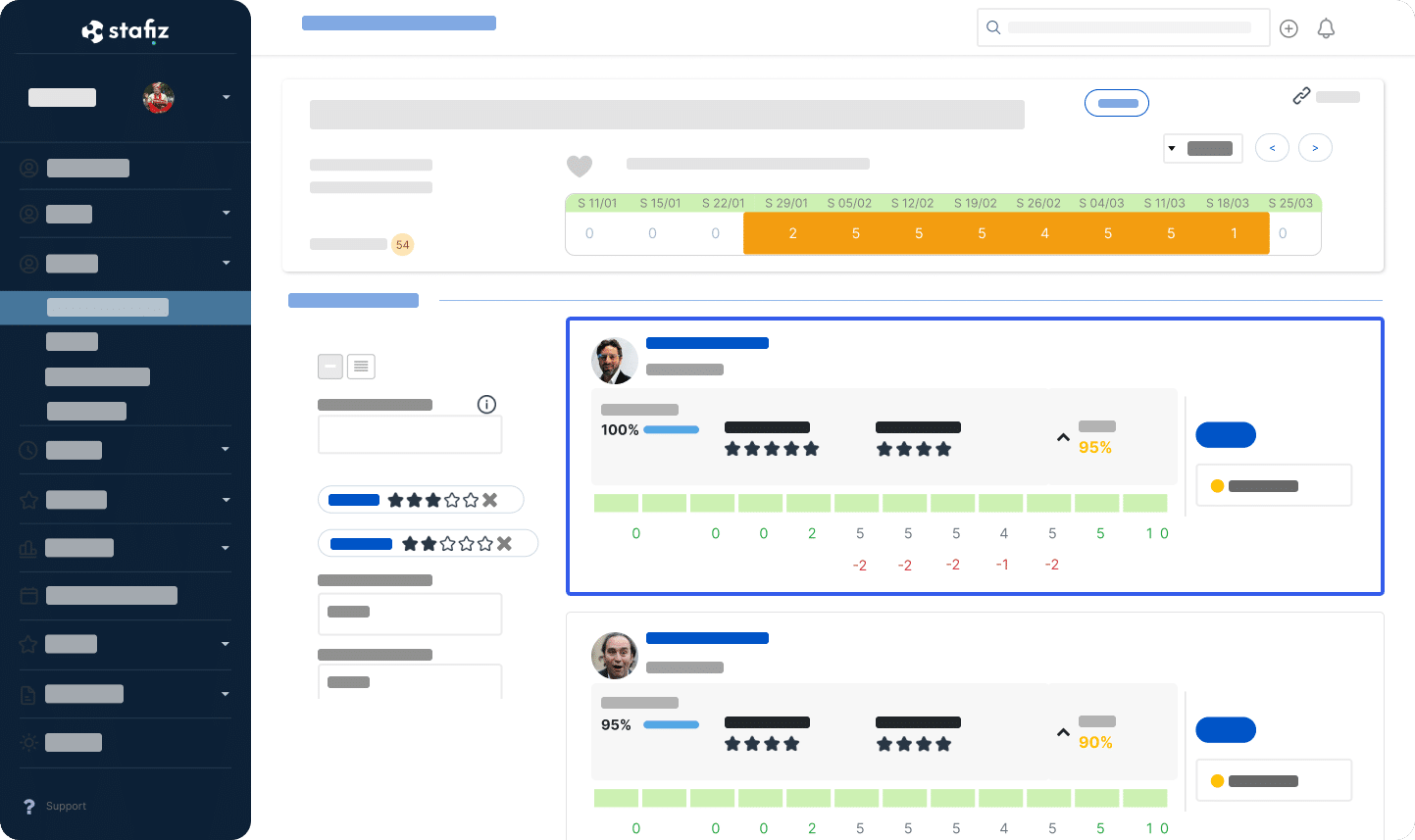
- resource planning and resource planning (matching engine by skills, availability and appetites)
- Time and CRA monitoring with integrated managerial validation
- Financial management of the missions: budget, realized, FAE/PCA, landing margin
- Expense management and expense reports with mobile OCR
- Multi-contract invoicing: time management, fixed price, milestones, on-call duty
- Capacity planning and forecasting
- Complete management of subcontracting (freelancers treated as internal resources)
- Reporting and dashboards: realized and projected income statement, Power BI connector
Advantages of Stafiz
- Comprehensive resource planning: The matching engine helps to select profiles by availability, skills, levels and appetites. The plan of resource planning reflects the reality on the ground, with continuous updating for optimal load management and visibility on availability
- End-to-end provisional financial management: provisional budget, margin to date, margin on landing and FAE/BCP are calculated as time is entered, without manual extraction or consolidation between tools.
- Native multi-contract invoicing: time management, fixed price, milestones and on-call payments are invoiced from the same interface, with automatic reconciliation between time spent and amounts to be invoiced.
- Dedicated support: at Stafiz, each client has a dedicated consulting account manager. Onboarding is personalized according to the profile of the structure, including for teams without an internal IT department.
Stafiz Limits
- No general accounting or payroll module: Stafiz only covers the business scope (resource planning, time, project invoicing, margin) and manages pre-accounting. An integration with a third-party accounting tool is to be expected (Sage, Cegid, SAP).
- Break-even point: below 15 to 20 consultants, the ROI materializes less quickly than beyond the threshold where manual coordination becomes costly.
Stafiz Use Cases
The software is suitable for consulting firms with 30 to 500 employees with mixed package/management models or managed services, and for IT Services who manage multi-client CRAs and subcontracting. It is less suitable for structures of less than 15 people without complexity of resource planning or billing.
Stafiz supports you in centralizing your activity management: resource planning, time, invoicing and profitability in a single tool. Gain real-time visibility into the utilization rate, project margins and projected turnover in order to manage your business without waiting for monthly consolidation.
Discover the best PSA to manage your projects
2. Kantata (ex-Mavenlink / Kimble)
Kantata is a PSA platform of American origin, born from the merger of Mavenlink and Kimble, positioned in the segment of large international professional services organizations. It targets consulting firms and agencies with more than 100 employees operating in several English-speaking countries and markets.
Key features of Kantata
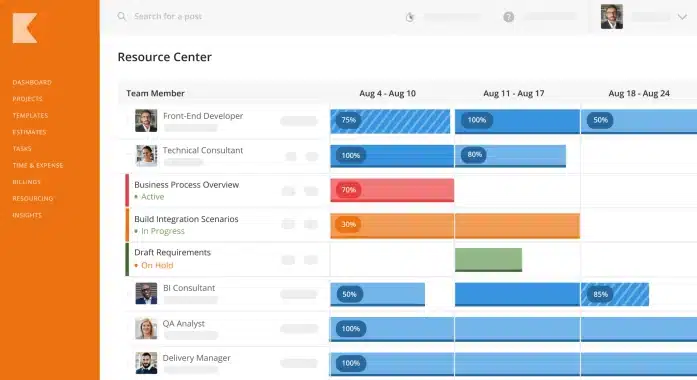
- Resource management and capacity planning
- Project management and task tracking
- Time tracking and expense management
- Billing and revenue recognition
- BI reporting and analytics
- CRM Integrations (Salesforce Native)
Benefits of Kantata
- Advanced resource management: the allocation of resources by skills, availability and cost profile reaches a level of precision adapted to multi-project environments with high turnover of consultants.
- Native integrations with payroll solutions: CRM continuity → delivery → invoicing is established without intermediate development, which reduces breaks in the business cycle of organizations already equipped with Salesforce, NetSuite, HubSpot and the main English-speaking payroll solutions.
- Integrated BI reporting: Dashboards allow you to analyze profitability by customer, project and resource. Exports are designed to be presented directly to the management committee.
- International coverage: The platform natively handles multi-currency, multi-entity, and compliance with revenue recognition practices (ASC 606, IFRS 15).
Kantata Limits
- English interface: French-speaking teams have to enter their daily time in an English-speaking interface, which hinders field adoption.
- Premium pricing: Kantata's positioning makes the tool difficult to access for structures with fewer than 100 consultants. The cost/benefit ratio becomes unfavourable below this threshold.
- Long implementation: the production launch requires several months of project support. This lagges the return on investment compared to lighter SaaS solutions.
Kantata Use Cases
Kantata is suitable for French subsidiaries of international groups with an existing Salesforce ecosystem and teams accustomed to English-language tools, or multi-country consolidation needs.
Kantata is less suited for mid-sized firms with no global presence, where the investment and complexity of implementation outweigh the benefits.
3. BigTime Software
BigTime Software is an American PSA with historical roots in technical consulting firms: engineering, architecture, IT, auditing. It is aimed at English-speaking mid-market structures that need rigorous monitoring of time and costs, coupled with flexible invoicing per project.
Key features of BigTime
- Time & expense tracking
- Project management and approval workflow
- Flexible invoicing (time/materials, flat rate)
- Budgeting and cost tracking
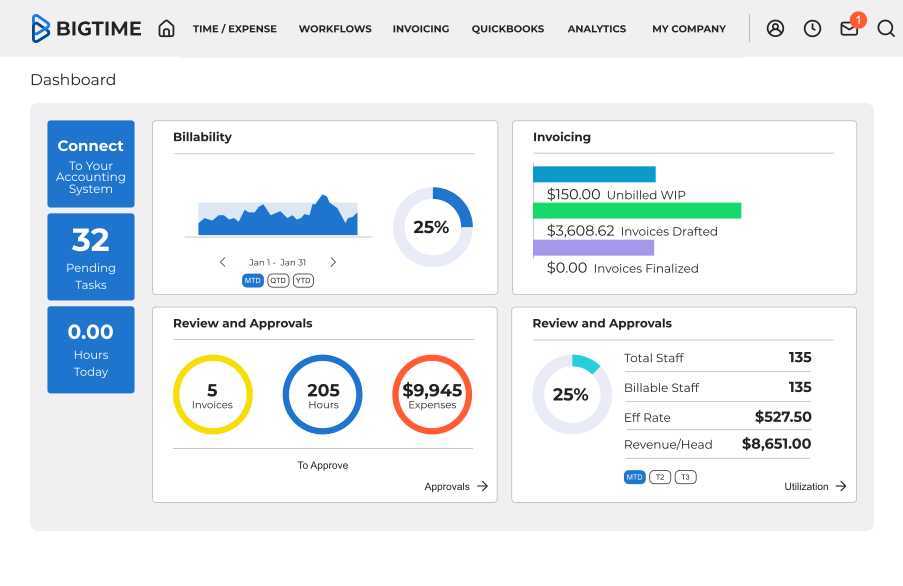
- Reporting and dashboards
- Accounting integrations (QuickBooks, Sage)
Benefits of BigTime
- Time recording software: Entry is done to the nearest quarter of an hour with budget codes per task, which is suitable for firms that bill by the hour or half-day
- Flexible invoicing: time and material, flat rate and progress invoicing models are configurable per project without heavy configuration.
- Visibility on WIP (work in progress): the dashboard displays in real time the work done but not yet invoiced for each project, which allows invoicing to be triggered without waiting for the end of the month.
- Rapid time to production: Deployment is shorter than enterprise solutions and does not require dedicated IT resources.
BigTime Limitations
- FR support non-existent: the documentation, support and interface are in English only, which complicates the daily life of the French teams.
- resource planning basic: this PSA does not offer skills matching or advanced capacity planning for structures with a high turnover of consultants.
- Dated interface: ergonomics are showing their age compared to recent solutions, which can slow down field adoption among young consultants.
- Deteriorating support: Reviews on Trustpilot (1.9/5 out of 128 reviews) report support and billing issues since 2025, out of step with G2 (4.5/5) and Capterra (4.6/5) ratings.
BigTime Use Cases
BigTime is suitable for English-speaking design offices and technical firms that charge mainly in time and materials and need accurate time tracking per task.
BigTime is less suitable for practices or IT Services with a need for an interface in French, local support and a module resource planning complete.
4. Everwin
Everwin is a French ERP/PSA developed for IT services companies wishing to cover the entire management cycle from a tool that complies with the practices of the French-speaking market. It is aimed at IT Services and integrators who are looking for a local solution integrating ERP and PSA, with hosting in France possible.
Key features of Everwin
- Sales management and CRM
- resource planning and business management
- Time and CRA tracking
- Invoicing and accounting management
- HR Management (module)
- Reporting and dashboards
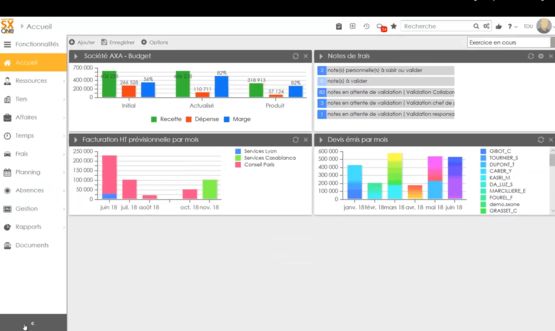
Everwin Pros
- ERP and PSA in the same tool: Everwin covers business management, HR, invoicing and operational reporting in a single environment. Data circulates between departments without export or re-entry.
- Designed for the French-speaking market: the solution is built around French specificities (CRA, hourly management, technical assistance contracts, intercontract) without the need for intermediate adaptation.
- Hosting option on French servers: Everwin makes it possible to meet the data sovereignty constraints to which certain structures are subject.
- Native accounting integration: reconciliation between PSA invoicing and general ledger does not require a third-party tool, which is an advantage for IT Services who want to avoid double systems.
- French-speaking support: the support and implementation teams for the French-language version are based in France and have knowledge of IT services sector practices.
Everwin's Limitations
- Aging interface: Ergonomics are showing their age compared to recent SaaS. Adopting time on a daily basis can be laborious.
- Long learning curve: the functional richness implies a substantial configuration and several months of skill development before complete autonomy.
- Limited scope of advice: optimized for IT Services and IT services companies, the solution shows limits on the complex package models and fine capacity planning specific to consulting firms.
- Cost of adjustments: Custom developments can cost several thousand euros.
Everwin Use Cases
Everwin is suitable for IT Services and French IT services companies with 30 to 300 employees who wish to consolidate ERP and PSA in a local tool. The solution is also suitable for structures subject to accommodation constraints in France and which prefer a single point of contact for their entire management cycle.
Everwin is less suited for consulting firms with resource planning capacity planning or real-time mission profitability management.
If your priority is to track the margin of each project from the start, check out our article on calculating the profitability of a project to identify the indicators to monitor.
5. Fitnet Manager
Fitnet Manager is a French CRA and PSA software designed for IT Services and IT services companies who manage missions on a contract or on a fixed-price basis. It is aimed at structures with 20 to 200 employees wishing to automate the CRA chain → invoicing → reporting without investing in a heavy ERP.
Key features of Fitnet Manager
- CRM and sales management
- resource planning and business management
- Time and CRA tracking
- Multi-contract invoicing (time management, fixed price)
- Administrative management (leave, expenses)
- Reporting and dashboards
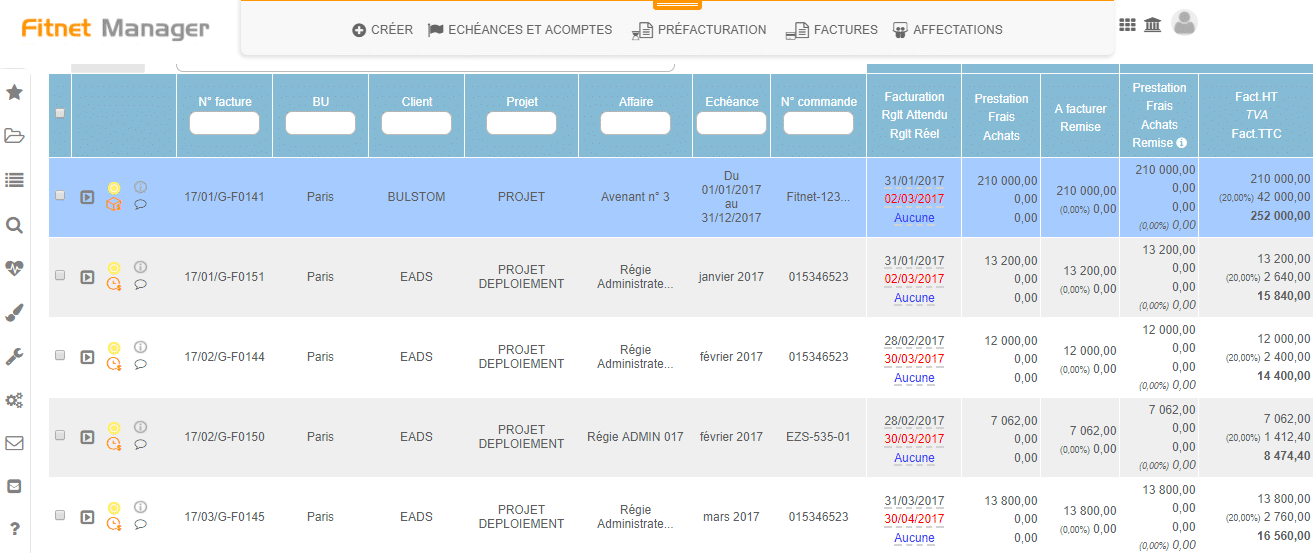
Benefits of Fitnet Manager
- Native management of the CRA: The capture, validation and archiving workflow is built for the constraints of IT Services with customer deadlines, validation formats and automated reminders.
- On-site and fixed-price billing: The two main models of the IT Services are managed natively, with an automatic reconciliation between time entered and amounts to be invoiced.
- Integration of the entire trade chain: the tendering pipeline, the resource planning Consultants and business management form a continuous sequence that covers the entire journey from pre-sales to execution.
- Financial readability: The dashboards provide a view of invoicing, outstandings, margins and unpaid invoices, which is a suitable reporting forIT Services of medium size.
- Rapid production: Fitnet Manager can be deployed in a few weeks, with support adapted to structures that do not have an internal IT department.
Fitnet Manager Limitations
- Resource planning is not its strong point: the resource planning module is less powerful than that of the PSAs specialized in capacity planning and matching by skills.
- Inaccurate margin at termination: the monitoring of the landing margin and the FAE/BCP remains below the tools positioned on the mission financial management.
- Little customization of reporting: dashboards offer less flexibility than dedicated BI reporting solutions to build customized views.
- Fitnet is more oriented IT Services than consulting firms: companies that manage fixed-price projects with invoicing based on progress or that need matching by skills and appetites will have to deal with a more limited scope of these functions.
Fitnet Manager Use Cases
Fitnet Manager is suitable for IT Services and French IT services companies with 20 to 200 employees oriented towards pure or mixed management/fixed price, with a need for rapid structuring of the CRA to invoicing chain. The solution is particularly suitable for structures that are looking to eliminate re-entries between time entry and invoice issuance.
Fitnet Manager is less suitable for consulting firms with complex billing models, a need for fine capacity planning or advanced financial management at the mission level.
Structures whose priority is visibility on the margin during execution will have to complete the tool or consider a solution more oriented towards financial management.
6. Akuiteo
Akuiteo is a French ERP/PSA designed for service and engineering companies with advanced management needs (complex projects, multi-typology invoicing, multi-entity structures). It is aimed at organizations with more than 100 employees wishing to integrate project management, accounting and operational management into a single system.
Key Features of Akuiteo
- Project and Portfolio Management
- Purchasing, subcontracting and business management
- Time and Expense Tracking
- Multi-type invoicing
- Accounting and finance
- HR and Resource Management
- Reporting and management
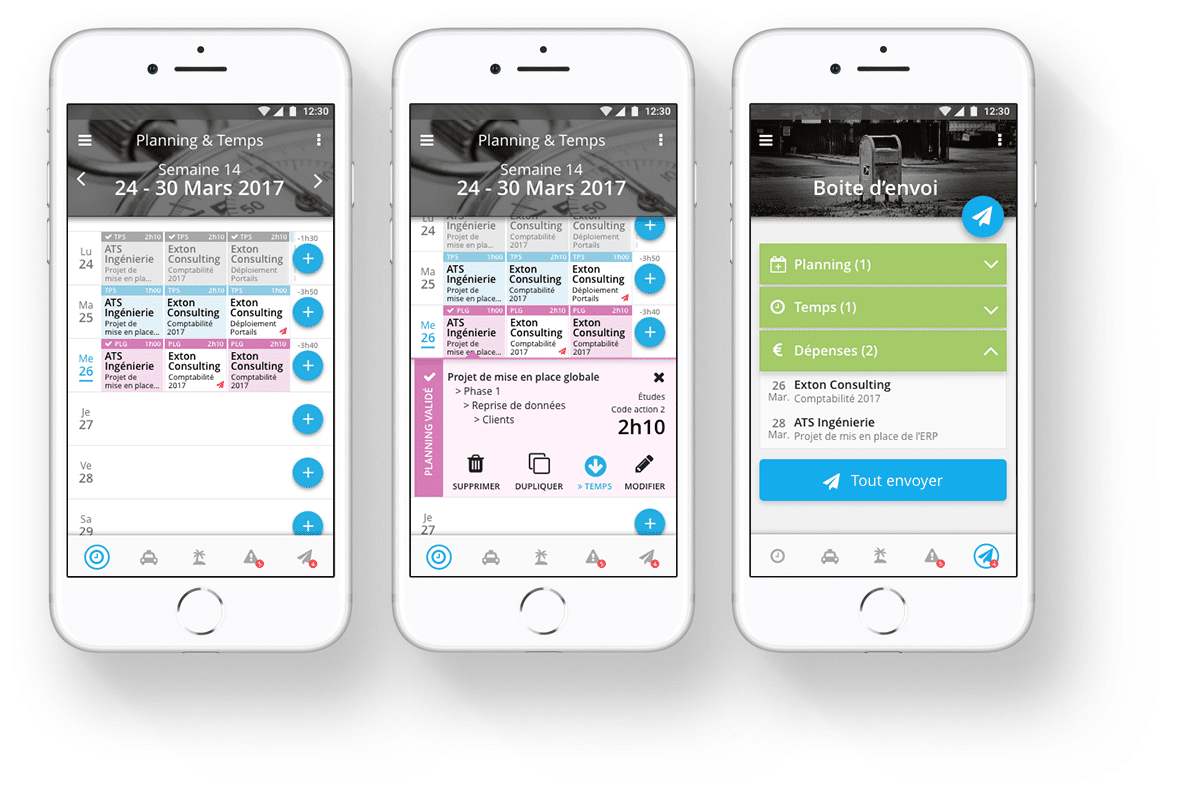
Pros of Akuiteo
- Extended functional scope: Akuiteo covers from business management to general accounting, procurement and outsourcing, a depth adapted to structures that have gone beyond the limits of specialized PSAs.
- Multi-typology invoicing: the complex invoicing methods specific to integrators and engineering companies (TMA, on-call duty, milestones, management, fixed price) are managed natively in the same interface.
- Multi-entity management: financial consolidation between several legal entities or subsidiaries is integrated into the tool, without the use of a parallel ERP.
- FR support and compliance: the solution is developed in France, with local support teams and native compliance with French accounting practices.
- Cost traceability: the monitoring of direct and indirect costs by project and by deal reaches a level of detail adapted to structures subject to strict contractual constraints.
Limitations of Akuiteo
- Long deployment: the production launch is spread over several months and requires structured project support; a time frame to be integrated into the transformation schedule.
- High initial investment: the total cost of ownership (license + implementation + training) positions Akuiteo in a segment accessible mainly to large structures.
- resource planning Basic: the planning module does not offer matching by skills or a detailed forecast view of the load. Structures that need to assign consultants by profile and availability will have to manage this dimension outside the tool.
- Insufficient native reporting: Built-in dashboards don't always cover user needs, making it necessary to use Power BI as an add-on to build custom reports.
Akuiteo Use Cases
Akuiteo is suitable for service and engineering companies with more than 100 employees, as well as software integrators and design offices with various types of invoicing (TMA, on-call duty, milestones). The solution is suitable for organizations that need a unified system ranging from project management to accounting.
Akuiteo, on the other hand, is less suitable for consulting firms or IT Services fewer than 100 employees, for whom the cost and complexity of implementation exceed the expected benefits. Lighter structures will derive more value from a rapidly deployable SaaS PSA.
PSA Software FAQs
Frequently asked questions:
Prices range from €10 to €50 per user per month for mid-market SaaS PSAs. Enterprise solutions such as Kantata or Certinia exceed 100 euros per user. Most French publishers (Stafiz, Fitnet, Everwin) work on a quote adapted to the size of the structure.
Yes, if your billing model is complex (management + fixed price + subcontracting) and you need to plot the margin by mission. No, if your management is limited to a few simple missions where a spreadsheet and an invoicing tool are still enough.
Allow 2 to 4 weeks for SaaS PSA programs such as Stafiz or Kantata. Full ERP/PSA (Akuiteo, Everwin) require 3 to 6 months, depending on the number of modules activated and the complexity of migrating existing data.
Yes. Kantata integrates natively with Salesforce, and Stafiz offers HubSpot and Salesforce connectors. The majority of PSAs offer CRM integrations via API or native connectors. Check if the connector is bidirectional before you commit.
A project management tool like Jira, Asana, or Monday organizes tasks, sprints, and dependencies. It answers the question "Where is the project at?", but not "What is its revenue?". Professional services software covers the entire project lifecycle in service companies: resource planning consultants, time entry and validation (CRA), billing by contract (time and materials, fixed price, milestones) and real-time margin management.
In concrete terms, in a consulting firm, Monday does not know how to assign an available consultant to an assignment according to his or her skills, nor automatically reconcile the hours entered with a purchase order in the direct contract. Asana does not calculate the margin at completion of a fixed-price project. Jira does not generate an invoice from a validated ARC.
In practice, the two types of tools often coexist: a PSA for the operational and financial management of the mission, and a project management tool for the monitoring of deliverables within the delivery team.
Yes: Stafiz, Fitnet Manager, Akuiteo and Everwin are French-speaking solutions with interface, support and documentation in French. They are designed for the specificities of the French-speaking market (time management, CRA, intercontract).
Generalist ERPs (Sage, Cegid) offer PSA modules or integrated projects, but they do not integrate the logic of resource planning by skills. For service companies, a dedicated PSA suite better covers the business scope.
This is precisely the raison d'être of a PSA for service companies. Solutions such as Stafiz, Fitnet or Everwin manage both models natively, with automatic reconciliation between time entered and invoiced amounts.
The migration is done in stages: import of project and employee data, configuration of invoicing rules, then gradual changeover by team. Publishers offer dedicated support, and at our client JICAP the transition took a few weeks.
A resource planning pur (Napta, Whoz) covers resource planning and matching by skills, but it does not manage invoicing or financial management. A PSA integrates the resource planning in the complete chain, from the project need to the invoiced margin.
Not totally. An ASP, whether it is standalone software or an integrated module, does not cover general accounting or payroll. It replaces the business part of the ERP (resource planning, time, project invoicing, mission profitability) and integrates with the existing ERP for accounting and HR flows.
Yes, provided that the SME sells time or skills. A service SME with 20 to 100 employees (consulting firm, IT Services, design office) benefits immediately from a PSA: the automatic reconciliation between time spent and invoicing eliminates invoicing oversights, and visibility on the utilization rate allows you to anticipate off-peak periods. SaaS PSAs such as Stafiz or Fitnet Manager can be deployed in a few weeks and do not require an in-house CIO, which makes them accessible to small structures. On the other hand, an SME that manages only a few simple missions on a self-managed basis will find more value in a traditional invoicing tool than a complete PSA.
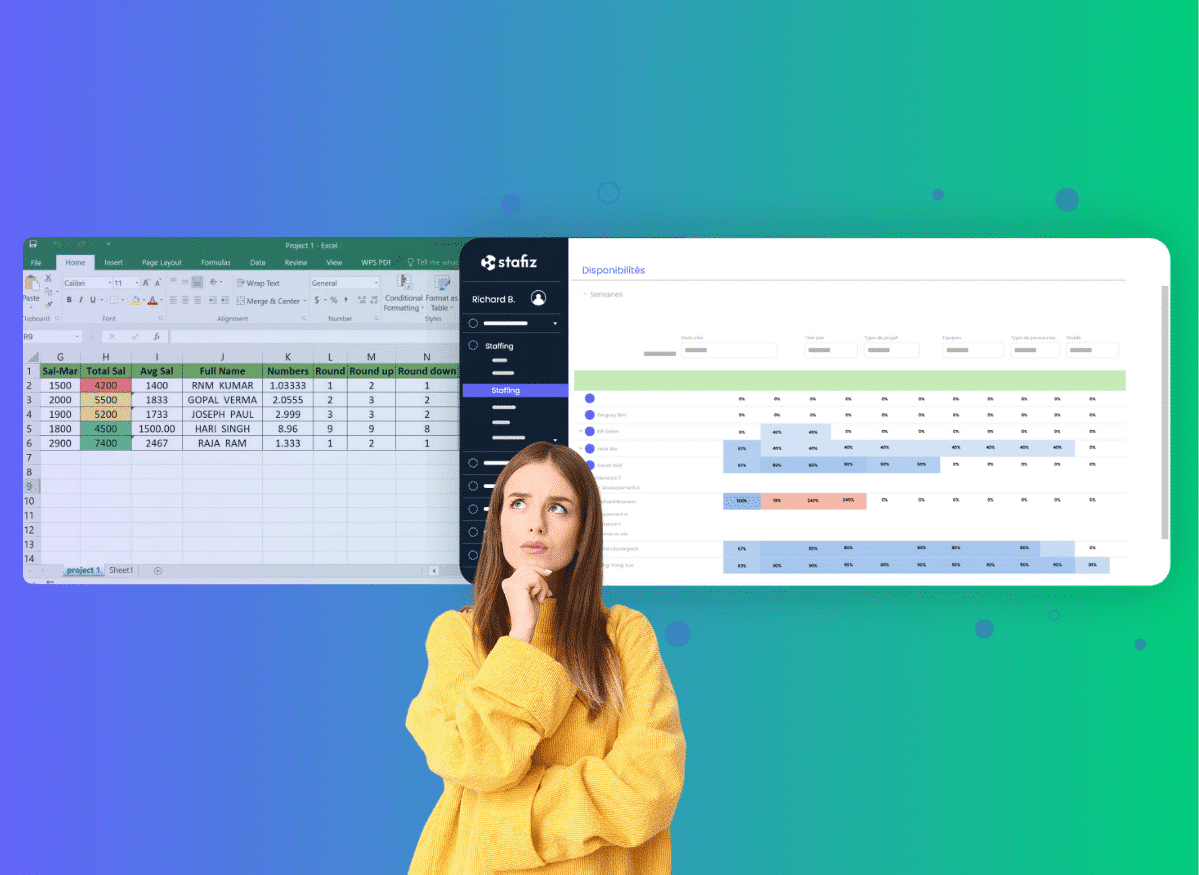


 WEBINAR STAFIZ