Comparison of the Best Project Accounting Software in 2026

If you had to rely on a single criterion to choose a project accounting software , it would be its ability to give a reliable margin in real time. A good tool automatically reconciles the actual, the forecast and the invoicing. If this data doesn't converge, your decision-making is based on contradictory numbers.
The challenge is to identify the tool that really supports your management, rather than software that produces attractive reports but provides an inaccurate picture of your project portfolio. Without a suitable solution, the gaps widen: undetected overruns, invoices sent too late and unstable spreadsheets that multiply versions and errors. As projects go by, this inconsistency ends up weighing on your results and eating away at your profitability.
This accounting software comparison analyses 12 solutions used in consulting firms, IT consulting firms and project-oriented structures. The goal: to help you select the platform that secures your margins and accelerates your growth without adding complexity.
What Is Project Accounting?
Before comparing software, it is important to clarify what we are talking about. There are 3 types of accounting.
- General accounting: it produces the legal balance sheet and income statement. It meets tax obligations, but does not say whether a particular client or project is profitable;
- Cost accounting: it breaks down costs by cost center (department, team, activity) to calculate overall cost costs and margins by department.
- Project accounting: this is the finest level. It allocates all costs and revenues to a specific project to track, on an ongoing basis, gross margin and net margin by mission, client or team.
A good project accounting software is therefore the bridge between operational execution (time, tasks, purchasing, subcontracting) and financial truth (project P&L, net margin, forecast).
Comparison Table of the Best Project Accounting Software
This table helps you quickly compare the main project accounting software according to:
- their target;
- their strengths in terms of finance and accounting;
- their relevance to carry out real/forecast management.
🎯 The objective: to identify the right tool for your structure without getting lost in unnecessary features.
| Stafiz | IT Services, consulting firms, project-oriented SMEs | – Calculation of the margin on date + landing – Update of the rest to be done – Load tracking & resource planning – Synchronization of internal / external costs – Recognition of the Board of Directors according to advancement |
Requires accounting integration if you want general accounting | The most complete for service companies that want a coherent actual/forecast project financial management |
| QuickBooks | VSEs / SMEs | – Simple general accounting – Fast invoicing – Payment automation |
Very low on project management and margin | For a small company that needs accounting + invoicing but no project management |
| ZipBooks | Self-employed / VSEs | – Simple invoicing – Bank reconciliation – Automatically categorizes transactions |
No time tracking, no project margin | For freelancers who want basic accounting |
| Teamleader | VSEs / SMEs | – CRM – Quote and invoicing management – Simple project management |
Limited analytics capabilities | For small businesses that want a simple all-in-one tool |
| ERPNext | SME / ETI | – Global ERP (accounting, inventory, HR, purchasing and projects in the same system) – Open source software – Multi-activities |
Complex to set up, limited project reporting | For companies that want to reduce licensing costs through open source |
| Striven | Small businesses | – CRM + Projects + Finance – Produces basic reporting |
High learning curve | For a small business that wants to centralize CRM + projects + finances |
| Paymo | VSEs / freelancers | – Time tracking + invoicing from the hours entered | No mass sending of invoices, limited for SMEs | For very small teams focused on time-based billing |
| Replicon | SMEs / distributed companies | – Advanced time tracking – Actual load tracking – Identifies availability – Mobile tracking |
Doesn't track non-billable hours | For hybrid teams with high mobility |
| NetSuite | Mid-caps / large companies | – ERP + financial management + advanced reporting – Multi-currency, multi-country |
Dated interface, limited customizations | For large structures that want a complete ERP |
| Accounting Seed | Salesforce Businesses | – Accounting + financial management in Salesforce –Currency |
Limited to Salesforce customers | For companies already equipped with Salesforce |
Stafiz, the Accounting Software Adopted by Consulting Firms
Stafiz's accounting features
Its strength: it really links project management, budgeting, cost accounting and revenue recognition, where most software is limited to invoicing.
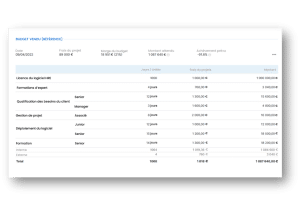
Budget tracking features
Stafiz centralizes all the costs associated with each project (direct and indirect):
- human costs (via time entered);
- purchasing;
- costs ;
- subcontracting ;
- etc.
Each cost is tracked in terms of consumption and remaining to be done, which makes it possible to constantly compare the actual with the forecast and to monitor progress in real time. Stafiz automatically values each entry (time, purchases, expenses) and then updates:
- the production carried out;
- costs already consumed,
- the remaining costs.
The platform also distinguishes between gross margin (directly attributable costs) and net margin (with allocation of indirect costs). This granularity allows for a detailed analysis of profitability by customer, by project and by team.
Based on the history of similar projects already completed, Stafiz also allows you to establish a provisional project budget.
Features related to invoicing and quotes
On the sales side, Stafiz ensures precise control of the scope and deviations. The platform allows rigorous monitoring between quotes, purchase orders and invoices by automatically comparing the amounts committed, the planned quantities and the amounts already invoiced, which makes it possible to immediately detect:
- discrepancies between the purchase order and invoicing;
- discrepancies between invoiced and uninvoiced;
- the remainder to be invoiced (whether or not all purchase orders have been consumed).
The tool also automatically calculates FAE (invoices to be issued) and BCP (deferred revenues) for each project line.
• If the invoicing exceeds the production → PCA.
On the purchasing side, Stafiz retrieves supplier invoices to update the actual consumption.
The tool also calculates the purchase-side equivalent of the sell-side FAE/PCA for complete accounting symmetry, namely:
- the CSFs (deferred charges);
- FNP (unreceived invoices);
Revenue calculation features
Stafiz adapts to the different contractual models of service companies by integrating several methods of recognition of turnover.
- Method at completion: CA recognized once the final deliverable has been validated.
- Method of advancement: CA proportional to the percentage of advancement.
- Billing-based method: Revenue aligned with invoices issued.
- Subscriptions: distribution of turnover over the duration of the contract.
- Managed services: combination of a fixed and a variable part.
These approaches cover both the management and the packages or recurring contracts, offering consistent recognition of the turnover at the end of each period.
Billing features according to the type of contract
As seen above, Stafiz supports all billing methods used in service companies (agency, package, managed services, and subscriptions.) Each model follows its own rules for calculation, consumption and billing, without re-entry or parallel spreadsheets.
Analytical and fence management features
Stafiz offers a project-by-project income statement that includes all the financial elements:
- recognized revenue;
- human costs, purchasing, fees, subcontracting;
- gross margin and net margin.
This detailed reading allows you to compare performance between projects, clients or teams, and to quickly identify the levers for improvement.
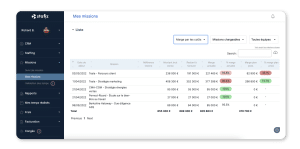
Cost-based project profitability tracking in Stafiz
The platform allows you to compare the budget with the forecast, by displaying side by side the initial budget, the consumed to date, the rest to be done, the revised landing.
Deviations appear immediately, which allows for early reaction: adjustment of the resource planning, renegotiation of the scope or reassessment of costs. Similarly, the forecast is updated automatically as soon as a time, cost or purchase is recorded.
Finally, to guarantee financial consistency, Stafiz makes the management of accounting closings more reliable, without the risk of retroactive changes:
- automatic calculation of FAE / ECP / CCA / NPF before closing;
- locking of periods (month, quarter) once validated;
- No possible change in times, costs or fees over the closed periods.
This mechanism ensures a stable close, without manual restatement or the risk of late changes altering the figures.
Do you want to improve the accuracy of your margins, reduce restatements and detect drift earlier?
This webinar details best practices for project financial management and approaches that strengthen profitability in service-oriented organizations.
Why Stafiz outperforms other project accounting softwares
For project probability monitoring, most software is limited to the margin to date, i.e. past performance. Stafiz goes further and continuously calculates the margin at completion and integrating a dynamic forecast.
This predictive model makes it possible to identify loss-making projects early on (anticipation of mandatory provisioning) and to obtain a stable view of the financial landing. Each update (time, cost) triggers a new calculation, avoiding manual and late simulations in Excel.
Why should your accounting software integrate an automated forecast?
Where the majority of solutions require exporting data to reconstruct a forecast, Stafiz produces a dynamic forecast that is updated with each action:
- the entry of a time;
- Registering a purchase;
- the revision of the remainder to be done.
This continuous forecast gives a stable view of the financial landing and helps teams to adjust the resource planning, the loads or the scope.
What are the consequences if your software does not calculate the margin at completion, nor does it have an automated forecast?
Without MAT (margin on completion) or automated forecasting, drifts are only detected at the end of the project, when corrections are no longer possible. This lack of visibility weakens your margin, lengthens monthly closings, and creates a high risk of decisions based on incomplete data. It's like finding out how profitable a project is when it's finished: too late to take corrective action.
The Best Project Accounting Software for Small Businesses
Very small structures (freelancers, VSEs and teams of 2 to 10 people) are looking for a simple tool, quick to learn and at a controlled cost:
- a lightweight software, combining general accounting and invoicing;
- minimal project monitoring, to manage a few missions without advanced processes;
- an intuitive interface, without long configuration or heavy training;
- An economical solution, adapted to simple models (control room, short package, single assignments).
In this context, basic tools are often sufficient and represent a good compromise between simplicity, cost and efficiency.
The QuickBooks tool to link accounting and project monitoring
QuickBooks Online is one of the most widely used accounting software by small businesses, especially in English-speaking countries, thanks to its intuitive interface and ecosystem of automated banking integrations. Its QuickBooks Online version offers permanent cloud access from computer, tablet or mobile, eliminating the single-user licensing constraints of the old desktop versions.
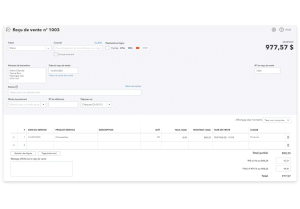
QuickBooks is a great replacement for several separate tools, as long as project management remains simple. It is a popular solution for small businesses that need a simple tool that combines general accounting, invoicing and basic project monitoring.
QuickBooks features for accounting
QuickBooks covers the essential needs of a small organization.
- Financial tracking by project: time spent, expenses, revenue, and simple margin.
- Invoicing and quotes: customizable templates, fast sending, automatic reminders.
- Collections: connection to online payment solutions (credit card, platforms such as PayPal or others via partner applications).
- Expenses and expense reports: quick entry, automatic categorization.
- Bank reconciliation: daily import of transactions and automatic suggestions.
- Simplified reporting: cash flow, P&L, monitoring of assets under management.
It is an effective tool for very light accounting and project monitoring .
For what use case?
QuickBooks is suitable for structures that do not need advanced project management.
- Freelancers and self-employed people invoicing on a self-managed basis: consultants, developers, graphic designers or trainers selling man-time time with monthly invoicing or by one-off assignment.
- Small service agencies and small IT Services employing few employees and simultaneously managing 5 to 20 customer projects. Project-based visibility on costs and margins helps prioritize profitable customers and identify loss-making assignments. They mainly sell man-time and do not need advanced management (FTE, resource planning, remains to be done in detail).
- Craftsmen and shopkeepers with site monitoring requiring monitoring of material costs and labour per site, with customer re-invoicing of purchased supplies.
Quickbooks: Pros and Cons
➕ The Benefits of Quickbooks
- Quick to get started: Consumer interface designed for non-accountants, with a guided setup wizard and built-in video tutorials. A very small company can use it in less than a day without expensive external training.
- Competitive value for money: entry-level subscriptions starting at €10/month (depending on the country and current promotions) including general accounting, unlimited invoicing and basic project monitoring. Pricing is transparent, with no hidden setup or support fees.
- Rich ecosystem of integrations: more than 650 connectable third-party applications (CRM, e-commerce, payroll, marketing), allowing you to extend native functionality without changing accounting platforms.
➖ Cons of Quickbooks
- Limited project features: Lack of resource planning (resource planning), FTE management or advanced financial forecasting. The follow-up is limited to the actual cost versus the initial budget, with no ability to project the rest to be done.
- Unsuitable for complex contractual models: it is impossible to properly manage a mix of management/package/subcontracting on the same project, nor to set up differentiated revenue recognition rules. Mixed projects require manual contortions or add-on software.
ZipBooks: for a more accentuated project management dimension
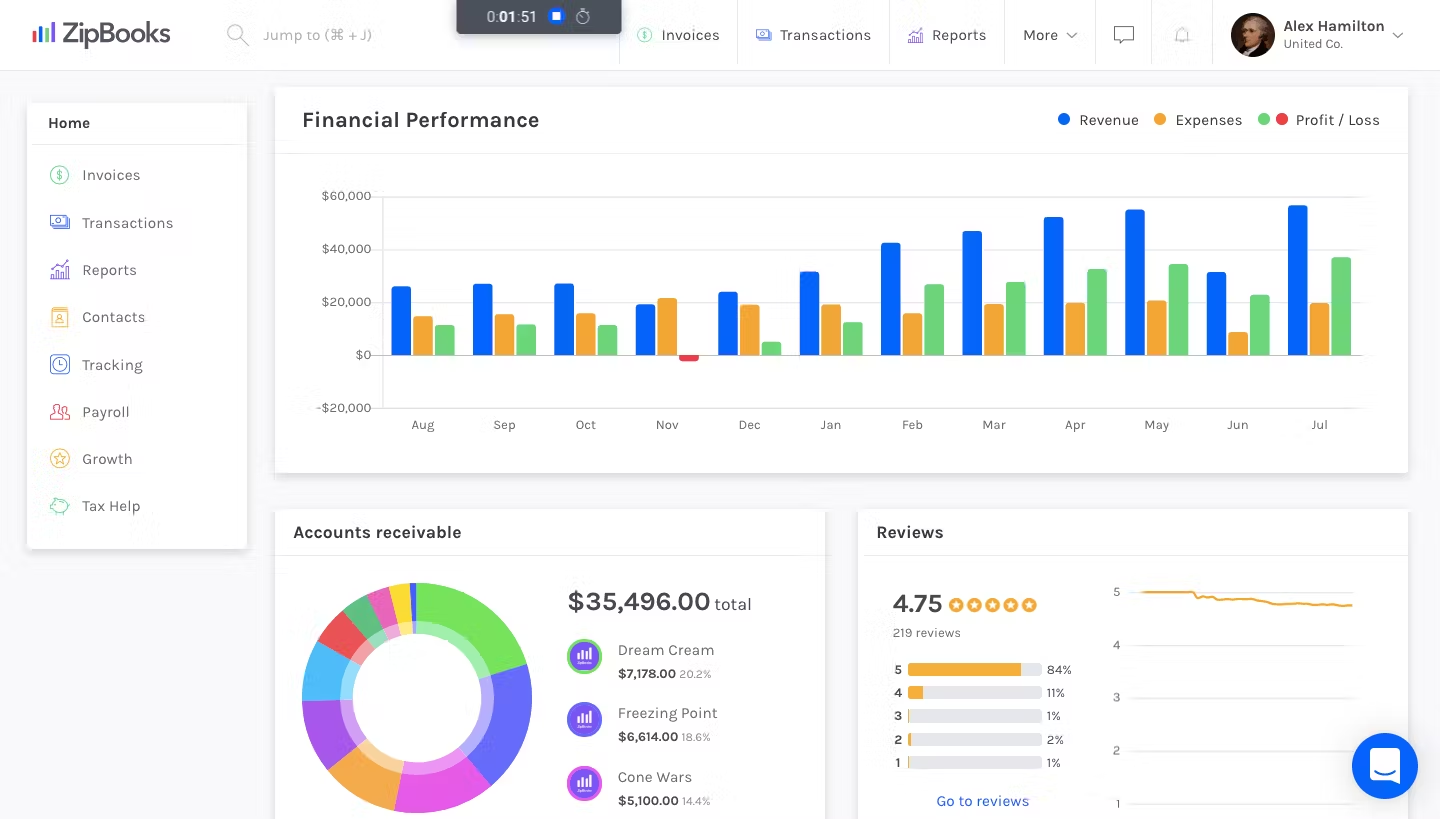
ZipBooks is positioned as a modern and refined alternative to QuickBooks, and designed specifically for freelancers and small businesses who are looking for a seamless user experience on mobile. Its minimalist interface hides an advanced customization capability, especially on multi-currency invoicing and graphical financial reports.
ZipBooks' accounting features
ZipBooks offers the essentials to manage accounting and a few concurrent projects.
- General accounting: creation of invoices, expense management, bank reconciliation.
- Basic project tracking: time spent, associated expenses, invoicing per project.
- Online quotes and payments: integration with Stripe and PayPal.
- Financial reports: profitability by project, cash flow, simple key indicators.
- Automations: payment reminders, recurring invoices, automatic categorization.
It is an effective solution for those who manage few projects and are looking for intuitive operation rather than advanced management.
For what use case?
ZipBooks is ideal for the following profiles.
- Freelancers and independent consultants : developers, designers, writers or coaches who invoice on a self-managed or fixed-price basis. The mobile-first interface and simplified time tracking are ideal for mobile working methods.
- Small creative agencies : graphic studios, social media agencies or video producers, prioritizing the aesthetics of their invoices and ease of use over functional depth. Flexible tagging compensates for the lack of a structured project module.
- Pre-seed or seed startups : technological start-ups without a dedicated CFO, looking for a "quick and dirty" accounting sufficient for the first few years before full financial structuring. The free basic packages reduce the burn rate.
However, as soon as the volume of invoices increases or the accounting complexity increases (multi-entity, consolidation), ZipBooks is no longer suitable.
Zipbooks: Pros and Cons
➕ The Benefits of ZipBooks
- Very intuitive interface: sleek design inspired by consumer applications (Spotify, Netflix), with interactive onboarding and micro-animations making accounting almost fun. The rapid adoption rate even for profiles that are resistant to accounting.
- Seamless interconnection with payments : Native Stripe/PayPal integration turns every invoice into a direct payment link, with automatic reconciliation.
- Attractive rates : unlimited free plan in number of invoices (rare on the market), paid plans starting at $15/month for advanced features. No hidden setup or migration costs.
➖ Cons of ZipBooks
- Lack of resource or forecast planning: Unable to budget for future projects, plan employee loads, or simulate financial scenarios. The vision remains strictly retrospective (what has happened) without any prospective capacity (what will happen).
- Limited functionality for organized structures: no management of approval workflows (expense approval hierarchy), closed by locked period, or granular user rights. Unsuitable as soon as several people handle the accounting.
- Fairly basic project vision: the tag system, although flexible, does not replace a real hierarchical project structure (project > phases > tasks). It is impossible to track technical progress or to compare budget versus completed line by line.
Quickbooks vs Zipbooks for Small Business, Freelancers, and Freelancers
| Financial accounting | Very comprehensive: invoices, expenses, bank reconciliation, detailed P&L | Essential: Invoices, expenses, basic bank reconciliation, simple reports |
| Project monitoring | Basic project module (time, expenses, simple margin) | Project tracking via tags (time, expenses, invoicing per project) |
| Project structure | Income→/Expense Project → Margin | Tags → flexible grouping but no real project structure |
| Time management | Simple timesheet to bill for hours | Mobile-first stopwatch and time tracking |
| Invoicing & Quotes | Customizable templates, reminders, recurrence | Simple invoices, multi-currency, recurrence |
| Online collection | Connections via apps (PayPal, partner solutions) | Native Stripe & PayPal integration for immediate payments |
| Automations | Reminders, recurring invoices, smart categorization | Reminders, recurrence, automatic categorization |
| Bank reconciliation | Robust: daily import + smart suggestions | Basic but fast: automatic categorization |
| Proactive Reporting | Cash, project margin, full P&L | Simple profitability, cash flow, key metrics |
| Advanced project management | ❌ No (no resource planning, no forecast) | ❌ No (no forecast, no phases/tasks) |
| Customization | Very high (650+ apps, mature ecosystem) | Medium (invoices, tags; remains limited) |
| Rates | Entry-level ≈ €10/month (depending on country/promotions) | Free plan + paid plans ≈ $15/month |
Which Project Accounting Software For an SME?
For an SME or a growing startup, the right accounting software must become a central management brick that structures the complete life cycle of projects. Solutions must be integrated, forward-looking, and able to follow a variety of contractual models.
Between 20 and 100 employees (and up to 300 for fast-growing structures), needs are changing radically: management can no longer rely on POS tools or Excel files. SMBs need to orchestrate multiple dimensions at the same time: sales, projects, planning, purchasing, accounting, and financial reporting.
At this stage of maturity, the key needs for accounting and project management software become.
- Structured project management : the teams manage dozens of projects in parallel, often multi-client. The monitoring of project costs, remaining costs, margins and progress can no longer be manual: it must be reliable, centralized and automated.
- Cross-functional processes to align the company's different workflows: sales cycle → project → invoicing → accounting, purchasing → control → project allocation and resource planning → ability → profitability.
- More advanced accounting features such as turnover recognition, management of assets under management (FAE/PCA), multi-activity, multi-entity or multi-currency reconciliations.
- A modular and scalable solution: SMEs are looking for tools that can support them for several years without switching to a new ERP at each stage.
Two approaches generally meet this need: unified ERPs (ERPNext, Striven, Microsoft Dynamics 365) which bring everything together in a single system and specialized PSA platforms (Teamleader Orbit, Paymo, Firmbee) associated with an external general accounting tool (Sage, Cegid, Xero, etc.) via API integration.
Teamleader Orbit: to combine finance and project accounting
Teamleader Orbit targets service agencies (marketing, digital, consulting) and European B2B SMEs looking for an integrated CRM-project-invoicing platform, without the cumbersomeness of a full ERP. Its positioning "between QuickBooks and Salesforce" appeals to structures that have gone beyond POS tools but refuse the complexity of large systems.
Teamleader Orbit features
Teamleader Orbit covers a set of features tailored to project-oriented SMEs.
- Project follow-up: budget, hours consumed, costs incurred, margin achieved.
- Timesheets and workload management: time entry and workload per employee.
- Automated invoicing: on-site (approved time) or fixed-price (milestones), plus recurring subscriptions.
- Financial reporting: margin, profitability, billing plan.
It's an intermediate solution: more advanced than QuickBooks on the project side, but without the depth of a PSA or a full ERP.
For what use case?
Teamleader Orbit is suitable for the following profiles.
- Multi-client service agencies : digital, marketing, communication or consulting agencies employing 10 to 100 employees and simultaneously managing 30 to 200 client projects with a mix of contractual models (time management, fixed price, monthly retainer).
- B2B SMEs with a complex sales cycle: software publishers offering services (integration, training, support), technical engineering companies or architectural firms requiring a structured CRM coupled with rigorous project financial monitoring.
Pros and Cons Teamleader Orbit
➕ The advantages of Teamleader Orbit
- CRM-project-native invoicing integration: Full continuity from the business opportunity (CRM) to the customer invoice, including the quote, the execution project and the timesheets, without leaving the interface or re-entering data.
- Good project financial vision: automatic calculation of margin and profitability with a distinction between gross and net margin, provisional invoicing plan, budget overrun alerts. Sufficient for SMEs without a dedicated management controller.
- Suitable for structured service teams: time and expense validation workflows, granular access rights (sales, project manager, CFO), multi-level reporting (project, customer, type of service).
➖ Cons of Teamleader Orbit
- Not a complete accounting software : Teamleader Orbit does not manage general accounting (no complete chart of accounts, no general ledger, no automatic generation of accounting entries). It requires integration with external accounting software (Yuki, Exact, Sage) or the maintenance of a chartered accountant managing the General Ledger.
- Limited Predictive Vision: Inability to model resource planning Alternative solutions with margin impact, no automated forecast of the remaining costs, no margin calculation at completion anticipating future losses. The piloting remains mostly retrospective.
- Basic resource planning : no management of multiple skills per employee, no medium-term capacity planning (3-6 months), no automatic optimization of assignments according to skills and availability. Suitable for up to 50-70 employees, beyond which requires a dedicated tool (such as Stafiz).
ERPNext: an open source ERP with project accounting
ERPNext is a complete open source ERP that covers all the processes of a growing SME. Developed by Frappe Technologies, this modular system covers all business processes: general and cost accounting, project management, CRM, purchasing, stocks, production, HR, helpdesk.
It is one of the few solutions that is free of charge under license, while offering a functional depth comparable to some proprietary ERPs.
The features of the ERPNext software
ERPNext offers a rich set of modules, useful for organizations that need advanced project accounting.
- General & Cost Accounting : This cost accounting software for project management incorporates a configurable chart of accounts, automatic entries, multi-currency and customer/supplier management. It is also a multi-axis cost accounting software (project, team, department), allowing you to monitor the profitability of each activity in detail.
- Budgets and project expense tracking: Each project can be associated with a budget and alert rules in case of overruns. ERPNext automatically consolidates costs (time, purchases, costs), which gives a reliable view of the actual cost and facilitates budget management.
- Production monitoring, purchasing, stocks: The ERP manages the entire operational chain: purchasing, stock management, possible internal production or assembly. This functional depth is useful for hybrid services + product companies, or those that need to manage inventory in parallel with their projects.
- Project management (Gantt, tasks, time): ERPNext offers structured project management via tasks, dependencies, Gantt chart, progress tracking, and time entry. Hours logged and allocated purchases automatically feed into project costs, ensuring consistency between operational and financial.
- CRM, HR and invoicing are unified within the same platform (sales follow-up, contracts, leave, quotes and accounting). This centralization reduces silos and limits re-entry between several software programs.
For what use case?
ERPNext is aimed at the following companies.
- Fast-growing SMEs and mid-caps (20-300 people) who need the functionalities of a complete ERP, but at a more competitive price than a large license.
- Structures requiring advanced project cost accounting with a granular view of profitability by project, customer, type of service and geographical area.
- Companies demanding total control of their information system, and refusing dependence on proprietary publishers and their imposed roadmaps. ERPNext is hosted on your own servers (or cloud) and can be freely modified to meet your business specificities.
- Multi-entity or multi-country groups, with several subsidiaries, managing several currencies and accounting standards. ERPNext natively handles multi-company and multi-currency.
Pros and Cons of ERPNext
➕ The benefits of ERPNext
- Highly comprehensive and customizable : functional breadth rivaling SAP Business One or Microsoft Dynamics at a fraction of the cost. The modules cover 90% of the standard needs of an SME, avoiding the multiplication of specialized tools.
- Excellent project analytical level: multidimensional cost accounting allowing sophisticated cross-analysis (profitability per project AND per customer AND by type of service).
- Open source = controlled cost: the absence of a software license (zero cost for the software) saves 50 to 70% of software expenses over 5 years compared to proprietary solutions.
➖ The Cons of ERPNext
- Heavier implementation : ERPNext deployment requires 3 to 12 months depending on scope and level of customization, mobilizing internal resources (project manager, key users) and external consulting budget. Higher complexity than a turnkey SaaS tool.
- Requires an integrator partner : Unless you have in-house Python/JavaScript technical skills, implementation and customization require an ERPNext certified partner. The choice of this partner strongly conditions the success of the project.
- Significant learning curve : the functional range is paid for by a sometimes dense interface and technical terminology. User training essential (2-5 days depending on roles), with acculturation phase of several weeks for full adoption.
Microsoft Dynamics 365 Finance & Project Operations
Microsoft Dynamics 365 Finance & Project Operations is aimed at companies that need a robust cloud ERP that can manage large volumes, multiple legal entities and strictly regulated processes. Highly integrated into the Microsoft ecosystem (Power BI, Teams, Excel, Azure), it combines advanced accounting, project management and workflow automation in a unified platform.
Microsoft Dynamics 365 Finance features
Microsoft Dynamics 365 Finance offers a set of features tailored to structured, multi-site organizations.
- Complete financial and analytical accounting with multi-company, multi-currency and multi-tax legislation. The general ledger is structured in unlimited financial dimensions (department, project, geographical area, product range), which allows extremely detailed analyses. The solution is suitable for companies that need to produce reliable and auditable consolidated reporting.
- Project management (budgets, time, expenses, billing): Ideal for service companies with a large volume of projects and multiple contractual models. The Project Operations module transforms Dynamics into a complete Professional Services Automation (PSA) platform. Project financial monitoring aggregates all cost dimensions, each transaction generates an accounting entry in the general ledger (traceability) and project invoicing supports all contractual models.
- Workflows, automation, multi-currency/country: a critical asset for multi-subsidiary organizations or organizations operating in multiple jurisdictions. Workflows automatically approve budgets, expenses, invoices, and payments. Automations eliminate repetitive tasks (recurring invoice generation, budget alerts, periodic closings, etc.)
- Strong Microsoft integration (Power BI, Teams, Excel): very interesting for companies already equipped with Microsoft 365.
For what use case?
Dynamics 365 Finance & Project Operations addresses the following needs.
- Mid-caps and large multi-subsidiary companies: groups consolidating 5 to 500 legal entities, operating in 10+ countries with various currencies and regulations (to justify the significant investment in the solution).
- Companies with many recurring projects: IT Services, consulting, engineering, R&D firms managing 100+ projects active simultaneously with a complex contractual mix (fixed-price/management/subcontracting). Managing contract volumes requires a robust system and a strong capacity for automation.
- Businesses that use Office 365, Azure, or Teams a lot. Native integration eliminates the cost and friction of third-party integrations and maximizes the ROI of the Microsoft ecosystem.
- Regulated industries requiring strict compliance: The financial, energy, or defense industries require rigorous audits and full traceability of transactions.
Pros and Cons of Microsoft Dynamics 365
➕The benefits of Microsoft Dynamics 365
- Highly modular and scalable : the architecture by independent modules (Finance, Supply Chain, Project Operations, HR, Commerce) allows a gradual implementation according to priorities and budget.
- Advanced reporting via Power BI: ideal for finance and management teams.
- Very good management of income recognition in accordance with IFRS 15 and ASC 606. WIP automation (WIP/FAE/PCA) secures year-end closes and audits.
➖ Cons of Microsoft Dynamics 365
- Long and expensive deployment: A typical implementation takes 6 to 24 months (depending on the scope), and mobilizes an internal project team and a Microsoft integrator partner. Total budget (licenses + services + training) estimated between 150k€ and 2M€ for an SME/ET, to be multiplied by 5-10 for large groups.
- High cost for small structures: licenses cost €70 to €180 per month and per user depending on their role (a cost impossible to justify for a company with less than 100 people). The TCO at 5 years often exceeds 500k€; this solution is reserved for structures with a large IT budget.
- Expertise needed to manage software complexity: Administration, customization, and evolutions of the platform require advanced technical skills (X++/Power Platform development, Azure administration). The company that uses Microsoft Dynamics 365 is highly dependent on its Microsoft partner or needs a specialized in-house team on an ongoing basis.
Firmbee: Complete project and financial management for SMEs
Firmbee is a SaaS solution designed for start-ups, digital agencies and small SMEs who want a tool that centralizes project management, planning, budgeting and invoicing, without the complexity or cost of an ERP. The modern interface, modular approach and value for money make it an attractive tool for multi-client project teams looking for a lightweight but consistent solution.
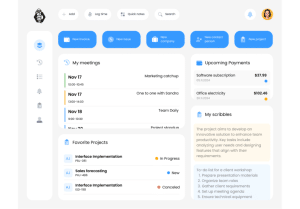
Firmbee is positioned between an enriched project management tool (such as ClickUp) and a mini-PSA, with enough financial building blocks to manage the margin without switching to an ERP logic.
Firmbee's features
- Budgets, expenses, margin: Firmbee allows you to create budgets by project or by client, then to track expenses (time, purchases, expenses) in real time. The margin calculation is automatic and gives a simple but reliable view of profitability. This is a sufficient approach for SMEs that do not have formalized management control.
- Planning, tasks, time, resources: task management is done in agile mode via a kanban, checklists, and roadmaps. Each employee can enter his or her time. The platform also includes resource planning, and provides visibility into team load and availability. In short, it enables smooth operational management for multi-client teams.
- Project-based billing: Firmbee is sufficient for standard billing cycles, with no contractual complexity. Invoices can be created directly from project data, in a time-based or fixed-price basis. Payments are tracked within a simple financial table.
- Global financial monitoring: designed for SME managers who want a quick read of their financial health without handling an ERP. The dashboards are simple and present profitability and performance by client or project.
For what use case?
Firmbee meets the needs of organizations that are looking for a tool that is more complete than a simple project invoicing software but much lighter than an ERP.
- Digital or creative agencies that manage several projects and clients simultaneously, with the need for clear margin monitoring. Firmbee allows them to track progress, invoice, and visualize profitability without adding a layer of additional tools.
- Service-oriented or hybrid (product + service) start-ups : This type of business requires a versatile tool, allowing you to organize work, track costs, set budgets and invoice. Firmbee offers a coherent view of operations and finance, adapted to young structures looking for efficiency and simplicity.
- Multi-project SME (5 to 100 people) for whom simplicity takes precedence over accounting sophistication. Firmbee provides them with enough depth to manage projects and their margin, while remaining accessible to non-technical teams.
Pros and Cons of Firmbee
➕ The advantages of Firmbee
- Modern, intuitive and pleasant interface, designed for collaboration and rapid adoption. Firmbee is designed as a recent, easy-to-adopt SaaS application with ergonomics adapted to cross-functional teams (project managers, designers, developers, financial managers).
- Very good value for money, much more affordable than an ERP or an advanced PSA, while remaining more powerful than a simple invoicing tool.
- Unified project + finance view, sufficient for SMEs that want to manage their activity without technical complexity. It allows executives and project managers to quickly understand where profitability stands without fiddling with multiple tools or exporting Excel spreadsheets.
➖ Cons of Firmbee
- Limited accounting: Firmbee is not a general accounting software. It requires an external tool or a chartered accountant for the management of the chart of accounts, entries, VAT and closings.
- Basic financial forecast: the platform does not offer an advanced forecast, an analysis of the remaining to be done, or a margin projection at completion. It remains focused on a current vision rather than a predictive one.
- Restricted analytics for more mature organizations: while Firmbee is very well suited to SMEs, its analytical capabilities become insufficient as soon as the company is looking for sophisticated multi-axis analysis (margin per profile, resource planning, automated forecasting).
Striven – All-in-one ERP with project accounting (SME/ET)
Striven is a cloud-based ERP designed for multi-service SMBs and mid-caps looking to unify all of their operations in a single system: accounting, projects, CRM, invoicing, purchasing, inventory, and human resources. Unlike specialized project-only or accounting-only tools, Striven offers an integrated financial and operational view, suitable for organizations that manage multiple processes simultaneously.
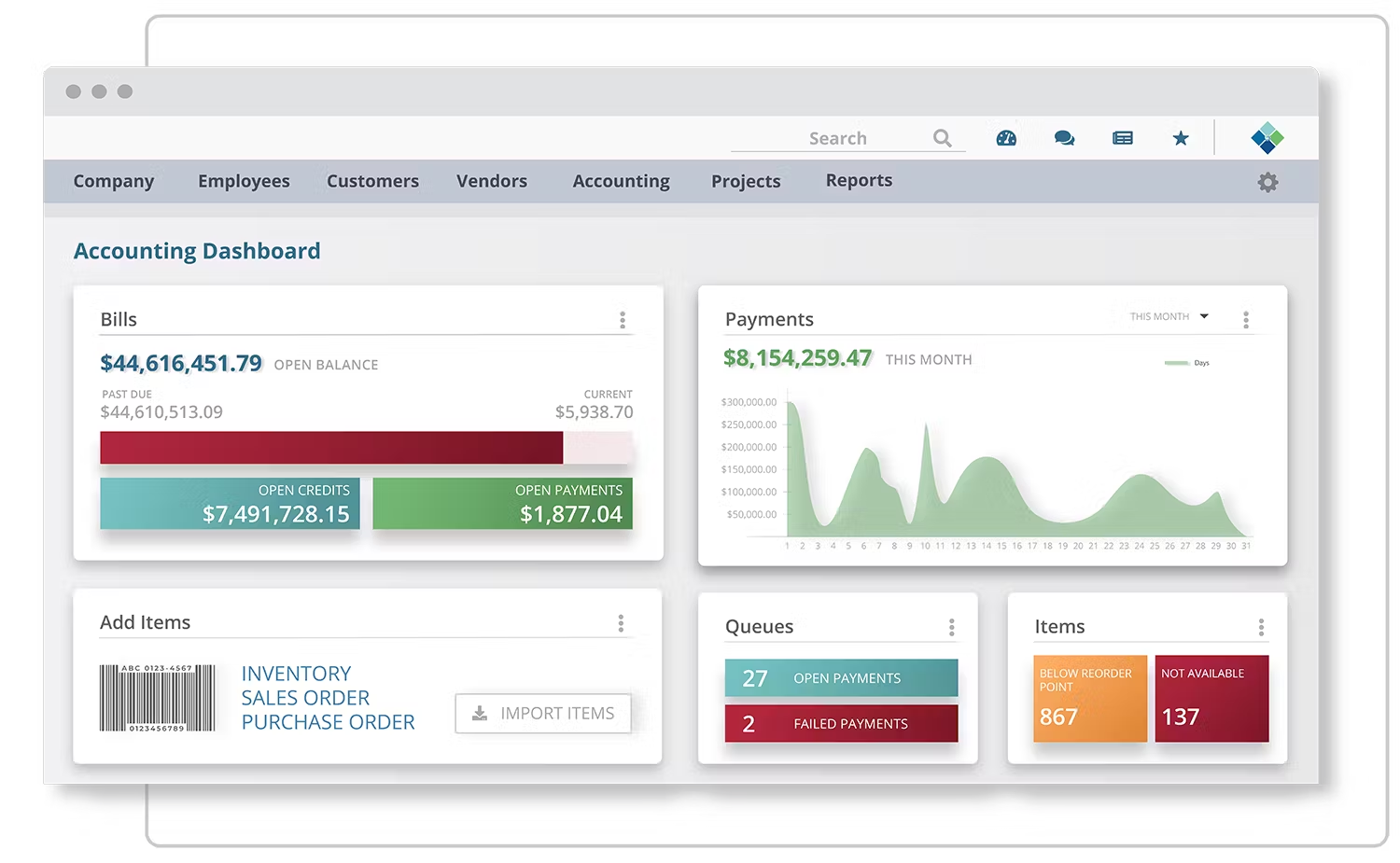
The tool is positioned as a less expensive and more flexible alternative to traditional ERPs (NetSuite, Dynamics), while remaining comprehensive enough to replace a set of separate software.
Striven Features
- Complete accounting: GL, AR/AP, budgets, analytics: Striven includes a complete accounting module: with a general ledger, accounts receivable and payable, budget and analytical tracking, bank reconciliation, fixed assets and multi-currency. Entries are automatically generated from transactions (purchases, sales, projects), which reduces re-entry.
- Project management: tasks, planning, costs, margins : the ERP offers structured project management : tasks, dependencies, planning, time entry, cost monitoring (salaries, purchasing, subcontracting) and automatic margin calculation.
- CRM, invoicing, inventory, HR, purchasing : Striven centralizes cross-functional functions such as sales management (quotes, opportunities), invoicing, inventory management, supplier management, purchasing, HR onboarding, etc.
- Workflow automations and advanced reporting (expense approval, time validation, invoice automation). The financial dashboards are fully configurable and give a global view of performance, cash flow and profitability.
- Unified view of finance + operations: all the modules are based on a single database. An update on the operational side instantly updates the financial sector: useful for companies wishing to avoid inconsistencies between business tools.
For what use case?
- Multi-service SME looking for a complete ERP including project accounting. Thanks to its unique environment, Striven avoids the multiplication of tools and the loss of information between teams.
- Companies with multiple processes to synchronize (production, services, recurring billing, inventory management, and consolidated financial reporting).
- Growing SMEs and mid-caps (20–300 employees) who do not want to invest immediately in a heavy ERP but need more than just an invoicing tool.
Sriven Pros and Cons
➕The advantages of Striven
- Highly comprehensive and unified ERP that covers finance, operations, projects, HR, CRM, and inventory in a single platform, reducing tool fragmentation.
- Replaces multiple software programs into one such as CRM, project management tool, invoicing and accounting software, inventory tracking, and accounting software, resulting in better data control and lower overall cost.
- Strong ability to customize workflows, dashboards, automation rules, and modules, without the need for complex IT development.
➖ Cons of Striven
- Longer implementation than a traditional project tool: like any ERP, even a "light" one, Striven requires a significant initial configuration: accounting structure, teams, internal processes.
- Less intuitive interface for the uninitiated: although modern, the interface remains dense. Adoption requires support or a learning curve.
- Potentially too heavy for small structures (teams of less than 10 people or with simple needs): Striven can quickly become disproportionate in terms of scope and configuration load.
Paymo – Profitability-oriented project management
Paymo is a project management tool designed for teams that want to accurately track their workload, costs, and the profitability of their assignments. Very popular with agencies and service companies, Paymo combines operational management (tasks, resources, planning) with simple but effective financial monitoring (budgets, margins, invoicing).
It is positioned as a more complete alternative to project-only tools (Trello, Asana, ClickUp) thanks to its excellent time tracking and margin monitoring features (without going as far as the complexity of accounting software or an ERP).
Paymo's features
- Very complete time tracking with a time tracking module that includes timesheets, automatic timers, multitasking time tracking, a charging calendar and desktop/mobile extension. Ideal for teams whose billing is directly dependent on time spent.
- Budgets, costs, and margins per project: Each project can be budgeted in hours, costs, or amount. Paymo automatically calculates the project margin and feeds a simple monitoring table to identify load drift or projects that are under-profitable.
- Automated billing based on time or packages, generated directly from approved hours or according to the packages defined in the contract. Invoices are customizable, and Paymo also handles online payments through Stripe or PayPal.
- Task and resource management via a complete module (Kanban, Gantt, checklists, dependencies), as well as a resource schedule to visualize the workload per employee.
- Financial and operational dashboards that track overall performance: time consumed, planned load, budget, margin, delays, project, and billing status.
For what use case?
Paymo is particularly suitable for organizations that have a large volume of projects and time to follow.
- Marketing agencies, creative studios, production companies that mainly sell time or packages related to creation and need reliable time tracking, a clear schedule and project profitability monitoring.
- Multi-project service SMEs (10–200 people) who manage several clients at once, and appreciate the unification of task management + time tracking + invoicing.
- Companies that want a complete project tool but not an ERP.
Paymo: advantages and disadvantages
➕ The advantages of Paymo
- Excellent time tracking via precise timing, multi-device timers, auto-completion, and detailed tracking by task or project.
- Clear view of margin and profitability: Budget, cost and margin dashboards provide immediate visibility into the profitability of engagements, useful for SMBs that want to monitor their margins without an advanced accounting tool.
- Very good value for money, as it is more affordable than full PSAs while offering enough depth to manage projects on a daily basis.
➖ The Cons of Paymo
- Limited accounting function : Paymo does not manage general accounting or accounting entries. It must be coupled with external accounting software for VAT calculation, closings or chart of accounts management.
- Not ideal for multi-subsidiary or multi-country environments because the tool is still designed for centralized teams. Multi-entity, consolidation or multi-currency management remain limited.
- Simple provisional schedule that lacks fAdvanced Onctionalities of resource planning or load simulation (no remaining to be done, no detailed financial forecast). It remains operational, not predictive.
Comparison of the best project and finance software for SMEs and mid-caps
| Financial accounting | ❌ No | ✅ Yes | ✅ Yes | ❌ No | ✅ Yes | ❌ No |
| Project Cost Accounting | 🟠 Partial | ✅ Very advanced | ✅ Very advanced | 🟠 Basic | ✅ Yes | ✅ Yes |
| Project management | ✅ Advanced | ✅ Advanced | ✅ Very advanced | 🟠 Intermediary | 🟠 Intermediary | ✅ Advanced |
| Time management | 🟠 Basic | ✅ Yes | ✅ Very advanced | 🟠 Basic | ✅ Yes | ✅ Excellent (trackers, apps, multitasking) |
| Billing | ✅ Time, package, milestones, recurrence | ✅ Yes (quotes, ERP invoices) | ✅ All models (package, control room, subscription) | ✅ Yes (basic project) | ✅ Comprehensive ERP | ✅ Yes (time/package + Stripe/PayPal payments) |
| Built-in CRM | ✅ Yes | ✅ Yes | ✅ Yes | ❌ No | ✅ Yes | ❌ No |
| Inventory / Purchasing Management | ❌ No | ✅ Yes | ✅ Yes | ❌ No | ✅ Yes | ❌ No |
| HR / internal management | 🟠 Basic | ✅ Yes | ✅ Advanced | ❌ No | ✅ Yes | ❌ No |
| Forecast | ❌ Limited | 🟠 Depending on modules | ✅ Very advanced | ❌ No | 🟠 Basic | ❌ No |
| Analytics & Reporting | ✅ Yes | ✅ Strong (multi-axis arrays) | ✅ Expert via Power BI | 🟠 Basic | ✅ Advanced (custom dashboards) | ✅ Yes |
| Customization | 🟠 Moderate | ✅ Very strong (open source) | ✅ High but complex | ❌ Weak | ✅ Strong without complex dev | 🟠 Moderate |
| Complexity of use | Easy | Complex | Complex | Very easy | Complex | Accessible |
| Suitable for... | Small Business Services (10–100) | SMBs (20–300) | Mid-caps / large groups (100–2000) | Start-ups / small SMEs (5–100) | Multi-service SMBs (20–300) | SME Services (10–200) |
Project Accounting Softwares For Large Companies
Mid-caps and large international groups have much more complex needs than SMEs. Their environment generally involves:
- A multi-subsidiary/multi-country organization that requires financial consolidation and management of multi-currency and multiple accounting standards (IFRS, GAAP), not to mention local tax requirements.
- complex projects: portfolios of several hundred projects, international collaborations, various contractual models (fixed-price, management, subcontracting);
- Large volumes of data: Thousands of timesheets, purchases, and invoices to process each month.
- Strong requirements on the financial management side : fine control of project costs, advanced revenue recognition, reliable time tracking, accurate forecasting and auditability.
These companies are looking for robust and proven solutions that can integrate with an existing ERP, ensure high availability, and support complex workflows with a certified level of security.
Replicon – a high level of project finance
Replicon is a platform specialized in advanced time tracking and financial management of projects. Unlike generalist tools, Replicon focuses on time accuracy, international compliance, and cost control, while integrating deeply with enterprise ERPs like SAP or Oracle.
It is a tool used on a large scale in companies for which invoicing, margin and profitability depend directly on impeccable time tracking.
Features
Replicon offers a comprehensive package for organizations with critical time and cost management .
- Highly advanced time tracking : entry of hours, days, activities, multi-level timesheets, hierarchical approval systems, automatic retrieval of activities. Validation workflows reduce errors and secure invoicing.
- Budgets, costs, billable rates, margins : Replicon automatically calculates internal and billable costs, margins per project, and budget overruns.
- Multi-country/multi-currency project management : The system automatically applies the hourly rates, tax rules, and currencies corresponding to each country or subsidiary.
- HR and regulatory compliance : legal time management, jurisdiction-specific work rules, local VAT, audit compliance. Essential for international organizations.
- Powerful ERP integrations: Native connectors for SAP, Oracle, Workday, payroll tools, and invoicing solutions. Ideal for an already structured IT ecosystem.
For what use case?
Replicon is aimed at organizations that need precise control of time and costs, while linking this data to solid project financial management.
It is particularly used by:
- the IT Services, engineering firms and consulting firms (200–10,000 users) requiring accurate measurement of time sold and internal cost,
- R &D, design or intellectual production teams who must track efforts by activity or cost center,
- International companies with complex HR, legal or tax rules.
Pros and Cons of Replicon
➕ The advantages of Replicon
- Highly efficient at measuring work : one of the best systems on the market for capturing and validating time, with an accuracy essential to billable models.
- Suitable for international environments : multi-country, multi-currency, local legal rules and built-in compliance requirements.
- Solid integrations with ERPs : stable and proven connectors for SAP, Oracle, Workday, facilitating its adoption in complex IS.
➖ Cons of Replicon
- Not a planning or planning tool resource planning : Replicon measures and controls, but does not support load prediction or advanced planning.
- Less modern interface than some SaaS competitors : ergonomics favor functional depth over simplicity.
- High cost for small teams : Designed for large accounts, it quickly becomes disproportionate for structures of less than 100–150 people.
Prophix, the software to combine budgeting, forecasting and finances
Prophix is an FP&A (Financial Planning & Analysis) solution designed for finance departments that need to manage budgets, forecasting, cash flow and project profitability in complex environments. More advanced than a simple reporting tool, Prophix allows you to model financial scenarios, consolidate multi-country entities and automate the entire budget cycle.

It is a tool particularly appreciated by mid-sized companies and large groups looking to secure their financial planning process while obtaining a reliable view of project performance.
Prophix Software Features
Prophix offers a set of features that are clearly geared towards management control and advanced finance.
- Multi-country / multi-project budgets : collaborative budget construction, version management, approval workflow, automatic consolidation.
- Advanced financial modeling : creation of CAPEX/OPEX models, what-if scenarios, simulation of variations (rates, charges, resources).
- Consolidation, cash flow and project forecasts : automated projections, variance analysis, rolling forecasts, calculation of the projected cash flow by entity or by project.
- ERP integration (SAP, Oracle, MS Dynamics): synchronization of accounting, analytical and HR data to make financial models more reliable.
For what use case?
Prophix is aimed at organizations whose financial management requires a structured budget vision and reliable forecasts, in particular:
- finance departments looking for a specialized tool for cost control, planning and project profitability,
- Multi-subsidiary or multi-country companies with 200 to 5,000 employees who need to quickly consolidate heterogeneous data.
- Groups of 200 to 5,000 employees who manage many CAPEX/OPEX projects and need to anticipate their financial impacts.
Prophix: Pros and Cons
➕ Prophix Benefits
- Highly advanced in management control : ideal for FP&A teams who need to manage budgets, variances and financial scenarios.
- Financial Process Automation : Accelerates budget cycles, reduces errors, and centralizes financial data.
- Particularly suitable for CAPEX/OPEX projects : offers a clear view of investments, depreciation, operational costs and projected impacts.
➖ Prophix Cons
- Not an operational project management tool : Prophix drives financial performance, but does not manage tasks, schedules, or resources.
- Significant deployment : requires significant framing, modeling and support, closer to an ERP project than a simple SaaS tool.
Oracle NetSuite for Project Accounting
Oracle NetSuite is one of the world's most widely used cloud ERPs for managing finance, operations, and projects in multi-subsidiary organizations. Designed for companies with high complexity (internationalization, intercontracts, long-term contracts), it offers a level of robustness comparable to large on-premise ERPs, while maintaining the flexibility of a cloud solution.
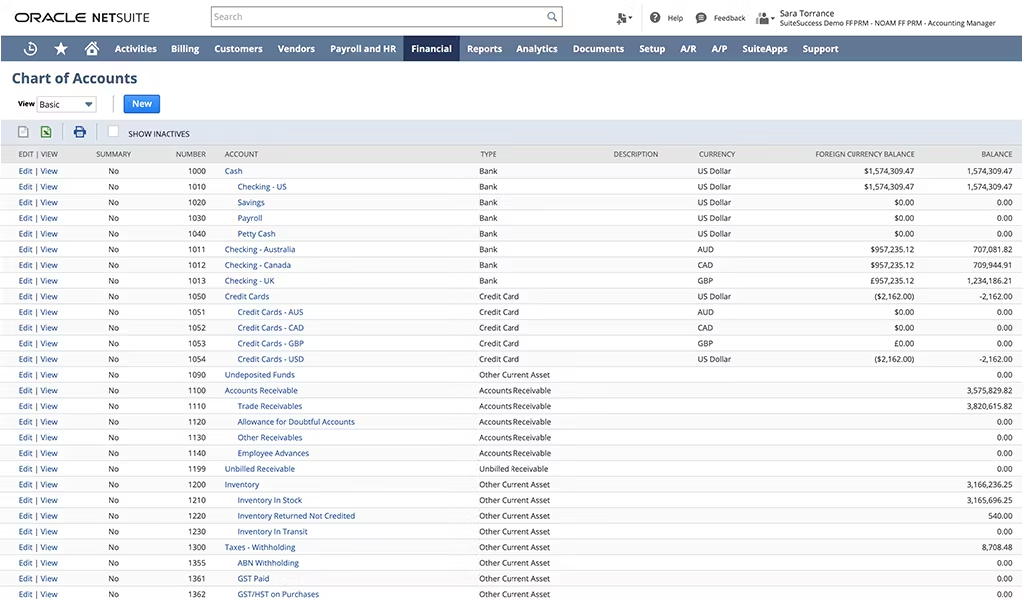
NetSuite particularly excels in project accounting, with fine-grained management of revenue, WIP (Work In Progress), costs, margin, and forecasting, which is essential for structured services companies and international projects.
Features
NetSuite offers a complete scope for finance departments and project teams.
- Complete multi-country, multi-standard accounting : general ledger management, multi-company, IFRS/GAAP, local taxes, automatic consolidation.
- Project financial management software : WIP monitoring, ASC 606 / IFRS 15 compliant revenue recognition, actual margin, incurred costs, financial forecasts.
- Multi-subsidiary, multi-currency management : automatic currency conversion, consolidated reporting, smooth intercompany transactions.
- Planning, resources and project invoicing : resource allocation, timesheet, salary costs, invoicing in the management room, package, milestones, subscriptions.
- Advanced automation : tailored workflows, automatic accounting rules, open APIs, integrations via SuiteTalk and SuiteFlow.
For what use case?
Oracle NetSuite meets the needs of organizations with complex financial and operational structures.
- Mid-caps and large groups (100 to 5,000 users) with international projects, long-term contracts, complex revenue recognition rules.
- Multi-subsidiary groups (100 to 5,000 users) with internal chargebacks, automated consolidation and multi-country reporting.
- IT Services, engineering firms, global services companies in need of a robust and unified cloud ERP.
NetSuite: Pros and Cons
➕ The Benefits of Oracle NetSuite
- Very powerful, robust and scalable: this ERP supports thousands of users, high accounting volumes, and multi-country structures without loss of performance. Its robustness makes it a preferred choice for growing or already complex organizations.
- Unified financial and operational vision: all processes (accounting, projects, invoicing, purchasing, inventory, treasury, HR) are based on a single database. This guarantees total consistency between operations and finance: each time, cost or purchase instantly impacts the results and the project margin.
- Compliance for integrated groups and complex projects: NetSuite natively handles multi-company consolidation, advanced revenue recognition (ASC 606 / IFRS 15), intercompany transactions, multiple currencies, and local regulations. It is a tool perfectly suited to international groups and long-term contracts.
➖ Cons of Oracle NetSuite
- High cost: Licenses, add-ons, and integration services are a significant investment. NetSuite is rarely cost-effective for companies with fewer than 100 employees or those with simple needs.
- Long deployment requiring a partner: like any large-scale ERP, NetSuite requires a supervised implementation: configuration of subsidiaries, accounting rules, workflows, revenue recognition, team training. A specialized integrator is essential for the success of the project.
Accounting Seed: Accounting in the Salesforce Environment
Accounting Seed is a native accounting and financial management solution on Salesforce. Designed for companies that already use the Salesforce ecosystem at the heart of their operations, it unifies CRM, delivery, and finance into a single platform. With its flexibility and Salesforce object-oriented architecture, Accounting Seed becomes a truly integrated accounting module, suitable for organizations that want to increase consistency between sales, projects, and financial performance.
Accounting Seed Features
- Comprehensive Accounting (GL, AP, AR, reporting): Accounting Seed manages general ledger, accounts receivable and payable, automatic entries, VAT, and configurable financial reporting. It offers the same level of depth as advanced accounting software on the market.
- Cost accounting and project financial tracking: Expenses, revenue, time, and purchases can be assigned to custom Salesforce projects, departments, or objects. The analytics module allows you to track margin, cost and financial performance per project.
- Advanced revenue recognition: the system is compatible with time and expense models, packages, subscriptions and multi-component contracts. The system manages performance obligations and revenue recognition in accordance with ASC 606 / IFRS 15.
- Purchasing, Expense, and Fixed Assets Management: Purchase Order Tracking, Approval Workflow, Employee Expense Management, and Fixed Asset Module with Automated Depreciation.
- Native Salesforce integration: All CRM data (opportunities, quotes, projects, resources) automatically syncs with accounting, eliminating double entries and improving data consistency.
For what use case?
Accounting Seed is best suited for organizations that want to unify sales, delivery, and finance in a single environment.
- Companies already equipped with Salesforce, looking to add a perfectly integrated accounting and financial brick.
- Sales + delivery-oriented companies, for which consistency between sales pipeline, project management and invoicing is strategic.
- SMEs and mid-caps (50–500 employees), especially 100% Salesforce structures that want to avoid multiplying external tools.
Pros and Cons of Accounting Seed
➕ The Benefits of Accounting Seed
- Native integration with Salesforce: all data (customers, deals, projects, time, invoicing) is centralized in the same environment, guaranteeing total consistency between sales and finance.
- Highly flexible and customizable: Because it's built on the Salesforce platform, Accounting Seed benefits from its power: custom objects, workflows, automations, Apex/Flow, dashboards.
- Excellent project analytical granularity: fine allocation of costs and revenues, precise vision of the project margin and multi-axis analyses for organizations demanding in financial monitoring.
➖ Cons of Accounting Seed
- Strong dependence on Salesforce, and therefore a high cost: the tool requires Salesforce licenses + Accounting Seed licenses, which quickly increases the total cost.
- Technical implementation requiring an integrator: Salesforce's flexibility often means a deployment configured by a certified partner, with a full integration project.
- Not suitable for small businesses: Salesforce + Accounting Seed is too expensive and complex for organizations with fewer than 20–30 people.
Comparison of the best project and finance software for mid-sized companies and large groups
| Financial accounting | ❌ No | ❌ No | ✅ Yes | ✅ Yes |
| Project Cost Accounting | 🟢 Advance | 🟢 Financial only | 🟢 Very advanced | 🟢 Very fine |
| Project management | 🟢 Financial only | ❌ No (not operational) | 🟢 Very advanced (WIP, revenue, margin) | 🟢 Financial + Margin |
| Time management | 🟢 Excellent | ❌ No | 🟢 Yes | 🟠 Basic |
| Budget / Forecast | 🟢 Budgets + costs | 🟢 Very advanced | 🟢 Very advanced | 🟠 Limited Forecast |
| Revenue recognition | 🟠 Basic (via ERP) | 🟠 Indirect | 🟢 ASC 606 / IFRS 15 compliant | 🟢 Advanced (package, control room, subscriptions) |
| Multi-country / multi-subsidiary | 🟢 Very good (local rules) | 🟢 Yes | 🟢 Excellent (interco, consolidation) | 🟠 Depends on Salesforce modules |
| Project invoicing | 🟢 Via ERP | ❌ No | 🟢 All models (control room, package, milestones, subscriptions) | 🟢 Yes |
| ERP Integration | 🟢 Native (SAP, Oracle, Workday) | 🟢 Strong (SAP, Oracle, Dynamics) | 🟢 Comprehensive ERP | 🟢 Very Good (Native Salesforce) |
| Compliance / audit | 🟢 Yes | 🟢 Yes | 🟢 Yes | 🟢 Yes (Salesforce security) |
| Analytics & Reporting | 🟢 Advanced | 🟢 Very advanced | 🟢 Very advanced | 🟢 Advanced |
| Customization | 🟠 Moderate | 🟢 Structured (Templates) | 🟢 High but complex | 🟢 Very strong (flows, objects, automations) |
| Complexity of use | Intermediary | Complex (finance-oriented) | High (full ERP) | Intermediate to complex |
| Suitable for... | IT Services, engineering, consulting (200–10,000) | Mid-cap finance departments (200–5000) | Multi-country groups (100–5000) | Salesforce Orgs (50–500) |
Checklist: a matrix to help you choose a project accounting software
To speed up your selection, here are a series of essential questions. They allow you to quickly identify the software category that matches your maturity level, project complexity, and financial needs.
Do you need to calculate the margin at completion and anticipate losses?
✅ Yes → If your priority is to obtain a reliable forward-looking vision — essential for provisioning, anticipating slippages and securing your margins — turn to solutions capable of producing a dynamic forecast such as Stafiz, Oracle NetSuite or Prophix.
❌ No→ If your business is simple and you don't need a predictive model, realization/budget monitoring tools like QuickBooks, ZipBooks, Firmbee, or Paymo are more than enough.
Are your monthly closings weighed down by the FAE/PCA and CCA/FNP?
✅ Yes → If processing outstanding amounts lengthens your closings or generates inconsistencies, choose tools capable of automating these entries and locking periods: Stafiz, Striven, Replicon or Oracle NetSuite.
❌ No→ If these issues are of little concern to your business, the use of simple tools for monitoring the achievement and budget is more than enough.
Do you work in multi-country, multi-subsidiary or multi-currency?
✅ Yes→ International organizations need advanced management of accounting standards, currencies and consolidation. In this case, choose Stafiz, Oracle NetSuite, ERPNext, Dynamics 365 or Accounting Seed.
❌ No → If your business remains focused on a single country or entity, service-oriented solutions like Teamleader Orbit, Paymo, Firmbee or Striven will be faster, lighter and more economical.
Do you want to replace multiple tools with a single platform?
✅ Yes→ If your goal is to reduce the fragmentation of your IS, an ERP or an "all-in-one" tool like Striven, ERPNext, NetSuite or Dynamics 365 is the best choice.
❌ →If , on the other hand, you prefer to keep your accounting separate and add a high-performance project module, a specialized PSA such as Stafiz, Teamleader Orbit, Replicon or Paymo will be more suitable.
Is your volume of projects and users high (more than 50 people or 30 active projects)?
✅ Yes→ Beyond a certain threshold, TPE tools are quickly outdated. To absorb volume without losing control, choose Stafiz, Dynamics 365, NetSuite or Replicon.
❌ No → Below this volume, simpler solutions such as Teamleader Orbit, Firmbee or Paymo offer an excellent compromise.
Do you need advanced analytics (multi-axis: client, project, team, type of service, geography)?
✅ Yes→ For an accurate and multi-dimensional financial reading, look for Stafiz, ERPNext, NetSuite or Accounting Seed.
❌ No→ If you're mainly looking for overall profitability, tools like QuickBooks, ZipBooks or Firmbee will meet your needs.
The resource planning (resource planning) is critical to your profitability?
✅ Yes→ If capacity, workload and skills have a direct impact on your margin, opt for tools that integrate a real resource planning such as Stafiz, Dynamics 365 or NetSuite.
❌ No → If the planning is secondary or managed elsewhere, Paymo, Teamleader Orbit or Firmbee are more than enough.
Disclaimer
This comparison of budget forecasting software is the result of an internal study carried out in December 2025, and cross-references different sources, such as the official websites of the software, as well as their documentation. The information will be regularly reviewed to keep the content as up-to-date as possible. Our goal is to help you determine your selection criteria and to orient your search as closely as possible to your needs. However, please take into account the possible non-exhaustiveness of the comparison, due to potential changes to be expected, and a limited scope of research.
Questions:
Yes, in particular via project accounting, which is its financial component. It is essential to monitor financial performance, ensure project profitability, and enable accurate and compliant invoicing.
The general accounting records all financial transactions to produce the legal statements (balance sheet, income statement). Cost accounting calculates actual costs and performance by activity or cost center. Project accounting, a specific form of analytics, accurately tracks costs, expenses, and revenues per project in order to measure individual profitability.
The accountant records and validates all financial transactions related to the project (expenses, expense reports, purchase orders). He applies accounting rules (depreciation, cut-off) and ensures the tax compliance of invoices. In collaboration with the project manager, he produces profitability reports and contributes to audits.
For efficient management of budgets and forecasts, a PSA (Professional Services Automation) software or an ERP with a project accounting module is ideal. These tools centralize forecast data (hours, expenses) and compare them in real time with the actual data charged, offering reliable and continuous monitoring.